How to Conduct a GDPR Website Audit (Step-by-Step Guide for 2026)
A GDPR website audit verifies how your site processes personal data during real visits. This guide explains how to inspect network activity, validate consent enforcement, review third-party behavior, and document technical evidence in a structured way.
Best for: privacy teams, technical auditors, founders, SaaS teams, ecommerce teams, agencies, legal/compliance stakeholders, and anyone who needs a more evidence-based GDPR website review process.
This guide is for technical and educational purposes only. It is not legal advice. GDPR-related findings should be reviewed with qualified legal or compliance stakeholders.
Useful next steps:

1. Context
A GDPR website audit is a structured technical review of how a website processes personal data at runtime.
Many organizations assume GDPR compliance is handled once they publish a privacy policy, install a consent banner, and sign vendor agreements. Those steps matter, but they do not always show what the website actually does when a visitor lands on a page.
In practice, a technical review often starts with a more practical question: what does the website actually do when a user visits it?
That is why a technical website audit matters. Privacy teams, legal reviewers, agencies, and internal compliance stakeholders increasingly need observable runtime evidence, not documentation alone.
This guide explains how to conduct a GDPR website audit step by step, with a focus on technical verification rather than policy review alone.
This guide covers:
- Identification of personal data at the network layer
- Runtime detection of cookies, trackers, scripts, and pixels
- Consent enforcement validation
- Third-party processor and destination mapping
- Evidence capture and documentation
2. GDPR Website Audit vs Website Privacy Audit
A GDPR website audit focuses on website behavior that may relate to GDPR obligations, especially for EU users. It usually reviews cookies, consent behavior, third-party scripts, tracking pixels, network requests, personal data indicators, and evidence that can support compliance review.
A website privacy audit can be broader. It may include GDPR, CCPA/CPRA, CIPA, cookie consent, privacy policy alignment, vendor disclosures, accessibility notices, security signals, and other website-level privacy requirements.
For this page, the focus remains GDPR. However, the same evidence-first method can help teams understand whether their website behavior matches what their privacy notices, cookie banners, and vendor records claim.
3. Legal and Regulatory Explanation
Understanding the legal baseline clarifies what the audit must measure. This section is a technical summary, not legal advice.
The General Data Protection Regulation (EU) 2016/679 governs the processing of personal data of individuals in the European Union.
A website may fall within GDPR scope when it processes personal data of EU residents, depending on the organization's activities, targeting, and processing context.
Under Article 4(1), personal data means any information relating to an identified or identifiable natural person. In a website context, this may include online identifiers such as IP addresses, cookie identifiers, device identifiers, and similar signals where they relate to an identifiable person.
Article 6 requires processing to have a lawful basis. For many website-level analytics, advertising, personalization, and tracking scenarios, consent is commonly relied upon and should be tested carefully.
Articles 4(11) and 7 explain valid consent. Consent should be freely given, specific, informed, and unambiguous. It should also be demonstrable.
For website audits, this means the review should not stop at "does the banner appear?" A stronger audit checks whether website behavior changes when a user rejects, accepts, or selects granular consent options.
Article 5 establishes principles such as lawfulness, fairness, transparency, purpose limitation, data minimization, and integrity. These principles may be relevant when a website sends identifiers, payloads, or tracking signals to third parties.
Article 28 governs processor relationships. If third-party scripts receive personal data, those vendors should be reviewed against processor records, contracts, and privacy disclosures.
Chapter V regulates international transfers. If personal data appears to be sent outside the European Economic Area, the transfer path and related safeguards may need review.
Article 30 requires records of processing activities. A GDPR website audit can help test whether those records reflect observed website behavior.
| GDPR Area | Website-Level Impact | What to Verify |
|---|---|---|
| Article 4(1) | IPs, cookie IDs, device IDs, and similar identifiers may qualify as personal data. | Check whether identifiers are transmitted during page load. |
| Article 6 | Processing requires a lawful basis. | Check whether tracking is gated where consent is required. |
| Articles 4(11) and 7 | Consent should be specific and demonstrable. | Check whether runtime behavior changes based on user choice. |
| Article 28 | Third-party processor relationships should be documented. | Check which third-party domains receive data. |
| Chapter V | International transfers may require additional review. | Check request destinations and endpoint geography where relevant. |
| Article 30 | Records should reflect actual processing. | Check whether documentation matches observed runtime behavior. |
4. Practical Application: Conducting the Audit
This section translates GDPR website audit requirements into a structured technical workflow.
A structured reference such as a GDPR website audit checklist can help standardize documentation during this process.
4.1 Defining Scope
A clear scope prevents ambiguity and keeps the audit focused.
The audit scope usually includes:
- Front-end website behavior
- Third-party scripts
- Network requests
- Cookies
- Local storage and session storage
- Data transmissions
- Consent enforcement
- Tracking pixels and analytics scripts
- Cross-border transfer signals
A GDPR website audit does not replace a DPIA. It evaluates website-layer data processing as experienced by an end user and creates technical evidence that legal, privacy, or compliance teams can review.
4.2 Identifying Personal Data at the Network Layer
The first operational step is defining personal data in technical terms.
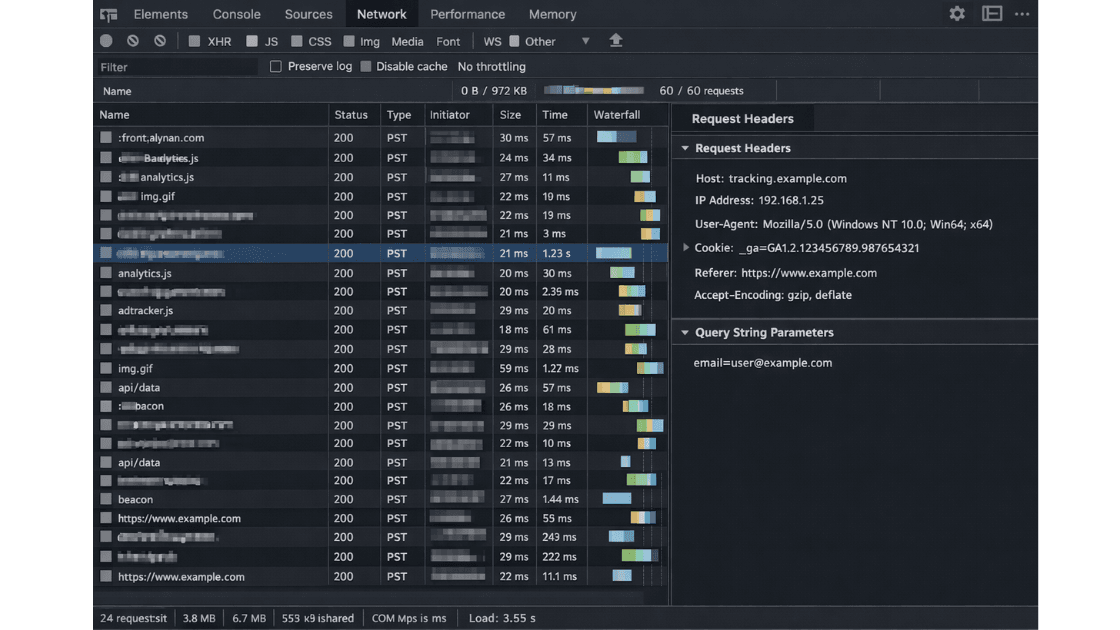
Personal data indicators can include:
- IP addresses
- Cookie identifiers
- Advertising IDs
- Device identifiers
- Email addresses in URLs
- User IDs
- Hashed email addresses where linkable
- Query parameters containing user attributes
- Referrer URLs revealing user behavior
- Session tokens
- Purchase or cart data in request payloads
For example, a request such as [email protected] may create direct personal data exposure. A hashed email may also require review if it can be linked back to a user or shared with third-party advertising systems.
Pseudonymous identifiers may still remain personal data where they can relate to an identifiable person. That is why the audit should capture both obvious identifiers and less visible technical identifiers.
4.3 Preparing the Testing Environment
Testing requires a controlled and reproducible baseline.
Use a fresh browser profile or incognito mode. Disable browser extensions. Clear cookies and local storage. Confirm that no prior consent signal exists. If relevant, simulate EU access conditions to reflect actual regulatory scope.
Record date, time, browser version, device type, operating system, test location, and environment details so the test can be reproduced later.
Clean Environment Checklist
- Use a fresh browser profile
- Disable extensions
- Clear cookies
- Clear local storage
- Clear session storage
- Disable cache
- Record date and time
- Record browser and device details
- Confirm geo context where relevant
4.4 Using Browser DevTools for Runtime Inspection
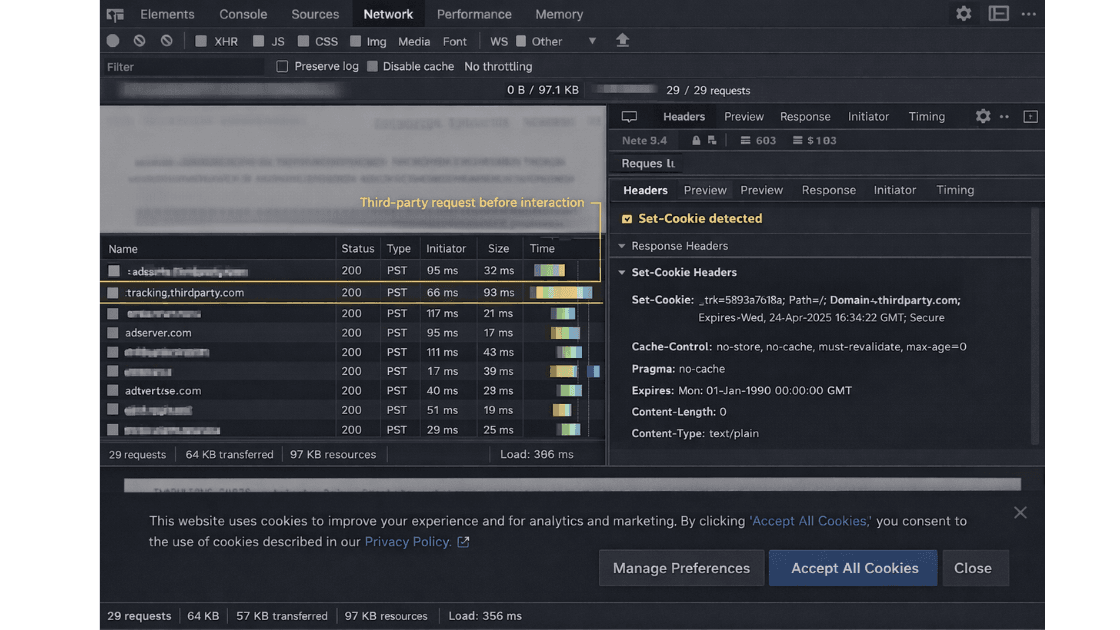
Open Developer Tools and navigate to the Network tab. Enable "Preserve log" and "Disable cache." Reload the page without interacting with the consent banner. Observe all requests initiated during initial load.
Filter requests by:
- Third-party domains
- XHR
- Fetch calls
- Script loads
- Image beacons
- POST requests
- Tracking pixel requests
For each relevant request, inspect:
- Request URL
- Request method
- Request headers
- Query parameters
- Request payload
- Response headers
- Set-Cookie headers
- Initiator script or source
This step establishes pre-consent behavior and forms the baseline for consent validation.
4.5 Detecting Pre-Consent Tracking
This stage evaluates whether tracking begins before user choice.
Assess whether:
- Analytics scripts load automatically
- Advertising pixels fire
- Tag managers initialize marketing or analytics tags
- Cookies are set before consent
- Device fingerprinting scripts execute
- Session replay or heatmap tools start recording
- Third-party requests include identifiers before consent
If scripts load regardless of user interaction, this may indicate consent gating is not working as intended. Some strictly necessary scripts may be handled differently, so findings should be reviewed in context.
For broader tracking context, review website tracking compliance.
4.6 Consent Validation Testing
Consent must affect runtime behavior, not just interface appearance.
Run structured consent testing using these scenarios:
- Test 1: First load without interaction
- Test 2: Explicit "Reject All"
- Test 3: Explicit "Accept All"
- Test 4: Granular consent selection
- Test 5: Reload after consent
For each scenario, document:
- Network requests
- Cookies set
- Scripts loaded
- Tracking pixels fired
- Consent state
- Behavioral differences
If network activity remains identical between "Reject All" and "Accept All," this may indicate that consent choices are not being enforced at runtime. The final interpretation should be reviewed by privacy, legal, or compliance stakeholders.
Further regulatory interpretation on consent is outlined in the EDPB Guidelines 05/2020 on Consent.
| Consent Scenario | What to Compare | Potential Risk Signal |
|---|---|---|
| No interaction | Initial page load before banner choice | Analytics, marketing cookies, or tag requests fire before user choice. |
| Reject All | Requests after explicit rejection | Analytics or marketing activity remains the same as initial load. |
| Accept All | Requests after explicit acceptance | Approved categories activate but are not documented clearly. |
| Granular consent | Selected categories only | Unselected categories still trigger scripts, cookies, or pixels. |
4.7 Inspecting Headers and Payloads
Headers and payloads often reveal more than visible interface elements.
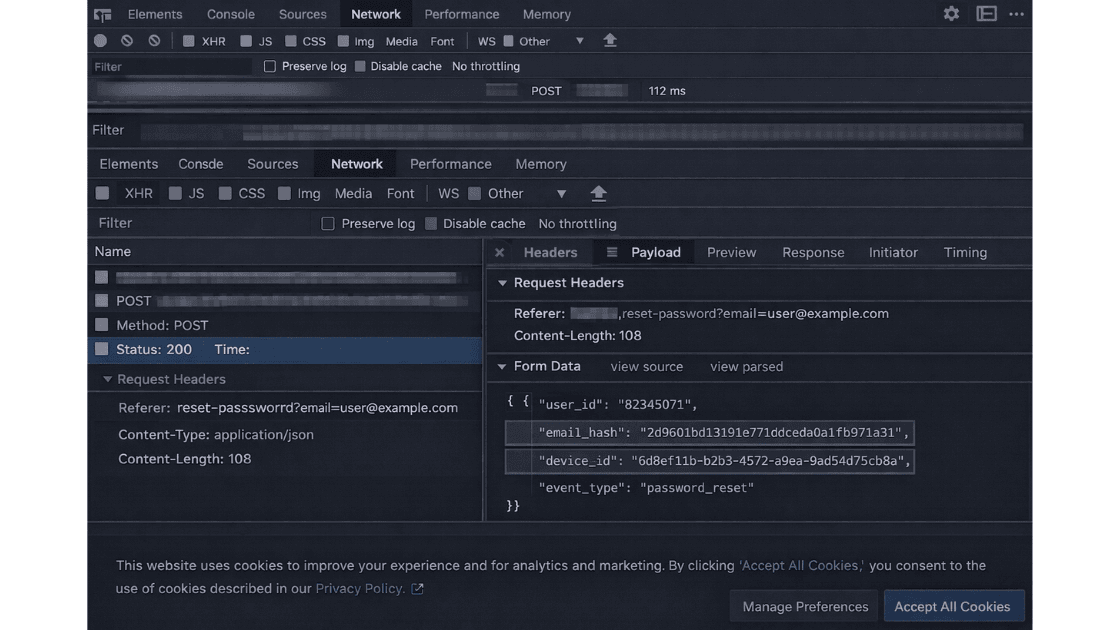
Inspect request headers for IP-related metadata, user-agent strings, referrer values, authorization data, and tracking parameters. Review request payloads for hashed emails, user identifiers, purchase data, cart data, device IDs, and behavioral signals.
Review Set-Cookie headers for tracking cookies, expiration patterns, domain scope, SameSite attributes, and third-party domain behavior.
Examples to Review
- URL parameter: email, user_id, customer_id, session_id
- Payload field: email_hash, device_id, event_id, cart_value
- Header value: referrer, user-agent, authorization, cookie
- Cookie behavior: set before consent, long expiration, third-party domain
4.8 Third-Party Processor Mapping
Every third-party request may represent a potential data disclosure or vendor relationship that should be reviewed.
Compile a list of third-party domains contacted during runtime and classify them by role, such as analytics provider, advertising platform, CDN, fraud detection service, payment processor, chat widget, heatmap tool, session replay service, or A/B testing tool.
Assess whether each third party:
- Receives personal data or online identifiers
- Acts as a processor, controller, or another type of recipient
- Appears in privacy notices or vendor records
- Sets or reads cookies
- Receives data before consent
- Transfers data internationally
This step should be checked against privacy notices, cookie declarations, processor records, and any relevant vendor agreements. A mismatch between observed third-party behavior and published documentation may require review.
For evidence-led documentation methods, see technical evidence for compliance reviews.
4.9 International Transfer Review
Cross-border transmission is a technical event that should be documented carefully.
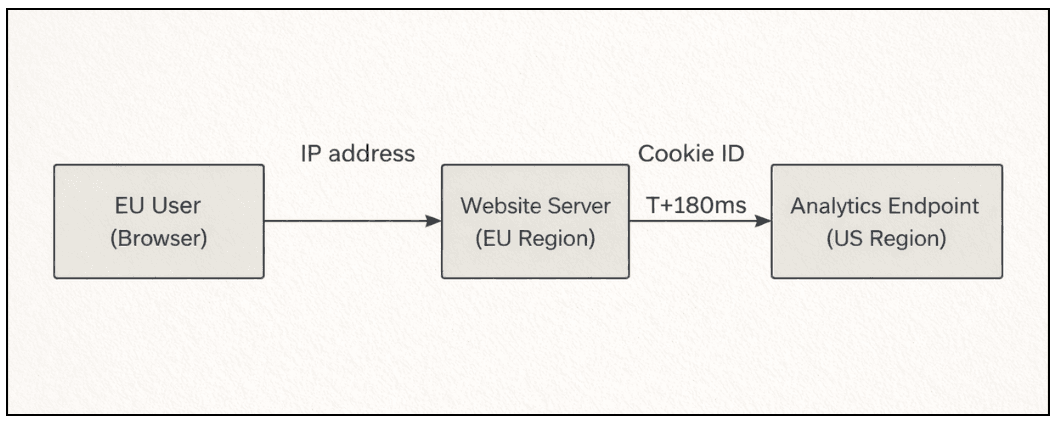
Identify destinations outside the EEA. Review request endpoints, vendor infrastructure, DNS resolution, and hosting geography where needed. If personal data appears to be transmitted to non-EEA services, document the transfer path, domain, endpoint, and consent state.
This does not automatically determine whether a transfer is lawful or unlawful. It creates technical evidence that legal or compliance teams can review alongside transfer safeguards, vendor terms, and internal documentation.
5. Manual Audit vs GDPR Website Audit Tools
Manual inspection and audit tools can both help, but they do not serve the same purpose.
Browser DevTools can show what happens during a real page visit, but the review is manual and time-consuming. Cookie scanners can help identify cookies, but they may not fully explain runtime behavior, consent state, or request payloads. CMP dashboards can show configuration, but configuration alone does not prove that scripts are gated correctly.
A stronger audit combines runtime inspection, consent scenario testing, third-party mapping, and preserved evidence. Auditzo's role is to help identify and organize technical evidence from website behavior into an audit-ready report. That report can support legal, privacy, or compliance review, but it should not be treated as legal advice or a guarantee of compliance.
6. Evidence Capture and Documentation
Evidence capture is essential in a GDPR website audit.
Export HAR files for each test scenario. Capture full-page screenshots. Record request and response headers, timestamps, browser details, test location, and consent state. Keep original exports unaltered where possible.
| Evidence Item | What It Shows | Why It Matters |
|---|---|---|
| HAR file | Network requests during each test scenario | Shows observed runtime behavior. |
| Consent screenshot | User choice or banner state | Connects evidence to a specific consent scenario. |
| Set-Cookie header | Cookie name, domain, expiry, and timing | Helps review whether cookies appear before or after consent. |
| Request payload | Identifiers or event data transmitted | Helps identify potential personal data indicators. |
| Domain map | Third-party recipients and vendor categories | Supports processor, disclosure, and transfer review. |
A structured evidence-backed audit should capture:
- Test date and time
- Browser and device details
- Geo context where relevant
- Consent state tested
- HAR file for each scenario
- Screenshot of banner or consent state
- Request URL and method
- Request headers and response headers
- Request payload where available
- Set-Cookie headers
- Third-party domain and vendor category
- Observed personal data indicators
- Risk notes for legal or compliance review
Create a domain mapping record including:
- Domain
- Purpose
- Data transmitted
- Consent state
- Cookie behavior
- Jurisdiction or endpoint location
- Potential risk signal
- Recommended review owner
Evidence Preservation Checklist
- Export HAR file
- Capture full-page screenshot
- Extract request headers
- Record timestamps
- Save original file unaltered
- Log consent state
- Update third-party domain mapping
- Attach notes explaining why the evidence was captured
If you want to see how evidence can be presented in a structured review format, view this sample evidence-backed website privacy audit report.
7. Common Misconceptions
Several recurring assumptions can weaken GDPR website reviews.
- "We have a cookie banner, so we are covered." A banner should be tested against actual website behavior. The key question is whether cookies, scripts, and trackers respond to consent choices.
- "IP addresses do not matter." IP addresses may qualify as personal data when they relate to an identifiable individual or are processed with other identifiers.
- "Hashed data is always anonymous." Hashed identifiers may still require review if they can be linked back to a person or used across systems.
- "A trusted vendor removes our responsibility." Vendor reputation does not replace controller-side review of disclosures, processing records, and observed data flows.
- "Server-side tracking removes consent issues." Server-side tracking can still involve personal data processing and should be reviewed for lawful basis, consent behavior, and documentation.
8. Risk Scenarios
The scenarios below are technical risk signals. Whether they create a legal compliance issue depends on context and should be reviewed by legal or compliance teams.
Pre-Consent Analytics Loading
Analytics requests fire during first page load before the user interacts with the consent banner. Capture the HAR file, consent state screenshot, request URL, and Set-Cookie headers. This may create consent enforcement concerns if analytics is not strictly necessary.
Advertising Pixel Auto-Firing
A marketing pixel loads automatically before consent. Capture the pixel request, payload, cookies, third-party endpoint, and initiator script. This may require review because advertising pixels often involve tracking, profiling, or cross-site identifiers.
Undocumented Third-Party Script
A script transmits device identifiers or behavioral data to a third-party domain that does not appear in the privacy notice or vendor list. Capture the request evidence and compare it with published disclosures. This may create transparency or processor documentation concerns.
Email in URL Parameters
A password reset link, checkout flow, or form redirect exposes an email address in the URL or referrer. Capture the request URL, referrer, destination domain, and timestamp. This may create direct personal data exposure that should be reviewed.
Cross-Border Transfer Signal
EU traffic sends identifiers to a non-EEA analytics, advertising, or infrastructure endpoint. Capture the endpoint, request evidence, consent state, and vendor category. This may require transfer documentation review.
Cookie Misclassification
A tracking or analytics cookie is labeled as "necessary" in the banner or cookie list. Capture cookie details, expiration, domain, category, and behavior before and after consent. This may require review of the cookie classification and consent setup.
9. Evidence Regulators and Reviewers May Look For
Regulatory and compliance reviews are often evidence-driven. Depending on the situation, reviewers may ask for:
- Description of processing activities
- Lawful basis documentation
- Proof of consent
- Technical evidence of consent enforcement
- Processor or vendor documentation
- International transfer safeguards
- Security measures
- Data retention policies
- Records showing whether documentation matches observed website behavior
Consent logs should ideally demonstrate:
- Timestamp
- User action
- Specific preferences selected
- Version of notice presented
- Consent category activated or rejected
Website-level evidence may include:
- HAR comparison before and after consent
- Screenshot of consent state
- Third-party domain map
- Cookie table
- Request headers and payload examples
- Evidence appendix with preserved source files
If runtime behavior conflicts with declared policies or consent settings, the finding should be documented and reviewed.
10. When Findings Should Be Reviewed by Legal or Compliance Teams
A technical audit can help identify and document risk signals, but legal interpretation should sit with qualified legal or compliance stakeholders.
Escalate findings for review when:
- Trackers or advertising pixels fire before consent
- Personal data appears in URLs, payloads, or referrer headers
- Third-party scripts are missing from privacy notices or vendor records
- Consent choices do not change runtime behavior
- Analytics or marketing cookies are classified as necessary
- Server-side tracking sends personal data to third parties
- EU traffic appears to reach non-EEA endpoints
- Consent logs are missing or incomplete
11. Closing Clarity
A GDPR website audit evaluates actual data processing behavior at the technical level. It helps assess whether observed runtime activity appears aligned with GDPR-related consent, transparency, processor, and documentation expectations.
In summary:
- Identify personal data at the network layer
- Validate consent enforcement through runtime comparison
- Map cookies, scripts, pixels, and third-party requests
- Capture reproducible technical evidence
- Route legal interpretation to qualified compliance or legal stakeholders
Compliance cannot be assumed from documentation alone. It should be supported by technical records showing what the website actually does.
If you want to move from manual review to a structured next step, these are the best follow-up options:
- Check GDPR risk signals on your website
- Run an evidence-backed GDPR website audit
- View a sample evidence-backed website privacy audit report
- Read a GDPR and CCPA website compliance audit case study
A structured GDPR website audit report may include:
| Report Section | Purpose | Evidence Attached |
|---|---|---|
| Executive summary | High-level findings and review context | No |
| Scope definition | Tested pages, environments, and consent scenarios | No |
| Runtime findings | Observed cookies, scripts, requests, and trackers | Yes |
| Consent validation results | Comparison of no interaction, reject all, accept all, and granular consent states | Yes |
| International transfer observations | Domains, endpoints, and transfer signals requiring review | Yes |
| Evidence appendix | HAR files, screenshots, headers, payloads, and timestamped records | Yes |
12. Frequently Asked Questions
1. What is a GDPR website audit?
A GDPR website audit is a technical review of how a website processes personal data during real visits. It checks cookies, consent behavior, third-party scripts, tracking requests, and evidence that may need compliance review.
2. What are the steps involved in a GDPR website audit?
Common steps include defining scope, testing with a clean browser, inspecting network requests, checking cookies, testing consent choices, mapping third-party domains, and preserving evidence.
3. How do you extract evidence for a GDPR website audit?
Evidence can include HAR files, screenshots, request headers, payloads, Set-Cookie headers, timestamps, consent states, and third-party domain mappings.
4. Is a cookie banner enough for GDPR compliance?
A cookie banner alone is not enough. The website's actual behavior should be reviewed to see whether cookies, trackers, and scripts respond correctly to user consent choices.
5. How can I check GDPR risk signals on my website?
You can start by reviewing cookies, third-party scripts, consent behavior, tracking pixels, and network requests. Auditzo can help identify technical risk signals, but legal conclusions should be reviewed by compliance or legal teams.
6. What should a GDPR website audit report include?
A useful report should include scope, test environment, consent scenarios, cookies observed, third-party domains, request evidence, screenshots, HAR files, risk notes, and recommended review areas.
7. Can a GDPR website audit tool prove compliance?
No tool should be treated as full legal proof of compliance by itself. A technical audit tool can help identify, organize, and document website behavior for legal or compliance review.
8. When should GDPR website audit findings be reviewed by legal or compliance teams?
Findings should be reviewed when trackers fire before consent, personal data appears in URLs or payloads, third-party scripts are undocumented, or observed behavior conflicts with privacy notices.
Table of Contents
- 1. Context
- 2. GDPR Website Audit vs Website Privacy Audit
- 3. Legal and Regulatory Explanation
- 4. Practical Application: Conducting the Audit
- 4.1 Defining Scope
- 4.2 Identifying Personal Data at the Network Layer
- 4.3 Preparing the Testing Environment
- 4.4 Using Browser DevTools for Runtime Inspection
- 4.5 Detecting Pre-Consent Tracking
- 4.6 Consent Validation Testing
- 4.7 Inspecting Headers and Payloads
- 4.8 Third-Party Processor Mapping
- 4.9 International Transfer Review
- 5. Manual Audit vs GDPR Website Audit Tools
- 6. Evidence Capture and Documentation
- 7. Common Misconceptions
- 8. Risk Scenarios
- 9. Evidence Regulators and Reviewers May Look For
- 10. When Findings Should Be Reviewed by Legal or Compliance Teams
- 11. Closing Clarity
- 12. Frequently Asked Questions