How a Law Firm Used Auditzo to Document CIPA Tracking Evidence
Audience: Law firms, litigation teams, in-house counsel, privacy practitioners, and compliance teams
Focus: CIPA forensic audit reports, trap-and-trace evidence, HAR logs, DNS lookups, Wireshark, Fiddler, consent-state screenshots, and technical evidence for review.
Introduction: When Cookie Banners Weren't Enough
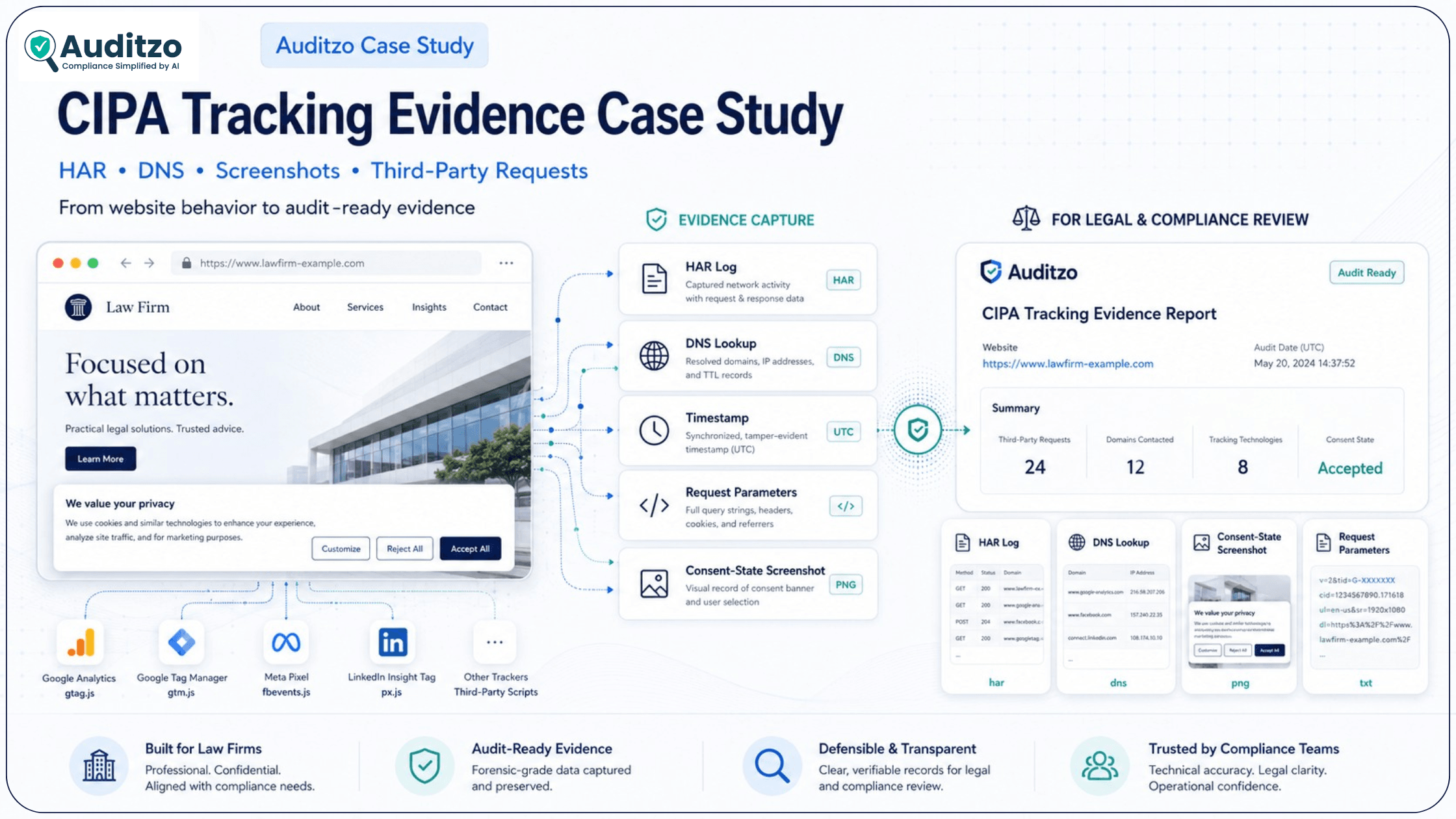
In 2025, a US-based law firm, with its name withheld under NDA, faced a familiar challenge in a website tracking matter. A cookie banner was visible, but the team needed stronger technical documentation to understand what requests fired, when they fired, what data signals were included, and where those requests were routed.
Cookie scanner screenshots helped with initial triage, but they did not provide enough depth for a legal and compliance review. The firm needed an audit-ready evidence package that connected consent state, network activity, third-party endpoints, request parameters, and screenshots in one structured report.
Important scope note: Auditzo provides technical website audit evidence and documentation. Auditzo is not a law firm, does not provide legal advice, does not determine liability, and does not guarantee admissibility. Findings should be reviewed by qualified legal or compliance professionals.
Problem: Evidence That Did Not Go Deep Enough
The initial review relied heavily on cookie scanner outputs. Those outputs showed that certain tags or scripts were present, but they did not clearly explain the full technical sequence behind the website behavior.
- Scanners showed tag presence, but not always request-level payloads or parameters.
- There was limited timing evidence showing whether tracker activity happened before or after consent interaction.
- There was no clear DNS corroboration showing third-party routing paths.
- Consent banner screenshots were not aligned with the network timeline.
- The evidence was not organized into a structured report for legal and compliance review.
The core issue was not simply whether a tracker existed. The real issue was whether the technical evidence could help legal and compliance teams review what happened during the page load, before and after user interaction with the consent banner.
Scanner vs Forensic Proof
Most cookie scanners are useful for hygiene checks and early triage. But when a legal or compliance team is reviewing CIPA-related website tracking risk, they may need deeper technical evidence. That is where a forensic-style website tracking audit becomes more useful.
| Evaluation Criteria | Cookie Scanner or Triage Tool | Forensic-Style CIPA Audit Report |
|---|---|---|
| Evidence depth | Lists cookies, tags, or scripts detected on the page. | Captures request and response activity using HAR logs, Fiddler, and network evidence. |
| Timing proof | May not show when requests fired in relation to consent interaction. | Documents timestamps and sequence of events before and after consent interaction. |
| Routing evidence | May infer third-party destinations from detected tags. | Uses DNS lookups and endpoint mapping to help review third-party routing. |
| Identifiers and signals | May not expand query parameters, request headers, or payload details. | Extracts and reviews signals such as page URL, document title, referrer, IDs, cookies, or tracking parameters where visible. |
| Consent-state linkage | Usually does not align banner state with network activity. | Connects consent-state screenshots with network timelines and request evidence. |
| Report usability | Often provides a dashboard export or tag list. | Provides an audit-ready evidence package that legal and compliance teams can review. |
For a broader view of how technical logs, screenshots, and request evidence can support compliance review, see Auditzo's guide on digital evidence for compliance reviews.
Prefer to see what a report looks like? Review a sample website privacy compliance audit report before requesting a scoped review.
What a CIPA Trap-and-Trace Audit Report Includes
A CIPA-focused forensic audit report should not simply list cookies. It should help legal and compliance teams review the technical behavior of a website in a structured way.
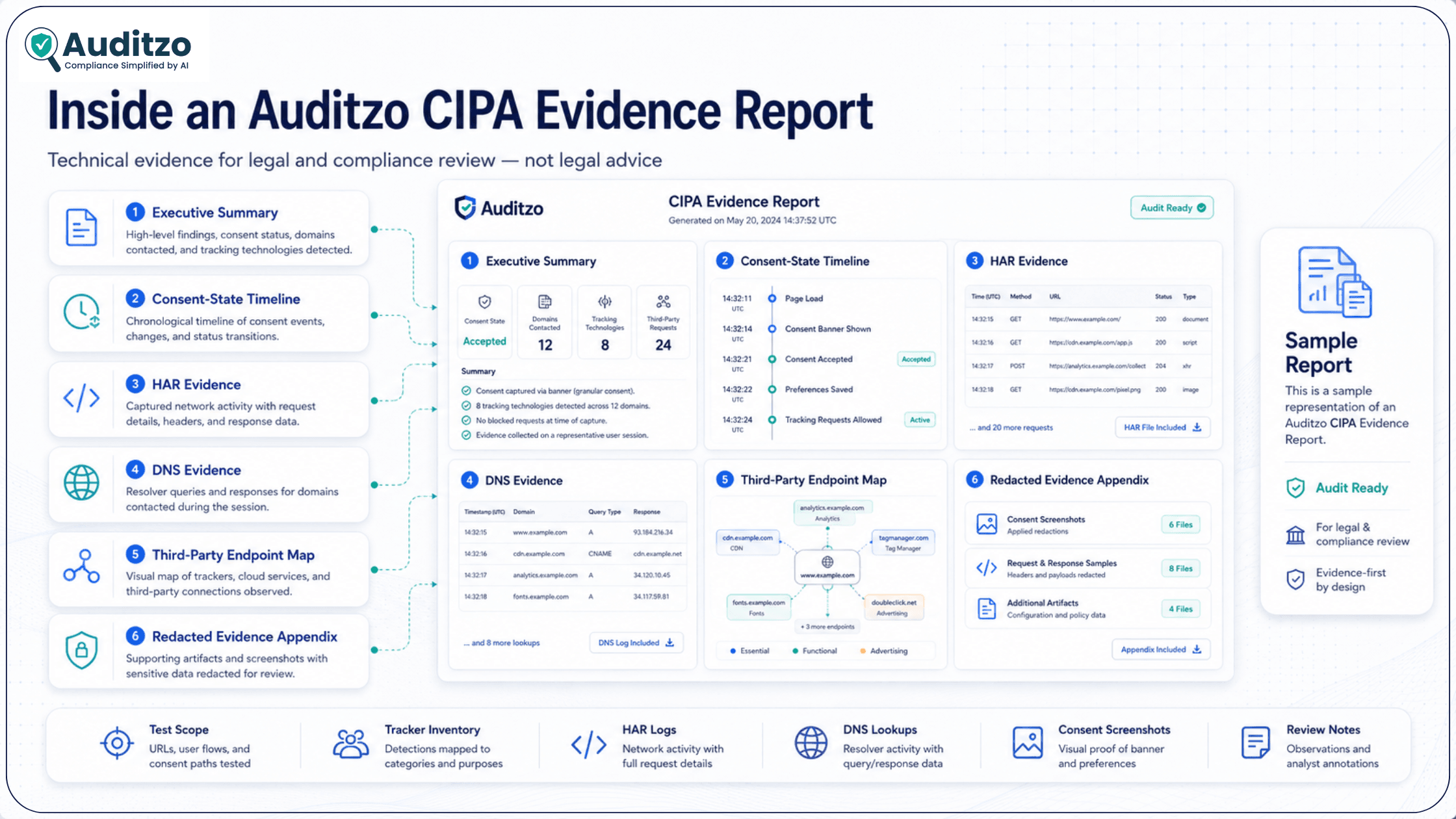
A typical Auditzo evidence-backed report may include:
- Executive summary: A plain-English overview of key website tracking observations.
- Testing scope: Pages reviewed, browser/session setup, test conditions, and consent flow observed.
- Consent-state timeline: Screenshots and timestamps showing banner state before and after user interaction.
- Tracker inventory: Third-party scripts, pixels, analytics endpoints, and relevant tracking technologies observed.
- HAR evidence: Request URLs, timestamps, parameters, headers, payload details, and destination endpoints where available.
- DNS evidence: DNS lookups and routing observations for third-party domains.
- Identifier and signal review: Visible request signals such as page URL, referrer, document title, client IDs, session IDs, or pixel identifiers where present.
- Evidence appendix: Redacted HAR snippets, DNS observations, screenshots, and supporting notes.
- Limitations: Notes on test conditions, scope, browser state, and areas that should be reviewed by counsel.
For statute-specific website tracking review, Auditzo also provides a dedicated CIPA §638.51 website audit page.
Legal Context: Why Specific Evidence Matters
CIPA website tracking claims are fact-specific and continue to be reviewed through developing legal arguments and case interpretations. For legal and compliance teams, broad scanner claims may not be enough. The stronger question is often whether the available technical evidence clearly documents timing, routing, request parameters, consent state, and third-party activity.
In CIPA-related website tracking reviews, legal teams may look at whether technical signals were transmitted before consent interaction, where requests were routed, and what identifiers or behavioral metadata appeared in the request chain. These issues should always be reviewed by qualified counsel.
What routing or tracking signals may need review:
- Request context such as page URL, document title, referrer, and event path.
- Identifiers such as client IDs, session IDs, pixel IDs, cookie IDs, or browser-generated tracking values where visible.
- Third-party requests to analytics, advertising, chat, session replay, or tracking pixel endpoints.
- DNS lookups to third-party domains before or after consent interaction.
- Consent banner state at the time requests were captured.
Technical evidence does not replace legal analysis. It helps legal and compliance teams review what the website actually did during the test session.
For a deeper law-firm-focused explanation, see Auditzo's guide on a CIPA trap-and-trace audit report for law firms.
Checklist: Link each claim to evidence
- Pre-consent timestamp captured in HAR logs.
- Endpoint and parameters mapped from the request URL or payload.
- DNS lookup reviewed for third-party routing.
- Consent UI state aligned with the network timeline.
- Screenshot evidence connected to the exact test sequence.
Resolution: Auditzo's Evidence-Backed Forensic Report
Auditzo prepared a forensic-style website tracking report that organized the technical evidence into a reviewable format. Instead of only listing tags, the report connected website behavior with network logs, DNS activity, request details, consent-state screenshots, and a clear evidence timeline.
- HAR logs documented request and response activity, including timestamps, URLs, parameters, and observed payload details.
- Wireshark DNS captures helped review third-party routing activity.
- Fiddler payload analysis supported deeper review of request parameters and identifiers such as client IDs, session IDs, and pixel values where visible.
- Timestamped screenshots aligned network events with the consent banner state.
- Third-party endpoint mapping helped identify analytics, advertising, pixel, and tracking-related domains.
- Data broker or vendor checks were reviewed where relevant and available.
The result was a technical evidence package that the law firm's team could review with more confidence. It helped connect what appeared on the website with what happened in the browser's network activity.
The Auditzo Forensic Workflow
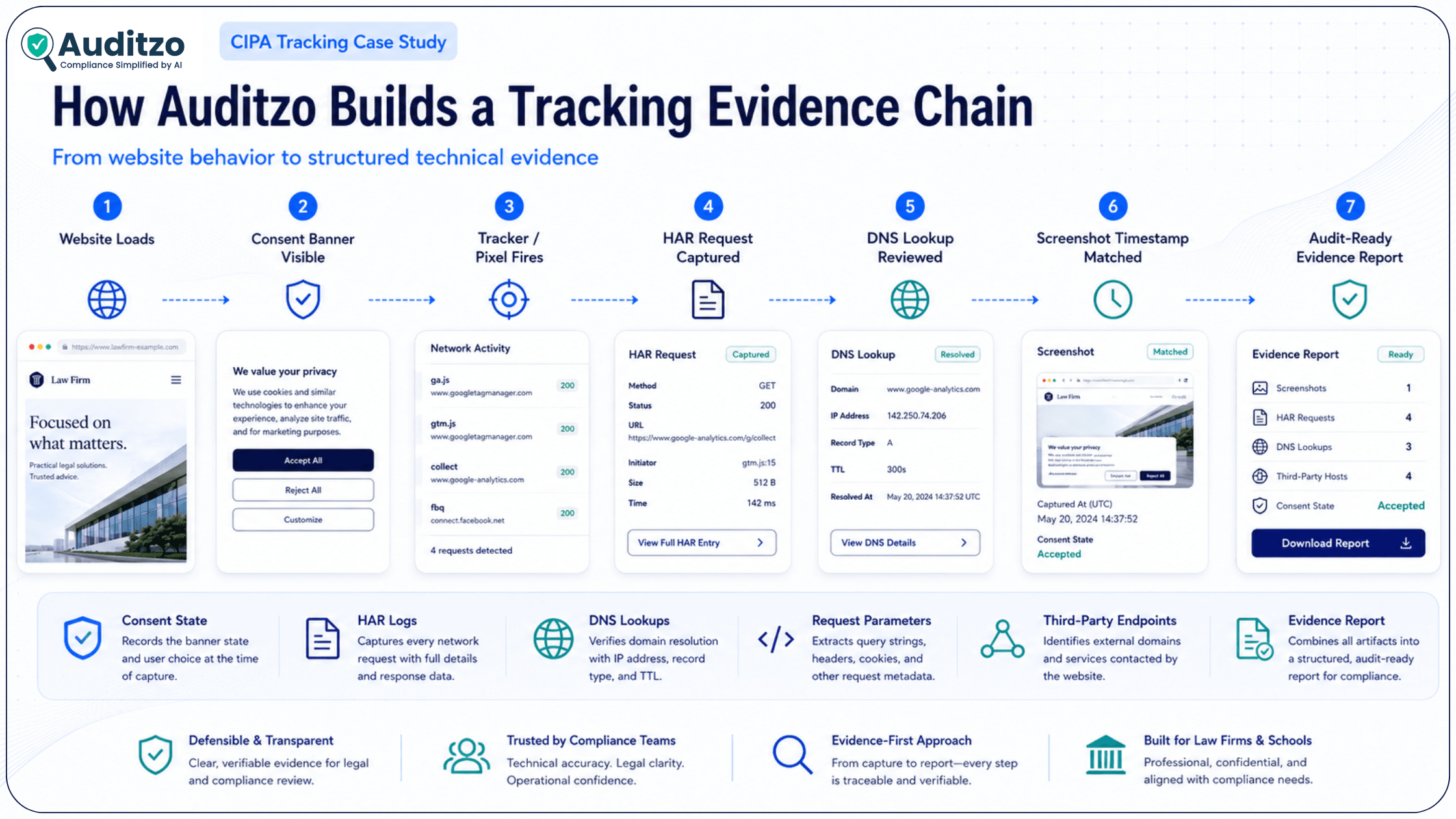
Auditzo's workflow is designed to document website tracking behavior in a structured sequence. Each step supports a clearer review of consent state, tracker activity, request evidence, and third-party routing.
- Website load: The test session begins with a clean browser state and defined test conditions.
- Consent state observed: The consent banner or privacy interface is captured with screenshots and timestamps.
- Tracker activity reviewed: Third-party scripts, pixels, analytics calls, and network requests are monitored.
- HAR and DNS evidence captured: Requests, timestamps, parameters, and DNS lookups are documented.
- Evidence mapped: Requests are connected with endpoints, identifiers, consent state, and screenshots.
- Audit-ready report prepared: Findings are organized for legal, compliance, and technical review.
This workflow turns raw website behavior into a structured evidence package that can help legal and compliance teams review tracking risk more clearly.
What Counts as Pre-Consent Tracking Evidence?
Pre-consent tracking evidence is not based on a single screenshot or cookie name. It usually requires a sequence of technical observations that show what happened before a user accepted, rejected, or adjusted consent settings.
Auditzo looks for evidence such as:
- A third-party request firing before the user interacts with the consent banner.
- A tracking pixel loading before consent choice is recorded.
- An analytics request containing page URL, referrer, document title, event name, or identifier before consent interaction.
- A cookie, local storage value, or browser identifier appearing before consent action.
- A DNS lookup to a third-party tracking domain during the pre-consent window.
- A timestamped screenshot showing the consent banner still active while network requests are captured.
These observations do not automatically prove a legal violation. They can help identify tracking behavior that may need legal, compliance, or technical review.
How Auditzo Connects Website Behavior to Technical Evidence
A strong website tracking review connects each claim to a specific piece of evidence. That is where HAR logs, DNS lookups, screenshots, and endpoint mapping become useful.
| Website Behavior | Technical Evidence Captured | Why It Matters |
|---|---|---|
| Pixel or script fires before consent interaction | HAR timestamp, request URL, screenshot of consent state | Helps review timing and consent-state linkage. |
| Third-party endpoint is contacted | DNS lookup, destination domain, request host | Helps review routing to external services. |
| Identifier appears in a request | Query parameter, cookie value, payload field, or request header | Helps review what signals were transmitted. |
| Consent banner remains visible during network activity | Timestamped screenshot and network timeline | Helps connect user interface state with technical activity. |
| Scanner output looks incomplete | HAR logs, screenshots, DNS evidence, and request-level review | Helps legal and compliance teams look beyond tag presence. |
For more technical background, see Auditzo's guide on screenshots, logs, and HAR files as evidence.
Impact: From Assumptions to Reviewable Evidence
With Auditzo's evidence-backed CIPA audit report, the law firm was able to move from broad assumptions about tracking to a clearer technical review of website behavior.
- Timing was easier to review because network requests were mapped against consent-state screenshots.
- Third-party routing was clearer because DNS observations and endpoint mapping were included.
- Request-level signals were documented through HAR logs, request parameters, and Fiddler review.
- Legal and technical teams could work from the same evidence package instead of separate screenshots, scanner exports, and notes.
- Remediation discussions became more focused because specific scripts, endpoints, and consent-state issues were easier to identify.
Auditzo helped bridge the gap between technical logs and legal review. The report made it easier for our team to understand what happened on the website and where the evidence came from.
Inside the Evidence: Redacted HAR and DNS Example
Below is a simplified, redacted example of the type of evidence that may appear in a CIPA-focused website tracking audit report. Actual findings depend on the website, scripts, consent flow, browser state, test conditions, and legal review.
Timestamp: 00:00.42 after page load
Consent state: Banner visible, no accept/reject action recorded
Request type: GET
Destination: analytics.example-third-party.com
Request path: /collect
Observed parameters:
dl=https://clientsite.example/home
dt=Homepage
cid=xxxx-xxxx-xxxx
Referrer: https://clientsite.example/
Evidence source: HAR log
Timestamp: 00:00.42 after page load
DNS lookup observed:
connect.example-third-party.net
Evidence source: DNS capture
Review note:
Third-party routing observed during the test session. Legal and compliance teams should review the timing, purpose, consent state, and applicable legal context.
These examples are redacted and simplified. In a full report, Auditzo can include screenshots, network logs, endpoint mapping, request details, and supporting notes in a structured appendix.
To review the report format, visit the sample website privacy compliance audit report.
How This Case Study Guides Your Strategy
- Cookie banners and scanner screenshots may not be enough for a detailed legal or compliance review.
- Timing, request payloads, DNS lookups, consent-state screenshots, and third-party routing should be reviewed together.
- A CIPA-focused audit should connect website behavior with technical evidence, not just list detected tags.
- Law firms and compliance teams should use technical reports as review support, not as a replacement for legal analysis.
- A full forensic evidence report is more appropriate when a matter requires structured HAR/DNS documentation and audit-ready evidence.
For teams that want a practical evidence checklist before requesting a report, Auditzo also provides a CIPA audit checklist.
FAQs: CIPA Forensic Audit Reports for Law Firms
What is a CIPA forensic audit report?
A CIPA forensic audit report documents technical website tracking activity such as third-party requests, tracker behavior, HAR logs, DNS lookups, request parameters, and consent-state screenshots. Auditzo prepares technical evidence for legal and compliance review, not legal advice.
How is a CIPA trap-and-trace audit different from a cookie scanner?
A cookie scanner usually lists tags or cookies found on a website. A forensic-style CIPA audit looks deeper at timing, request payloads, third-party routing, identifiers, DNS activity, and whether tracking signals appeared before consent interaction.
What evidence can Auditzo document in a CIPA website tracking audit?
Auditzo can help document HAR requests, DNS lookups, third-party endpoints, tracking pixels, request parameters, identifiers, consent-banner state, screenshots, and network timelines. The findings should be reviewed by legal or compliance teams.
Can HAR logs and DNS lookups help review pre-consent tracking?
Yes. HAR logs can show when browser requests fired and what parameters were sent. DNS lookups can help confirm routing to third-party domains. Together with screenshots, they can support review of pre-consent tracking behavior.
Does Auditzo determine whether a website violates CIPA?
No. Auditzo is not a law firm and does not provide legal conclusions. Auditzo provides technical, evidence-backed website audit reports that legal and compliance teams can review when assessing CIPA-related tracking risk.
When should a law firm request a full forensic report instead of a triage audit?
A triage audit is useful for an initial tracking-risk review. A full forensic report is more appropriate when a law firm needs structured evidence, HAR/DNS documentation, screenshots, tracker mapping, and a report package for legal review.
Related Resources
- CIPA trap-and-trace audit report for law firms
- CIPA §638.51 website audit
- Digital evidence for compliance reviews
- Screenshots, logs, and HAR files as evidence
- CIPA audit checklist
Next Step: Review the Evidence Format
If your team is reviewing CIPA-related website tracking risk, start by looking at the structure of the evidence. A sample report can help you understand what Auditzo documents, how technical observations are organized, and what legal or compliance teams may want to review further.
Need a similar forensic evidence package?
Review the sample report or request a scoped, NDA-protected forensic evidence review for your matter.
View the Sample Evidence Report
Request an NDA-Protected Forensic Evidence Review
Note: A quick triage audit is useful for initial tracking-risk discovery. A forensic evidence report is more appropriate when legal or compliance teams need structured HAR logs, DNS documentation, screenshots, tracker mapping, and audit-ready reporting.
Summary: Key Takeaways
- Problem: Cookie scanner outputs may lack timing, payload, DNS, and consent-state evidence.
- Evidence need: CIPA-related website tracking reviews often require clearer documentation of requests, routing, identifiers, and consent state.
- Auditzo approach: Auditzo documents HAR logs, DNS lookups, Fiddler observations, Wireshark captures, screenshots, and tracker mapping in an audit-ready report.
- Business value: A structured evidence package helps legal, compliance, and technical teams review the same facts more clearly.
- Next step: Review the sample report or request an NDA-protected forensic evidence review from Auditzo.
Table of Contents
- Introduction: When Cookie Banners Weren't Enough
- Problem: Evidence That Did Not Go Deep Enough
- Scanner vs Forensic Proof
- What a CIPA Trap-and-Trace Audit Report Includes
- Legal Context: Why Specific Evidence Matters
- Resolution: Auditzo's Evidence-Backed Forensic Report
- The Auditzo Forensic Workflow
- What Counts as Pre-Consent Tracking Evidence?
- How Auditzo Connects Website Behavior to Technical Evidence
- Impact: From Assumptions to Reviewable Evidence
- Inside the Evidence: Redacted HAR and DNS Example
- How This Case Study Guides Your Strategy
- FAQs: CIPA Forensic Audit Reports for Law Firms
- Related Resources
- Next Step: Review the Evidence Format
- Summary: Key Takeaways