What Law Firms Should Look for in a CIPA Website Tracking Evidence Report
Website-tracking disputes often involve more than identifying whether a pixel, analytics tool, session technology, or third-party script is present. Counsel may need to understand what the technology did during a defined browser session, when requests occurred, which destinations received them, what observable information appeared in those requests, and how the website behaved before and after a visitor interacted with its consent controls.
A properly scoped technical evidence report can help organize those facts. It can document website behavior through screenshots, browser-network observations, cookies, browser storage, request timing, consent-state comparisons, and other agreed evidence.
It cannot independently determine whether a technology is legally a pen register or trap-and-trace device, whether the California Invasion of Privacy Act applies, whether a violation occurred, or whether an artifact will be admissible in a particular proceeding.
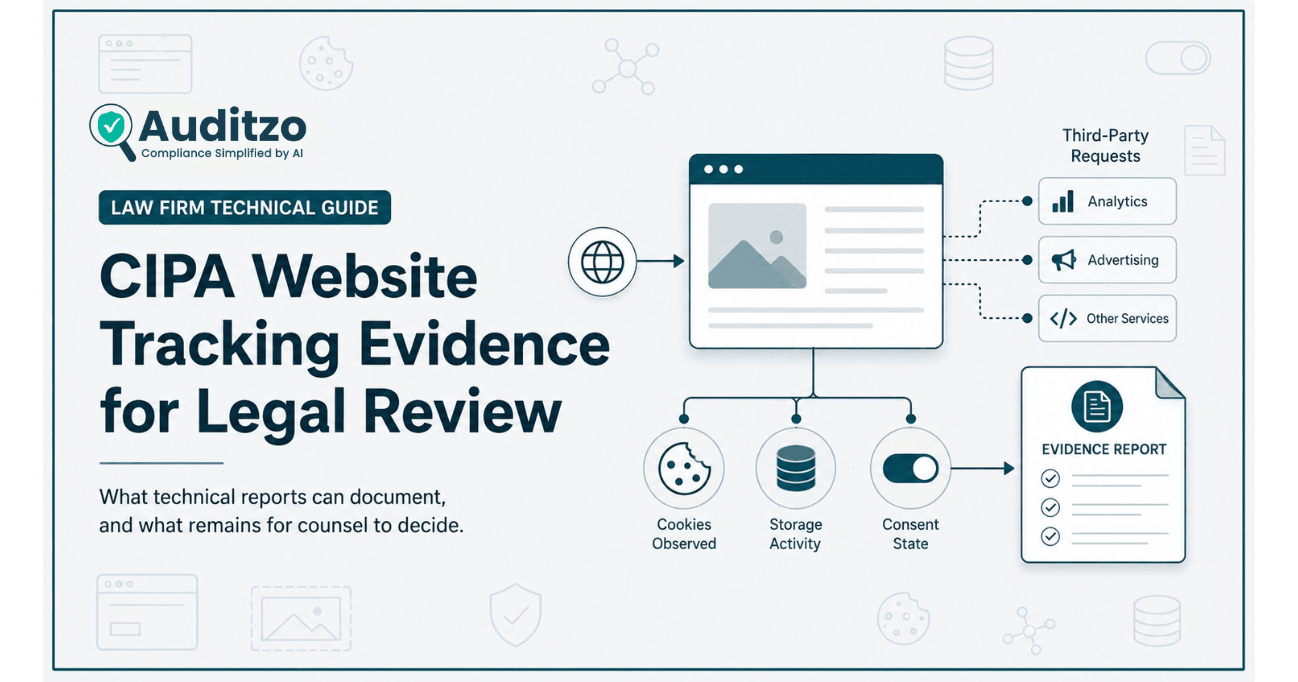
Key point: Auditzo documents observable website behavior and organizes technical findings for counsel-directed review. Auditzo does not provide legal advice, determine legal liability, certify compliance, or guarantee the admissibility or outcome of any legal matter.
Why Website-Tracking Reviews Need More Than a Tag List
A basic cookie scanner can provide useful initial visibility into technologies associated with a website. It may identify cookies, scripts, vendors, request destinations, and consent-management signals during a particular automated run.
That information can support triage, but a disputed website-tracking question may require deeper investigation.
Counsel may need to distinguish between:
- A technology listed in website source code and a request that actually occurred
- A request observed during initial page load and one activated after an interaction
- A script managed through a tag container and one embedded directly in a template or plugin
- A cookie name and the browser session in which it was created
- A third-party hostname and the particular information observable in a request
- A visible consent interface and the website behavior occurring underneath it
- A homepage observation and behavior across product, registration, chat, search, or checkout journeys
A technical evidence review should therefore preserve the relationship between the page, test environment, visitor journey, consent state, timestamp, request, and supporting artifact.
This does not transform a technical observation into a legal conclusion. It gives counsel a clearer factual basis for deciding which legal questions require analysis.
If the technical review begins after a business receives a demand letter, see our CIPA demand letter website-tracking evidence guide for a step-by-step framework covering preservation, allegation-specific testing, consent-state comparison, HAR review, and evidence preparation for counsel.
Law firms evaluating this type of support can also review Auditzo's website privacy audit support for law firms.
What CIPA Sections 638.50 and 638.51 Address
California Penal Code Section 638.50 contains definitions associated with pen registers and trap-and-trace devices. The statutory language refers to devices or processes involving dialing, routing, addressing, or signaling information and distinguishes that information from communication content.
California Penal Code Section 638.51 generally restricts installing or using a pen register or trap-and-trace device without first obtaining a court order, subject to statutory exceptions.
The official statutory text should be reviewed directly through California Legislative Information.
The definitions were not written specifically for modern ecommerce pixels, analytics tags, browser fingerprinting scripts, session tools, or other website technologies. Applying those provisions to a particular implementation therefore involves legal and factual questions that Auditzo does not decide.
Important boundary: Observing routing, addressing, signaling, cookie, browser, or request information does not by itself establish that the technology satisfies a statutory definition or that its use violated CIPA.
Why Application to Website Technologies Remains Unsettled
Courts have not applied CIPA Section 638.51 uniformly to website-tracking technologies.
Different decisions have considered issues such as:
- Whether a plaintiff alleged a concrete privacy injury
- Whether the technology qualifies as a device or process covered by the statute
- Whether the information captured was routing, addressing, or signaling information
- Whether the alleged information was communication content
- Whether the website operator or technology provider installed or used the relevant process
- Whether consent, authorization, or a statutory exception applies
- Whether the allegations adequately describe the technology's actual operation
Some claims have survived early procedural stages, while others have been dismissed based on standing, statutory interpretation, insufficient allegations, or the nature of the technology and information involved.
For that reason, a technical review should not begin with the assumption that every pixel, cookie, IP address, session identifier, or third-party request is covered by CIPA.
The more reliable approach is to document the observable technical facts and allow qualified counsel to assess their relevance under the authorities, procedural posture, and circumstances of the matter.
Auditzo's dedicated CIPA Section 638.51 website tracking review page explains the technical scope and service boundaries in more detail.
Technical Questions Counsel May Need Investigated
The correct technical scope depends on the legal theory, website architecture, relevant visitor journey, and questions identified by counsel.
A review may be designed to investigate questions such as:
- Which third-party technologies appeared during the reviewed session?
- When did each selected request occur relative to page navigation and consent interaction?
- Which hostname or endpoint received the request?
- What query-string, header, cookie, or payload fields were observable?
- Did the request include a page URL, document title, referrer, session value, campaign value, or other identifier?
- Did the technology operate during the initial state, after Reject, after Accept, or across multiple states?
- Did the behavior change between pages, browsers, devices, or regions?
- Was the script introduced through a tag manager, plugin, template, embedded widget, or directly loaded code?
- Did a session-replay, chat, video, analytics, advertising, or fingerprinting technology appear?
- Could the observed technology and request be linked to a defined evidence artifact?
A good technical scope should identify these questions before evidence capture begins. This reduces irrelevant collection and makes the resulting report easier for counsel and technical teams to review.
What a Technical Evidence Report Can Document
A scoped website-tracking evidence report may document several evidence layers. The exact contents depend on the engagement.
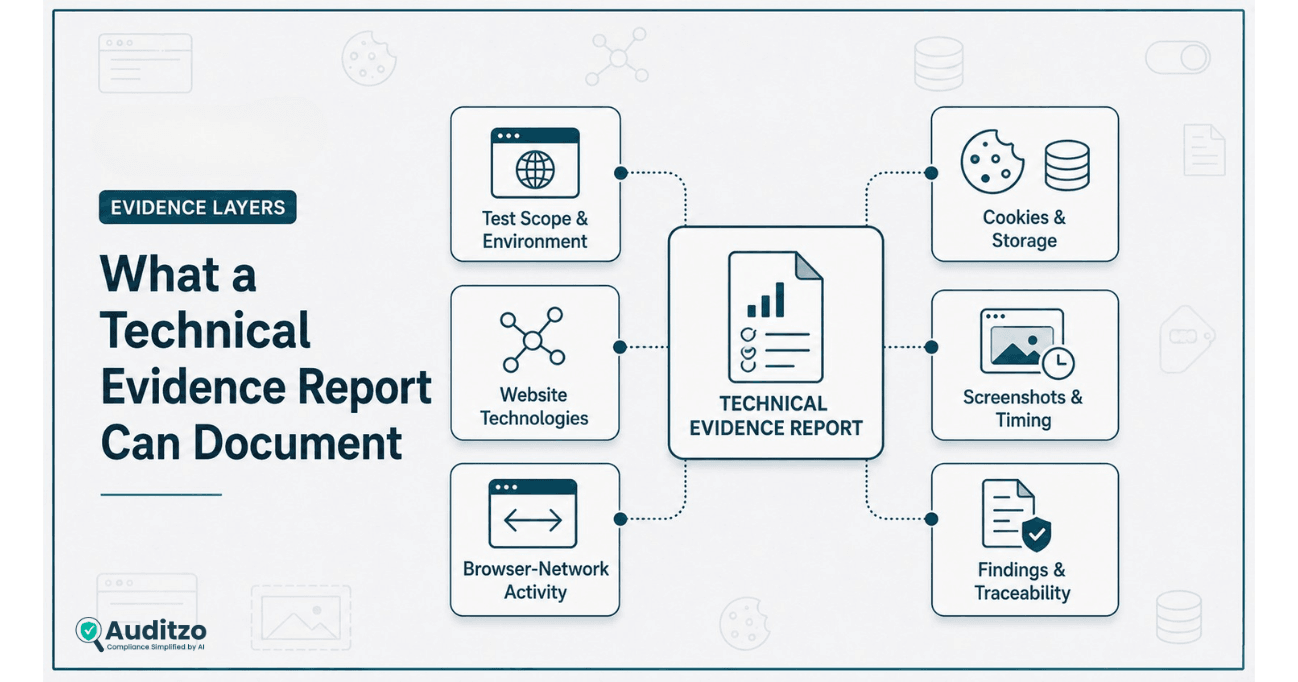
Test scope and environment
- Domain and page URLs reviewed
- Date and time of the observation
- Browser and device context
- Regional or network environment where relevant
- Session state
- Consent state
- Actions performed during the journey
- Known exclusions and limitations
Website technologies
- Observed analytics tools
- Advertising and social pixels
- Session-replay or behavioral technologies
- Chat, video, form, and embedded-service providers
- Consent-management platforms
- Tag-management systems
- Other third-party scripts and endpoints
Browser-network activity
- Request URLs and destinations
- Request method and timing
- Observable headers and parameters
- Page and referrer context
- Redirect behavior
- Response status information
- Associated vendor or technology category
Browser state
- Cookies visible during the reviewed session
- Local-storage and session-storage indicators
- Changes between selected consent states
- Observable identifier values where relevant and appropriately handled
Visual context
- Page screenshots
- Consent-banner state
- Visible user interaction
- Page or component state at the time of observation
Technical findings
- Observed behavior
- Affected page and session
- Supporting evidence reference
- Timing and consent context
- Technology or vendor involved
- Technical limitation or uncertainty
- Suggested technical owner
- Potential remediation or follow-up question
A report should clearly separate facts directly observed during the test from technical interpretation, unresolved questions, and matters reserved for legal review.
Why Consent-State Testing Can Matter
A visible consent banner shows what the visitor can see. It does not necessarily show how every script, cookie, browser-storage entry, or request behaves underneath the interface.
Where relevant to the agreed scope, a Manual Evidence Audit may compare separate sessions representing:
- Initial or no-interaction state
- Reject journey
- Accept journey
The comparison may examine whether selected technologies:
- Appear during the initial page load
- Remain active after a Reject choice
- Activate after an Accept choice
- Create or modify cookies or browser storage
- Send requests to different destinations
- Behave differently across representative pages
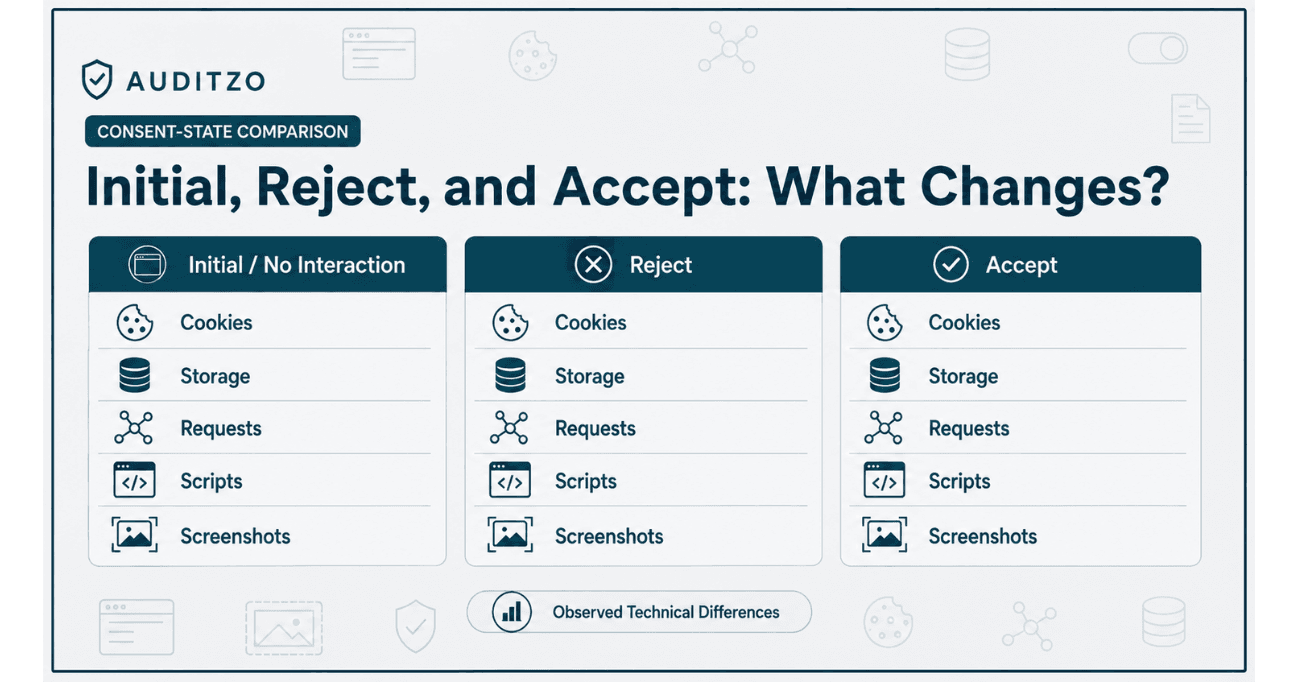
This illustration shows the categories that may be compared during testing. Actual cookies, storage entries, requests, scripts, and screenshots vary by page, session, website configuration, and agreed scope.
Consent-state testing is not a legal determination. It documents whether the website produced different observable technical outcomes during the sessions reviewed.
The appropriate legal significance of those differences depends on the applicable law, purpose, technology, consent language, visitor context, and other facts.
Organizations needing deeper consent-state testing can review Auditzo's Manual Evidence Audit.
HAR and Browser-Network Evidence
A HAR file or browser-network record can preserve information associated with requests and responses generated during a browser session.
Depending on the browser, website, capture method, security controls, and agreed scope, the record may contain:
- Request URL
- Request method
- Timestamp and duration
- Request and response headers
- Query-string fields
- Response status
- Initiator or sequence context
- Cookies associated with the request
- Page URL and referrer information
HAR evidence must be handled carefully. It may contain identifiers, authorization values, personal information, tokens, or other sensitive data.
Collection and sharing should therefore follow an agreed scope and appropriate access controls. Sensitive values may require redaction before a report or illustrative extract is shared more broadly.
A HAR file also has limitations:
- It represents a particular browser session
- It may not include every network-level event
- Encryption affects what is observable at different capture layers
- Browser and tooling configurations can influence the record
- Dynamic website behavior may differ across repeated sessions
- A request does not, by itself, establish the legal meaning of the data flow
HAR and browser-network evidence should therefore be interpreted together with screenshots, page context, timing, cookies, browser storage, and the documented test methodology.
Cookies, Storage, and Observable Identifiers
Cookies and browser storage can help explain how a website or third-party technology maintains state across page views and sessions.
A technical review may document:
- Cookie name and domain
- Cookie path and expiry information
- First-party or third-party context
- Local-storage or session-storage keys
- State changes between consent journeys
- Identifiers observable within selected requests
- Relationships between a browser value and a third-party destination
The existence of a cookie or identifier does not automatically establish that it is personal information, communication content, routing information, or legally prohibited data.
Those questions may depend on how the value is generated, whether it is persistent, what it can be linked to, which party receives it, how it is used, and the relevant legal framework.
Technical reporting should avoid labeling an identifier as unlawful, sensitive, or covered by CIPA unless that conclusion has been made by qualified counsel based on the full record.
Screenshots, Timing, and Website Context
Screenshots can preserve visible context such as:
- The page being reviewed
- The consent banner displayed
- The available Accept, Reject, or settings controls
- The state of a chat, form, video, or embedded component
- The point in the journey when an observation was made
A screenshot does not independently prove that a network request occurred or that a particular field was transmitted.
Similarly, a network request does not necessarily show what the visitor could see when it occurred.
Stronger technical documentation correlates the visual state with:
- A recorded timestamp
- The applicable browser session
- The page URL
- The consent state
- The related request or evidence reference
- The tester's documented action
This correlation helps counsel understand the sequence without treating any single artifact as conclusive on its own.
Evidence Integrity and Traceability
Technical evidence is easier to evaluate when the report explains how it was created, organized, and linked to the findings.
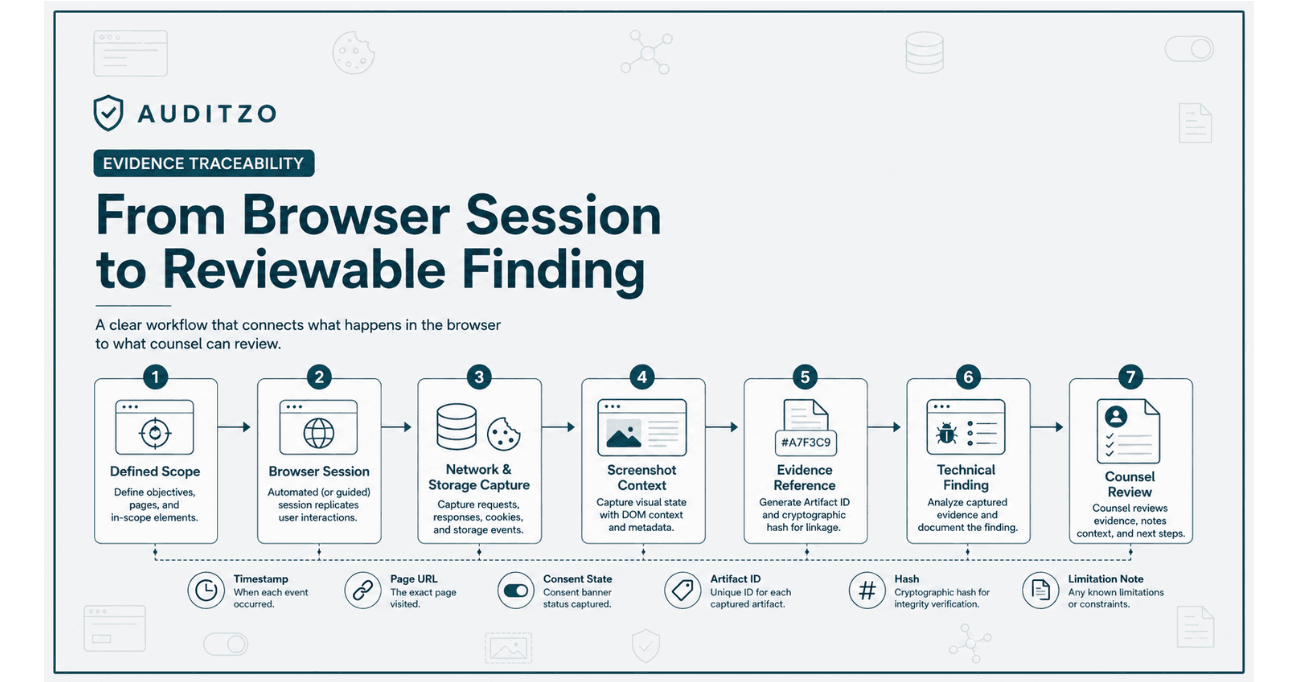
Depending on the engagement, useful integrity and traceability measures may include:
- A unique engagement or audit identifier
- Defined test scope
- Date, time, browser, device, and environment records
- File naming conventions
- Evidence indexes
- Finding-to-artifact references
- Cryptographic file hashes
- Redaction records
- Access and transfer records where maintained
- Tool or methodology version information
- Known limitations and deviations
A hash can help demonstrate whether a file has changed after the hash was calculated. It does not prove that the file was captured correctly, that the methodology was legally sufficient, or that the artifact is admissible.
Likewise, describing an evidence-handling process does not replace the authentication, foundation, expert, procedural, or evidentiary decisions that may be required in a legal matter.
Auditzo's audit scope and limitations explains these boundaries across automated and manual services.
Automated Scan vs Manual Evidence Audit
An automated audit and a Manual Evidence Audit serve different purposes. Neither service provides legal conclusions or compliance certification.
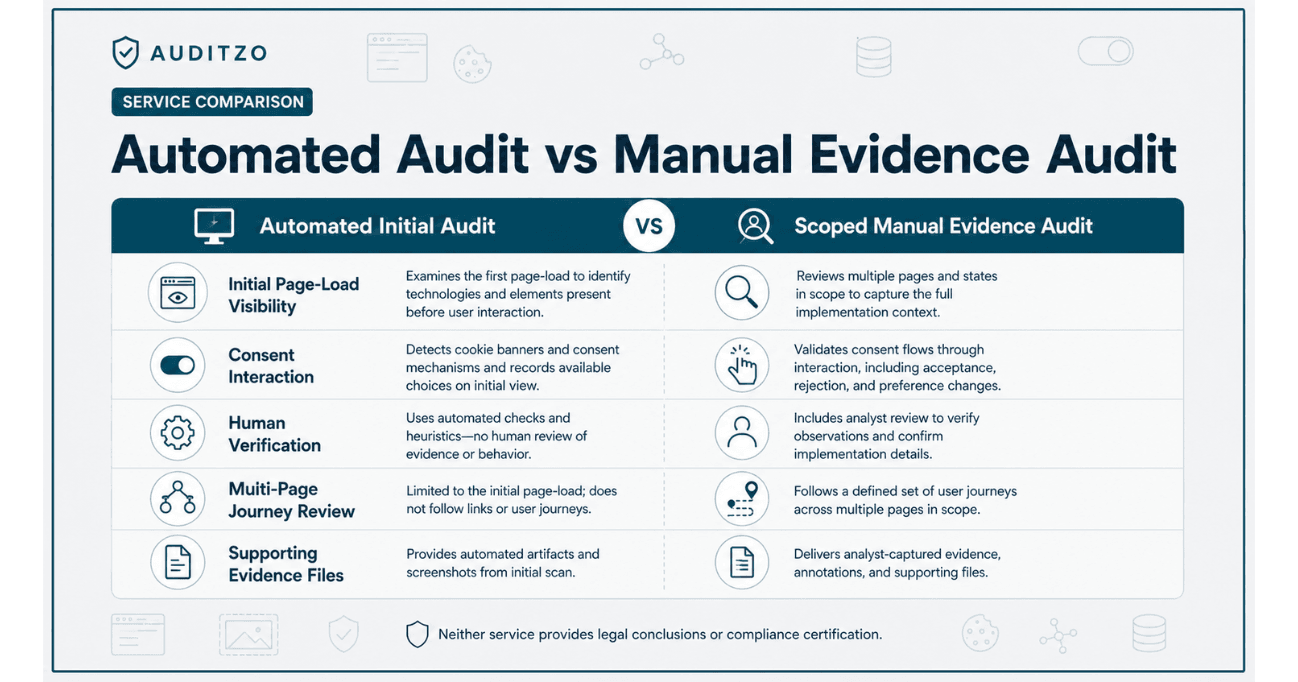
| Review Area | Automated Initial Audit | Scoped Manual Evidence Audit |
|---|---|---|
| Primary purpose | Initial technical visibility and triage | Human-reviewed investigation of agreed technical questions |
| Initial page-load observations | Yes, within the automated observation window | Yes, across the agreed pages and sessions |
| Cookies and third-party requests | Automated detection and reporting | Human-reviewed observations and comparisons |
| Accept and Reject interaction | No | Where included in the agreed scope |
| Multiple pages and journeys | Limited to the configured automated run | Representative pages and journeys defined in scope |
| Screenshots | Report context where generated by the automated system | Timestamped page or consent-state screenshots where scoped |
| HAR or request-level evidence | Not provided as a downloadable raw-evidence package | May be reviewed or included according to the agreed scope |
| Cookie and storage comparisons | No manual consent-state comparison | May be included across defined sessions |
| Human verification | No | Yes |
| Technical remediation guidance | Automated observations and general guidance | Finding-specific developer guidance where included |
| Legal conclusion | No | No |
| Compliance or admissibility determination | No | No |
An automated audit may help identify areas that warrant closer review. A Manual Evidence Audit is the more appropriate path when counsel needs consent interaction, human validation, multiple pages, request-level context, screenshots, or agreed supporting evidence files.
Teams can compare the available options on the website privacy audit plan comparison.
What a Technical Report Cannot Establish
A responsible report should state its boundaries clearly.
An Auditzo technical evidence report does not independently establish:
- That a technology is legally a pen register
- That a technology is legally a trap-and-trace device
- That CIPA applies to a particular website, party, or data flow
- That a statutory exception does or does not apply
- That legally effective consent existed or was absent
- That a person suffered a legally cognizable injury
- That a statutory violation occurred
- That a website operator or vendor is liable
- That an observed value is personal information or communication content
- That a report or artifact is admissible
- That evidence is privileged or protected work product
- That the reviewed behavior occurred in every visitor session
- That the website will continue behaving the same way after the test
- That a particular claim, defense, filing, or settlement position will succeed
Those questions require counsel to consider the law, facts, parties, contracts, disclosures, consent records, evidence foundation, procedure, and authorities relevant to the matter.
Auditzo's role is to document the technical behavior observed within the agreed scope and make that record easier for counsel and technical teams to evaluate.
How Law Firms Can Scope a Technical Review
A counsel-directed review is strongest when the technical scope follows the legal and factual questions rather than using the same generic scan for every matter.
1. Identify the relevant website journey
Specify the pages and interactions requiring review, such as:
- Homepage
- Landing page
- Search
- Product page
- Cart or checkout
- Registration
- Lead form
- Chat interaction
- Video playback
- Account creation or login
2. Define the relevant session states
Determine whether the review should cover:
- Initial or no-interaction state
- Reject choice
- Accept choice
- Consent-settings changes
- Returning visitor state
- Logged-in or logged-out context
3. Define the environment
Specify relevant:
- Browser
- Device type
- Visitor region
- Language
- Network or VPN requirements
- Date or campaign window
4. Identify technologies or questions of interest
Counsel may ask the technical team to focus on:
- A named pixel or analytics provider
- Session replay
- Chat or customer-support tools
- Browser fingerprinting
- Advertising identifiers
- Page URLs and referrers
- Form interactions
- Specific request fields
- Cross-domain or redirect behavior
5. Define required deliverables
Agree in advance whether the engagement should include:
- Technical report
- Findings register
- Timestamped screenshots
- HAR or network evidence
- Cookie and storage comparison
- Evidence index
- File hashes
- Redacted extracts
- Developer remediation guidance
- Follow-up verification
6. Define handling and communication requirements
Counsel should determine:
- Who instructs Auditzo
- Who may access the evidence
- How files should be transferred
- Whether sensitive values require redaction
- How retention should be handled
- Whether counsel has specific confidentiality or work-product instructions
Auditzo does not determine whether an engagement or communication is privileged. Counsel should establish the appropriate engagement and communication structure.
Illustrative Evidence Example
The following example demonstrates how request information may be organized in a technical report. It is illustrative only and is not evidence from a client matter.
Reviewed page:
https://example.test/product

Session state:
Initial / no consent interaction

Observed request:
https://analytics.example/collect

Observed timing:
1.42 seconds after page navigation

Illustrative fields:
page_url=https://example.test/product
document_title=Example Product
session_value=[redacted]

Associated evidence:
Screenshot E-01
Network entry N-04
Cookie table C-02

Technical observation:
The selected request appeared during the reviewed
initial-state browser session.

Legal conclusion:
Not provided. Reserved for qualified counsel.
A finding based on an example like this should explain:
- What was directly observed
- Which session and page produced the observation
- Which evidence artifact supports it
- Which values were redacted
- What limitations apply
- Which legal questions remain outside the technical report
The example should not be described as proof that a statutory definition, element, injury, violation, or liability has been established.
Frequently Asked Questions
What is a CIPA website tracking evidence report?
It is a technical report documenting observable website technologies, browser requests, timing, cookies, storage, consent behavior, and supporting evidence within an agreed scope.
The report may help counsel assess questions associated with CIPA, but it does not determine whether CIPA applies or whether a violation occurred.
Is every website tracker a pen register or trap-and-trace device?
No. The presence of a pixel, cookie, analytics tool, session technology, or third-party request does not by itself establish that the technology satisfies a statutory definition.
The analysis depends on the technology, information involved, implementation, parties, applicable authorities, and other facts evaluated by counsel.
Can Auditzo prove a CIPA violation?
No. Auditzo documents technical website behavior. Qualified counsel determines whether the observed facts support a legal claim, defense, or other conclusion.
Does a cookie banner resolve the CIPA analysis?
Not by itself. A banner provides visible context, but counsel may also need technical evidence showing what the underlying scripts and requests did during the reviewed sessions.
The legal effect of the banner and visitor interaction remains a question for counsel.
Can an automated scanner provide a legal evidence package?
An automated audit can support initial technical triage, but it does not include human verification, Accept or Reject interaction, or a downloadable raw-evidence package.
A scoped Manual Evidence Audit is more appropriate when counsel requires deeper browser testing and agreed supporting evidence.
Does every Manual Evidence Audit include HAR files?
No. Deliverables depend on the agreed scope. HAR or other network evidence may be reviewed or included when expressly agreed and technically appropriate.
Does Auditzo always use Fiddler or Wireshark?
No. Tools and capture methods depend on the technical question, environment, access, website behavior, and agreed methodology.
Auditzo does not present any one tool as mandatory for every website-tracking review.
Can Auditzo guarantee that its evidence will be admissible?
No. Admissibility depends on applicable evidence rules, authentication, foundation, procedure, context, expert testimony where required, and decisions made by counsel and the relevant court or authority.
Can law firms use Auditzo for plaintiff and defense matters?
Yes. Auditzo provides neutral technical evidence support. The scope may be designed to investigate allegations, assess a website implementation, support remediation, compare consent states, or answer other counsel-directed technical questions.
Can Auditzo help remediate the website after the review?
Yes. Remediation support can be scoped separately and may include tag-manager review, consent-platform configuration support, script cleanup, developer guidance, and selected post-change verification.
Learn more about website tracking remediation support.
Can Auditzo monitor the website after remediation?
Auditzo can provide recurring technical visibility into changes in cookies, trackers, and third-party requests through Website Privacy Monitoring.
Monitoring does not guarantee compliance or prevent every future implementation change.
Request a Counsel-Directed Technical Review
Law firms and legal teams can engage Auditzo to document website-tracking behavior within a defined technical scope.
A Manual Evidence Audit may include agreed pages, visitor journeys, consent states, screenshots, browser-network review, cookie and storage comparisons, evidence references, and technical findings.
Discuss a scoped Manual Evidence Audit or review Auditzo's website privacy evidence support for law firms.
Teams requiring only an initial automated view of cookies, trackers, and third-party activity can run an automated website audit.
Scope reminder: Automated audits provide initial technical visibility and do not include human verification, consent-button interaction, or downloadable raw evidence files. Manual Evidence Audit deliverables depend on the agreed scope. Auditzo does not provide legal advice, certify compliance, determine CIPA applicability or violations, guarantee admissibility, or predict litigation outcomes.
Official Legal Reference
Review the current statutory text through California Legislative Information: Penal Code, Title 15, Chapter 1.5.
This article provides general technical information and should not be relied on as legal advice or as a substitute for reviewing current statutes, decisions, procedural rules, and matter-specific facts with qualified counsel.
Table of Contents
- Why Website-Tracking Reviews Need More Than a Tag List
- What CIPA Sections 638.50 and 638.51 Address
- Why Application to Website Technologies Remains Unsettled
- Technical Questions Counsel May Need Investigated
- What a Technical Evidence Report Can Document
- Why Consent-State Testing Can Matter
- HAR and Browser-Network Evidence
- Cookies, Storage, and Observable Identifiers
- Screenshots, Timing, and Website Context
- Evidence Integrity and Traceability
- Automated Scan vs Manual Evidence Audit
- What a Technical Report Cannot Establish
- How Law Firms Can Scope a Technical Review
- Illustrative Evidence Example
- Frequently Asked Questions
- Request a Counsel-Directed Technical Review