Use this CIPA audit checklist to review potential website tracking risk indicators relevant to California Penal Code §638.51, including pixels, cookies, request metadata, IP-related signals, device identifiers, and third-party technologies.
Need to review live website behavior and evidence instead of only using a checklist? Use the website compliance checker.
Built to help teams review addressing information, third-party request behavior, tracking technologies, and evidence capture in a more structured way.
Useful for legal teams, privacy consultants, founders, and agencies
Useful before litigation review, remediation, or vendor changes
This CIPA audit checklist is designed for teams that need a structured way to review website tracking behavior that may raise California trap-and-trace or pen-register style risk questions. It is particularly useful where websites use pixels, analytics tools, advertising scripts, embedded technologies, or third-party services that may capture addressing or signaling information during visits.
Below is a preview of the kinds of technical and documentary controls included in the CIPA audit checklist. The downloadable version can be used as a working review document in Excel or PDF format.
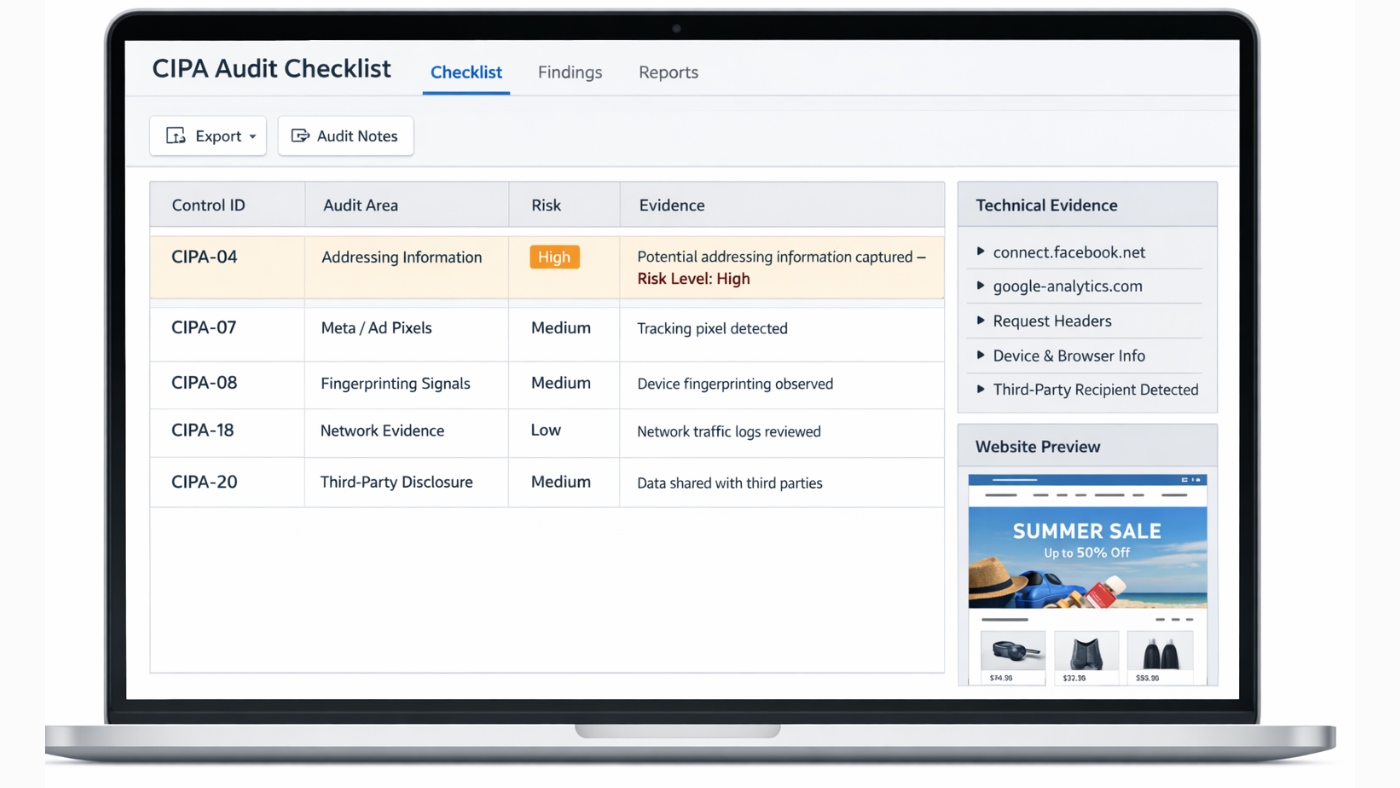
Preview of the CIPA audit checklist used to review website tracking technologies, addressing information signals, and evidence capture.
| Checklist Area | Sample Review Questions |
|---|---|
| Addressing Information | Do scripts or requests capture IP-related or signaling data during page visits? |
| Third-Party Pixels | Do Meta Pixel or other ad-tech tools transmit identifiers or request metadata to external recipients? |
| Fingerprinting Signals | Are browser, device, or environmental signals collected in ways that may support user correlation? |
| Consent and Disclosure | Do disclosures clearly explain the actual tracking behavior observed during testing? |
| Evidence Capture | Are HAR files, DevTools screenshots, and request traces preserved for review? |
| Third-Party Recipients | Can external recipients of addressing or signaling information be clearly identified? |
The downloadable CIPA audit checklist includes structured controls for reviewing website trackers, pixels, addressing information, identifier behavior, third-party recipients, consent disclosures, and reproducible technical evidence.
| Control ID | Audit Area | Control Description |
|---|---|---|
| CIPA-03 | Definitions | Review whether any website technology plausibly functions as a device or process capturing signaling or addressing information |
| CIPA-04 | Addressing Information | Identify whether IP address, routing data, browser or device signals are captured during visits |
| CIPA-07 | Meta / Ad Pixels | Assess whether ad-tech captures identifiers or request metadata that may be relevant to review |
| CIPA-08 | Fingerprinting Signals | Review whether browser or environmental attributes are collected in ways that may support correlation |
| CIPA-15 | First Visit Testing | Capture tracker behavior during a first-time visit in a clean browser |
| CIPA-18 | Network Evidence | Preserve HAR files, request logs, screenshots, and request metadata for each finding |
| CIPA-19 | Identifier Correlation | Map which identifiers are stable, unique, or correlatable across requests or vendors |
| CIPA-20 | Third-Party Disclosure | Document all external recipients of potentially relevant addressing or signaling information |
| CIPA-22 | Policy Mismatch | Compare privacy and cookie disclosures to the technical behavior actually observed |
| CIPA-26 | Remediation Planning | Document options such as script removal, sequencing changes, narrowing parameters, or stronger disclosures |
The full checklist contains additional controls related to statutory framing, provider exceptions, page-type coverage, consent-state testing, and audit summary preparation.
A useful CIPA audit checklist should go beyond general privacy review. It should help teams examine whether website technologies capture or transmit addressing or signaling information, how third-party pixels and trackers behave, what evidence can be preserved, and whether disclosures match the observed technical behavior.
Review whether scripts, pixels, and requests capture IP-related or other signaling information during visits.
Identify vendors, pixels, analytics tools, and embedded technologies that may receive request data or identifiers.
Compare policy language, banners, and notices against the technical behavior actually observed during testing.
Use structured controls to support HAR capture, screenshots, timestamp logs, and remediation planning.
Use the checklist as a working document for internal tracking reviews, evidence capture, vendor analysis, or preparation before running a live technical audit.
Useful for teams that want to track findings, evidence, notes, and remediation status in a structured format.
Download Excel checklist →Useful for review, sharing, legal discussion, and working from a fixed checklist format.
Download PDF checklist →Use Auditzo’s tools to review actual tracker behavior and third-party request activity beyond a manual checklist.
Use website compliance checker →A checklist helps structure manual review. If you want deeper visibility into what a website appears to do during real visits, you can combine this resource with Auditzo’s tools such as the website compliance checker, the cookie audit tool, the GDPR cookie checker, or the website compliance checklists hub.
Review live website behavior, scripts, requests, and tracking exposure.
Use tool →A CIPA audit checklist is a structured review document used to assess website tracking risk indicators relevant to California trap-and-trace or pen-register style claims, including addressing information, pixels, identifiers, and third-party request behavior.
It should include controls related to addressing or signaling information, third-party pixels, identifier correlation, first-visit testing, consent disclosures, evidence capture, and remediation planning.
Yes. The checklist is available as downloadable Excel and PDF files so teams can use it as a working review document.
No. This checklist is intended to support technical review and evidence gathering. It does not determine liability or replace legal analysis.
Use Auditzo’s live tools to review tracker behavior, third-party requests, and technical evidence across your website.
Start with the CIPA checklist for structured manual review, then analyze your live website for clearer visibility into pixels, scripts, identifiers, and third-party request behavior.