GDPR Cookie Tracking Evidence Report Template: What to Document and How to Structure It
A cookie tracking evidence report should do more than list cookies or identify third-party scripts. It should explain which website was reviewed, how the browser session was prepared, what consent state applied, what was observed, which artifacts support each finding, and what technical limitations remain.
For GDPR-oriented reviews, careful terminology matters. Rules governing the storage of information on or access to a user’s device commonly arise under national laws implementing the EU ePrivacy Directive. The GDPR may separately apply to subsequent processing where personal data is involved. In the United Kingdom, storage and access technologies are addressed through PECR together with the UK GDPR.
A technical report can document requests, cookies, browser storage, visible consent choices, session timing, and related artifacts. It cannot independently decide whether consent was legally required, whether an exception applies, whether a GDPR lawful basis is available, or whether a violation occurred.
This practical template is designed for privacy teams, law firms, data protection officers, developers, agencies, and website operators that need a clearer and more traceable record of cookie and website-tracking behavior.
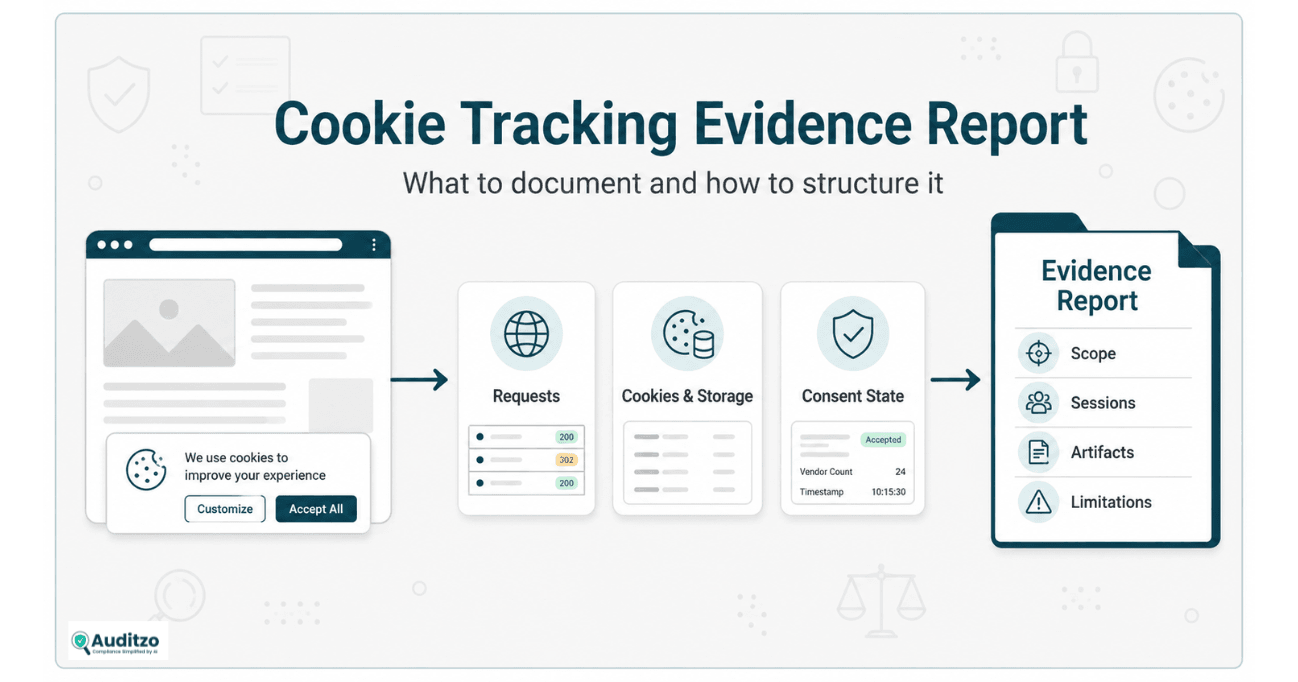
Key point: The purpose of a technical evidence report is to document observable behavior accurately and transparently. It should support legal, privacy, and remediation review without turning technical observations into predetermined legal conclusions.
What Is a GDPR-Oriented Cookie Tracking Evidence Report?
A GDPR-oriented cookie tracking evidence report is a structured technical record of observable website behavior relevant to privacy review.
Depending on the agreed scope, it may document:
- The website, pages, and visitor journeys reviewed
- The browser, region, device profile, and session conditions
- The visible consent interface and available choices
- Initial or no-interaction behavior
- Reject, Accept, Custom, or Returning Visitor behavior
- First-party and third-party network requests
- Cookies, local storage, and session storage
- Scripts, tags, pixels, embeds, and other technologies
- Differences between separately prepared consent states
- Screenshots and browser-network artifacts
- Finding-to-artifact references
- Known limitations and unanswered questions
The report should distinguish what was directly observed from what was inferred through vendor documentation, domain research, configuration information, or other sources.
What the report is not
A technical cookie evidence report is not automatically:
- A GDPR violation report
- An ePrivacy infringement determination
- A PECR compliance certification
- A legal opinion on lawful basis
- A consent-validity determination
- A complete data-flow map
- A record of all server-side processing
- Proof of downstream vendor use
- An admissibility opinion
- A guarantee of regulator or litigation outcomes
For broader evidence-quality principles, review Website Tracking Evidence Reliability: A Technical Review Checklist.
GDPR, ePrivacy, and PECR: Why the Distinction Matters
The phrase GDPR cookie violation is often used too broadly.
For websites serving users in the European Union, the technical and legal review commonly involves at least two connected layers:
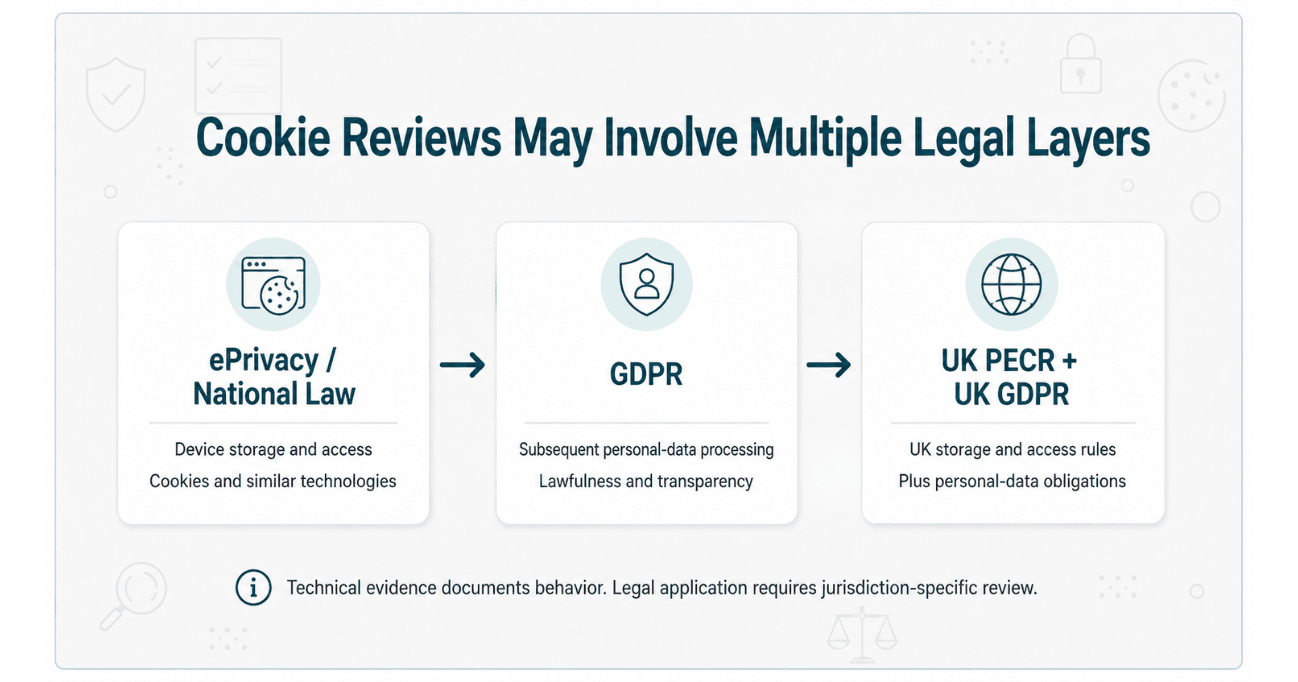
Storage or access on a user’s device
The placement or reading of cookies and similar technologies is generally addressed through national laws implementing Article 5(3) of the EU ePrivacy Directive.
Those rules may apply to technologies that store information on or access information from a user’s terminal equipment. The precise national implementation, competent authority, exceptions, and enforcement approach can vary by jurisdiction.
Subsequent processing of personal data
Where information collected through cookies, storage, pixels, or related technologies is personal data, subsequent processing may also need to comply with the GDPR.
That may require assessment of matters such as:
- Lawfulness, fairness, and transparency
- Purpose limitation
- Data minimization
- Accuracy
- Retention
- Security
- Controller and processor roles
- Data-subject rights
- International transfers
- Applicable lawful basis
Consent is one lawful basis under GDPR Article 6, but it is not the only lawful basis for personal-data processing generally. At the same time, relying on another GDPR lawful basis does not automatically remove a separate consent requirement under applicable ePrivacy or PECR rules.
Cookies that require consent
The safer technical and legal formulation is:
Cookies or similar technologies that require prior consent should not be activated before that consent is obtained.
It is not accurate to say that every cookie or every browser-storage item universally requires consent.
Potential exceptions may apply to particular technologies and purposes, including technologies necessary to transmit a communication or provide a service specifically requested by the user. The availability and scope of exceptions require jurisdiction-specific legal review.
United Kingdom reviews
In the United Kingdom, PECR governs storage and access technologies alongside the UK GDPR. Current ICO guidance addresses cookies, pixels, link decoration, web storage, fingerprinting, scripts, and tags, as well as applicable exceptions and consent-management expectations.
A report should therefore clearly identify whether it is supporting:
- An EU GDPR and national ePrivacy review
- A UK GDPR and PECR review
- A multi-jurisdictional review
- An internal technical remediation project
Official references:
- EU ePrivacy Directive 2002/58/EC
- General Data Protection Regulation
- EDPB Cookie Banner Taskforce Report
- ICO Guidance on Storage and Access Technologies
Legal boundary: Auditzo can document observable website behavior relevant to these frameworks. Qualified counsel should determine jurisdiction, statutory coverage, consent requirements, lawful basis, exceptions, violations, and legal consequences.
1. Define the Website and Review Scope
A useful report begins by defining exactly what was and was not reviewed.
Record the reviewed properties
- Primary domain
- Relevant subdomains
- Country or regional website version
- Mobile or desktop version
- Authenticated or public experience
- Embedded third-party services included in scope
List the reviewed pages
Representative pages may include:
- Homepage
- Product or service page
- Category or search page
- Cart
- Checkout before payment
- Registration or login page
- Lead-generation form
- Chat or support page
- Video or embedded-content page
- Privacy or cookie-settings page
Define the visitor journeys
A page-load observation and a multi-step visitor journey are different scopes.
Possible journeys include:
- Landing on the homepage
- Opening cookie preferences
- Rejecting non-essential categories
- Accepting selected categories
- Visiting a product page
- Adding an item to the cart
- Starting checkout
- Submitting a test form
- Opening a chatbot
- Playing embedded media
State exclusions
The report should also state what was not reviewed, such as:
- Mobile applications
- Logged-in user activity
- Server-side tagging
- Vendor backend systems
- Internal consent records
- Contractual arrangements
- International-transfer mechanisms
- Every page or visitor type
- Legal validity of notice or consent
2. Record the Browser and Test Environment
Website behavior may vary according to the visitor environment. The report should record enough detail to explain the conditions under which the observations were made.
Environment fields
- Review date and time
- Time zone
- Browser and version
- Operating system
- Device or viewport profile
- Visitor region
- Browser language
- Logged-in or logged-out state
- Private or standard browsing mode
- Cache condition
- Browser extensions
- Tracking-protection settings
- Global Privacy Control setting
- Starting URL
Describe session preparation
A record may state:
New private browser window opened
No prior website interaction in the session
Browser extensions disabled
Network log cleared
Preserve log enabled
Cache disabled during capture
Homepage loaded directly
No consent choice made before Initial-session capture
Do not use terms such as clean browser or fresh session without explaining what steps were actually taken.
3. Separate Initial, Reject, Accept, and Returning Sessions
Cookie and tracking behavior should be compared across separately prepared sessions rather than mixed into one undifferentiated capture.
Initial session
The Initial session records behavior before the reviewer interacts with the visible consent interface.
It may help document:
- What was loaded on first page view
- Whether a consent interface appeared
- Which requests were observed before interaction
- Which cookies or storage items were present
Reject session
The Reject session records behavior after the reviewer rejects non-essential categories or selects the closest available equivalent.
Accept session
The Accept session records behavior after the reviewer accepts the categories included in the agreed scope.
Custom session
A Custom session may test a specific combination, such as functional cookies allowed while analytics and advertising remain disabled.
Returning Visitor session
A Returning Visitor session may examine behavior where an existing consent preference is already stored.
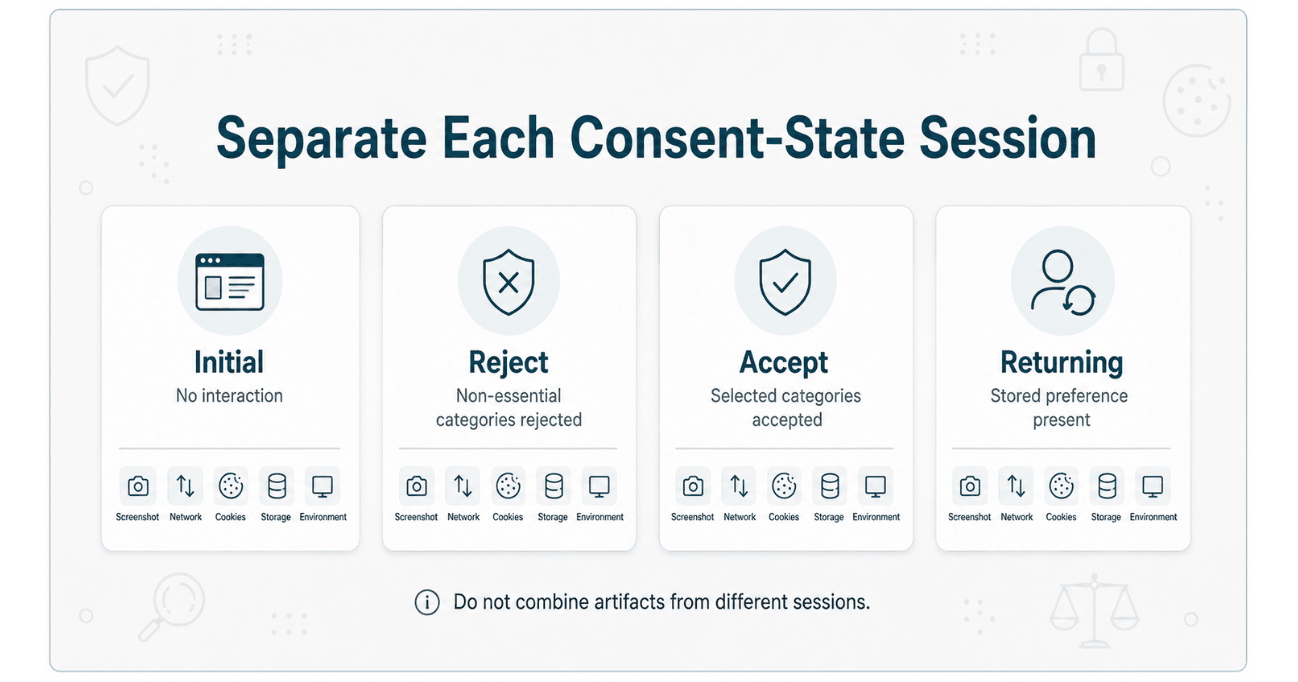
Each session should have separate artifacts
- Environment record
- Screenshots
- Browser-network record
- HAR file where included
- Cookie record
- Local-storage record
- Session-storage record
- Finding references
Artifacts from different sessions should not be combined without clear labels.
For consent-state methodology, review Cookie Consent Audits for Ecommerce Websites.
4. Document the Visible Consent Interface
The report should record what the reviewer could see and do within the consent interface.
Interface observations may include
- Whether a banner or other interface appeared
- When it appeared relative to page load
- Accept option
- Reject or continue-without-accepting option
- Preferences or settings option
- Category labels
- Default category states
- Pre-selected options
- Links to cookie or privacy information
- Method for reopening settings
- Method for withdrawing or changing a preference
Use scoped language
Instead of writing:
The website had no cookie banner.
Prefer:
No consent interface was visible within the captured viewport during the recorded Initial homepage session.
This wording does not assume that the interface never appears in another region, browser, page, visitor state, or point in time.
Visual appearance is not legal validity
A screenshot may show the interface and visible choices. It does not independently establish whether consent was:
- Freely given
- Specific
- Informed
- Unambiguous
- Sufficiently granular
- Easy to withdraw
- Required for the technology involved
Those questions require legal and factual analysis beyond the screenshot.
5. Record Browser-Network Requests
Browser-network evidence may help document requests observed during the defined recording window.
Useful request fields
- Request URL
- Hostname
- HTTP method
- Status code
- Resource type
- Initiator
- Request timing
- Redirect sequence
- Selected headers
- Query parameters
- Selected request or response fields
- Cookie-related headers
Record relative timing carefully
A report may state:
During the recorded Initial session, the browser Network log contained a request to the listed hostname before the reviewer interacted with the visible consent interface.
That is a technical timing observation.
It does not independently establish:
- That the request required prior consent
- That the hostname received personal data
- That the destination independently processed the information
- That no exception applied
- That the processing lacked a lawful basis
- That a legal violation occurred
HAR files
A HAR file may provide a structured export of entries recorded by the browser’s Network tool.
It should not be described as:
- A complete browser-session replay
- A record of all device activity
- A complete server-side capture
- A record of downstream vendor processing
- Automatically authentic or admissible evidence
For detailed artifact limitations, read Screenshots, Logs, and HAR Files: What Each Website Tracking Evidence Format Can Document.
6. Record Cookies and Browser Storage
The report may include cookies, local storage, session storage, and related browser-side records observed during each session.
Cookie fields
- Cookie name
- Associated domain
- Path
- Observed value or redacted value pattern
- Expiration
- Secure attribute
- HttpOnly attribute
- SameSite attribute
- Session in which it appeared
- Related request where identifiable
Storage fields
- Storage type
- Origin
- Key name
- Observed value or redacted pattern
- Session
- Time observed
- Related script or request where identifiable
Presence does not determine purpose
A cookie name may suggest a possible vendor or function, but purpose should not be assumed from the name alone.
Purpose review may require:
- Request analysis
- Script-source review
- Vendor documentation
- Consent-platform configuration
- Website owner records
- Contracts
- Internal processing documentation
- Legal review
Automated cookie classification should be treated as an observation or review candidate unless independently verified.
7. Identify Technologies Without Assuming Their Legal Purpose
A technical review may identify technologies such as:
- Analytics scripts
- Advertising pixels
- Tag managers
- Consent-management platforms
- Chat systems
- Video players
- Maps
- Payment services
- Fraud-prevention tools
- Performance-monitoring tools
- Content-delivery networks
- Session-analysis tools
The presence of a technology does not automatically establish:
- That it was active for every visitor
- That it set or read a cookie
- That it processed personal data
- That it was used for advertising
- That it required consent
- That the website’s classification was wrong
- That a disclosure or transfer occurred
- That a violation occurred
Separate identification confidence
A useful report may distinguish:
Confirmed: directly supported by observed script, request, or vendor documentation
Probable: supported by multiple technical indicators
Possible: name or pattern suggests an association but requires verification
Unknown: ownership or purpose not established
8. Connect Each Finding to Supporting Artifacts
Each material finding should connect to the evidence that supports it.
Recommended finding fields
- Finding ID
- Finding title
- Reviewed page
- Session and consent state
- Reviewer action
- Observation
- Screenshot reference
- Network or HAR reference
- Cookie or storage reference
- Technology or hostname
- Technical significance
- Recommended follow-up
- Limitations
The report summary should not become a substitute for the underlying artifact.
Another reviewer should be able to follow:
Finding
→ Page
→ Session
→ Screenshot
→ Network entry
→ Cookie or storage record
→ Limitation
9. Build an Evidence Index
An evidence index helps reviewers locate and understand the files associated with the review.
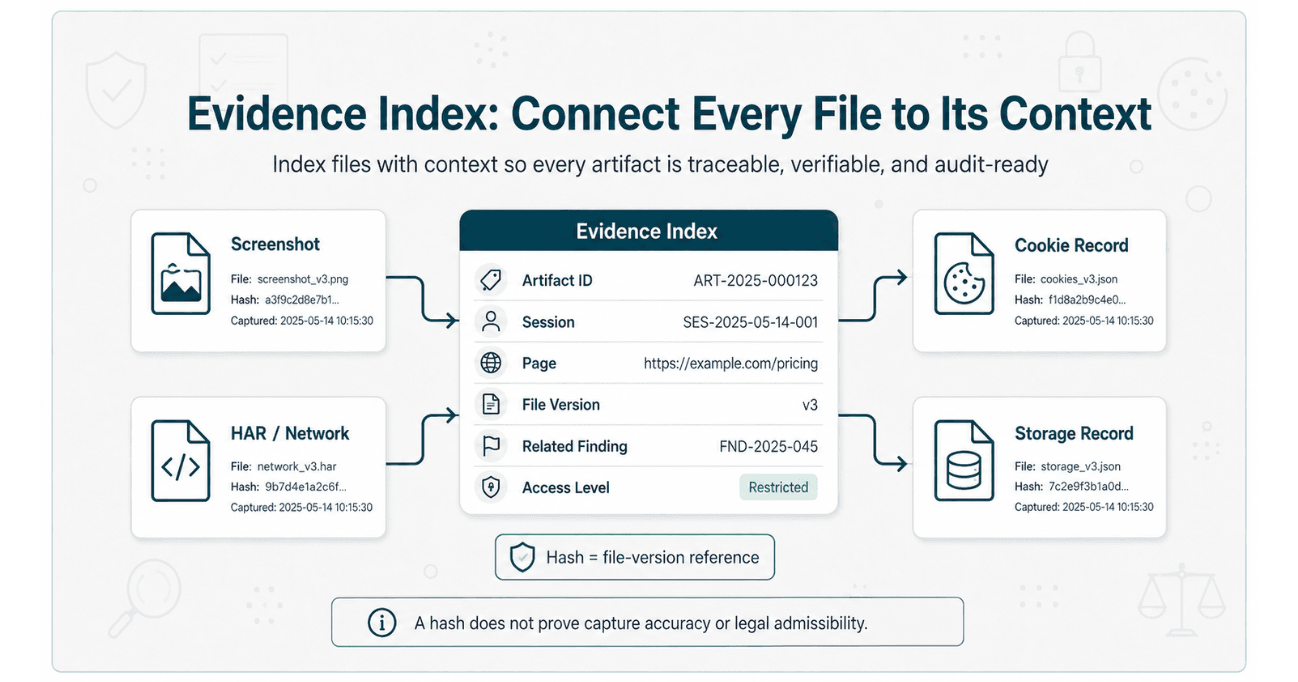
| Index Field | Example |
|---|---|
| Artifact ID | INIT-HAR-001 |
| Artifact type | HAR file |
| Session | Initial / no interaction |
| Page | Homepage |
| Capture time | Recorded date, time, and time zone |
| Filename | initial-homepage-network.har |
| Version | Original restricted capture |
| Hash reference | SHA-256 value for this file version |
| Related findings | NET-01, CK-03 |
| Access level | Restricted |
| Notes | Sensitive fields may be present |
The index should not overstate file properties
Do not label a file as:
- Authenticated
- Legally verified
- Admissible
- Complete
- Untampered
unless the person using those terms has a defined and supportable basis for doing so.
10. Distinguish Original, Working, Redacted, and Report Files
Original capture
The original capture is the version preserved after collection or intake. It should not be silently overwritten during analysis.
Working copy
A working copy may be filtered, searched, annotated, classified, or transformed for internal technical review.
Redacted copy
A redacted copy may remove sensitive information before sharing. The record should explain that redaction occurred and identify the categories of information removed where appropriate.
Report extract
A report extract contains selected fields, entries, screenshots, or summaries used to explain a finding.
Recommended labels:
ORIGINAL — restricted capture
WORKING — internal analysis copy
REDACTED — approved sharing copy
EXTRACT — selected material included in report
The original should remain separately preserved rather than being replaced by the edited version.
11. Use Hashes as Integrity References
A cryptographic hash can help identify a specific file version and compare whether a later copy matches that version.
A hash may help support
- File-version identification
- Detection of later file changes
- Verification that a transferred copy matches a recorded copy
- Evidence-index traceability
A hash does not independently prove
- Who created the file
- When the website event occurred
- Whether the browser session was correctly prepared
- Whether the file was complete
- Whether it had already been altered before hashing
- Whether the technical finding is correct
- Whether the file is authentic or admissible for a legal purpose
Hashes should be described as integrity references, not as legal authentication or chain-of-custody guarantees.
12. Record Technical Limitations
A credible evidence report explains what the review could not determine.
Common limitations
- Only selected pages were reviewed.
- Only one browser or device profile was used.
- The observations represent defined sessions, not every visitor.
- Geolocation, campaigns, personalization, or A/B testing may affect behavior.
- Server-side tagging was not reviewed.
- Downstream vendor processing was not visible.
- Encrypted or omitted fields were not interpreted.
- Some vendor ownership or purpose remained unverified.
- Internal consent records were not available.
- Contracts, policies, and controller-processor roles were not assessed.
- Legal consent requirements and exceptions were not determined.
Example limitation statement
The review documents browser-visible activity observed during the defined sessions. It does not establish all server-side processing, downstream use, vendor roles, legal purpose, lawful basis, consent validity, statutory exceptions, or behavior for other users and environments.
Suggested Cookie Tracking Evidence Report Structure
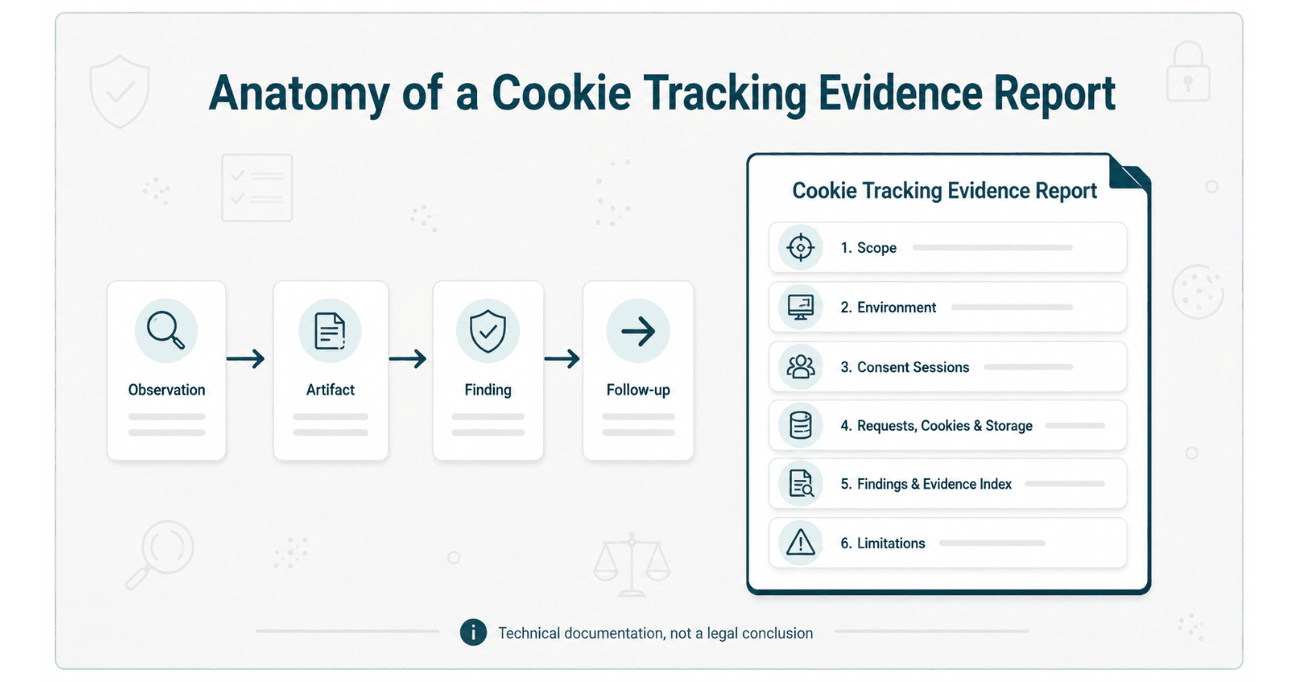
| Report Section | Recommended Content |
|---|---|
| 1. Executive summary | High-level technical observations, priorities, and limitations without legal conclusions |
| 2. Scope | Domains, pages, journeys, regions, consent states, and exclusions |
| 3. Methodology | Browser preparation, tools, session process, capture window, and reviewer actions |
| 4. Environment record | Browser, operating system, viewport, language, region, time, and stored-state conditions |
| 5. Consent-interface observations | Visible options, category states, screenshots, and preference-management behavior |
| 6. Session comparison | Initial, Reject, Accept, Custom, and Returning Visitor observations where scoped |
| 7. Network observations | Hostnames, request timing, selected fields, redirects, and related artifacts |
| 8. Cookie and storage observations | Names, domains, origins, attributes, values or redacted patterns, and session differences |
| 9. Findings register | Finding IDs, descriptions, technical significance, supporting artifacts, and follow-up actions |
| 10. Evidence index | Artifact IDs, filenames, versions, hashes, access level, and related findings |
| 11. Limitations | Unreviewed systems, unavailable information, and scope boundaries |
| 12. Remediation observations | Technical configuration or testing actions for the website team |
| 13. Legal-review questions | Clearly separated questions for counsel, DPOs, or privacy specialists |
The report does not need to map every technical item to a GDPR article. Legal mapping should be included only where qualified counsel has reviewed and approved it for the relevant matter.
Example of a Safely Written Technical Finding
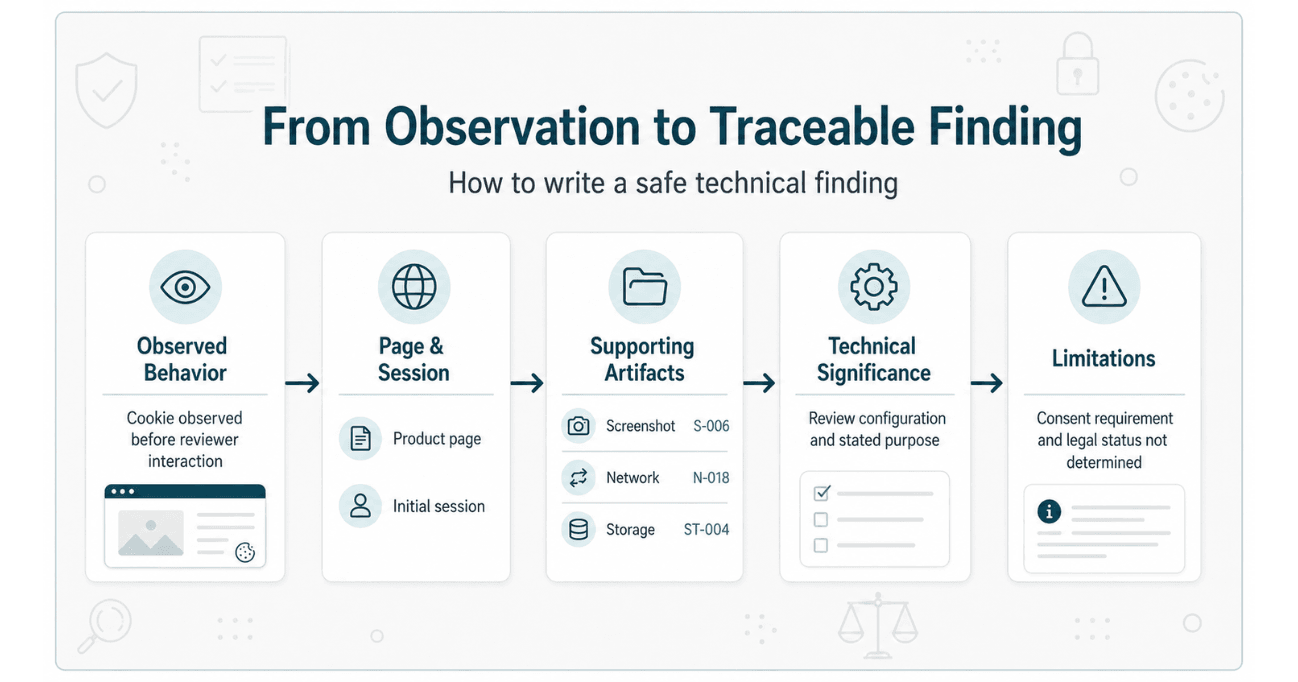
Unsafe version
Violation: Advertising cookie was unlawfully placed before consent in breach of GDPR Articles 5 and 6.
Safer technical version
Finding ID: CK-04

Page:
Product page

Session:
Initial / no interaction

Observation:
The browser storage record showed a cookie named _example_id associated
with the listed domain before the reviewer interacted with the visible
consent interface.

Supporting artifacts:
Screenshot INIT-SCR-006
Network entry INIT-NET-018
Storage record INIT-STO-004
HAR entry INIT-HAR-018

Technical significance:
The observed timing and apparent technology purpose should be reviewed
against the website's consent configuration and documented disclosures.

Limitations:
The review did not determine whether prior consent existed, whether the
technology qualified for an exception, whether the value was personal
data, which party determined its purpose, or whether a legal violation
occurred.
This format gives counsel and privacy teams a clear technical record without presenting a legal conclusion as an automated fact.
Evidence Component Comparison Table
| Evidence Component | May Help Document | Does Not Establish by Itself |
|---|---|---|
| Page screenshot | Visible page and consent-interface state | Complete network activity or legal consent validity |
| Network screenshot | Selected request visible in developer tools | The complete request history or downstream use |
| HAR file | Structured browser-network entries within the captured window | A complete session replay, server processing, or admissibility |
| Cookie record | Cookie presence, domain, attributes, and session | Purpose, necessity, transmission, or legal classification |
| Local-storage record | Keys and values present for an origin | Whether the value was transmitted or legally significant |
| Consent-state comparison | Observed differences between separately prepared sessions | Whether consent was legally required or valid |
| Vendor documentation | Described product purpose and configuration guidance | The exact website configuration or observed behavior |
| Hash reference | Identification of a specific file version | Correct capture, authorship, authenticity, or admissibility |
Common Cookie Evidence Documentation Mistakes
Calling every pre-consent cookie unlawful
The report should first document the technology, timing, purpose indicators, and available context. Whether consent was required or an exception applies is a legal question.
Treating GDPR and ePrivacy as one rule
Device storage and access, subsequent processing, consent, lawful basis, and national implementation should be separated.
Combining multiple consent states
Initial, Reject, Accept, Custom, and Returning Visitor artifacts should remain separately identifiable.
Using screenshots without underlying context
A screenshot should connect to its page, session, timestamp, reviewer action, and related request or storage record.
Assuming a cookie name establishes purpose
Names and automated databases may provide clues but require verification.
Calling HAR files complete captures
HAR files are exports of recorded browser-network entries, subject to browser, timing, export, sanitization, and protocol limitations.
Hashing a file and declaring it authenticated
A hash identifies a file version. It does not verify the capture process or legal authenticity.
Mapping automated findings directly to GDPR articles
Technical findings should remain separate from matter-specific legal analysis.
Hiding unknowns
Unknown vendor ownership, unclear purpose, encrypted fields, unavailable server data, and untested journeys should be disclosed.
Automated Report vs Manual Evidence Audit
| Review Area | Automated Auditzo Report | Scoped Manual Evidence Audit |
|---|---|---|
| Purpose | Initial technical visibility and prioritization | Human-reviewed investigation of agreed technical questions |
| Initial page-load observations | Yes, within the configured automated window | Yes, across agreed pages and journeys |
| Accept and Reject interaction | No | May be included where expressly scoped |
| Human verification | No | Yes |
| Representative journeys | Limited to automated configuration | Defined according to the agreed scope |
| HAR or raw network files | No downloadable raw-evidence package | May be reviewed or included where agreed |
| Cookie and storage comparison | Initial automated observations | Human-reviewed comparisons across scoped states may be included |
| Evidence index | Automated report references | May include scoped artifact and file-version indexing |
| Legal determination | Not provided | Not provided |
| Compliance certification | No | No |
An automated report can help teams identify technologies and initial behavior requiring investigation.
A Manual Evidence Audit is better suited to reviews requiring separate consent states, defined visitor journeys, screenshots, browser-network analysis, cookie or storage comparisons, evidence indexing, and human-reviewed technical findings.
Review the website privacy audit plan comparison and Auditzo audit scope and limitations.
What the Report Cannot Legally Establish
A technical cookie tracking evidence report cannot independently determine:
- Which jurisdiction applies
- Whether a cookie or technology required consent
- Whether an ePrivacy or PECR exception applies
- Whether the visitor legally consented
- Whether consent was valid
- Whether a value qualifies as personal data
- Which GDPR lawful basis applies
- Whether notice was legally sufficient
- Whether a vendor is a controller, joint controller, or processor
- Whether a transfer mechanism was required or valid
- Whether an organization complied with accountability obligations
- Whether a regulator would take enforcement action
- Whether evidence is legally authentic or admissible
- Whether a violation or liability occurred
Auditzo’s role: Auditzo provides technical observations and supporting artifacts for legal, privacy, development, and remediation review. It does not provide legal advice, determine GDPR or ePrivacy violations, certify compliance, guarantee admissibility, or predict regulatory or litigation outcomes.
Cookie Tracking Evidence Report Checklist
Scope
- Are the domains, pages, and journeys defined?
- Is the target jurisdiction or review context identified?
- Are material exclusions disclosed?
Environment
- Are browser, version, operating system, region, and viewport recorded?
- Are cache, extensions, stored preferences, and privacy settings documented?
- Are date, time, and time zone included?
Sessions
- Are Initial, Reject, Accept, Custom, and Returning sessions separated where relevant?
- Does each session have its own artifacts?
- Are reviewer actions recorded?
Consent interface
- Is the visible interface documented?
- Are available choices and defaults recorded?
- Is the observation scoped to the captured session?
Network activity
- Are observed requests tied to pages and sessions?
- Are timing, hostname, method, and selected fields recorded?
- Are HAR limitations disclosed?
Cookies and storage
- Are cookie names, domains, attributes, and sessions documented?
- Are local and session storage separated?
- Are sensitive values redacted where necessary?
- Does the report avoid assuming purpose from names alone?
Traceability
- Does each material finding reference supporting artifacts?
- Can another reviewer locate the screenshot, network entry, and storage record?
- Are contradictory or inconclusive observations retained?
File handling
- Are original, working, redacted, and report copies distinguished?
- Are hashes tied to specific file versions?
- Are sensitive files restricted appropriately?
Legal boundaries
- Does the report distinguish GDPR, ePrivacy, and PECR?
- Does it avoid calling every cookie unlawful?
- Does it avoid declaring consent invalid?
- Does it avoid guaranteeing authenticity or admissibility?
- Does it reserve legal conclusions for qualified counsel?
This checklist supports technical documentation. It is not a compliance certification, legal-elements checklist, or substitute for jurisdiction-specific legal advice.
Frequently Asked Questions
Is every cookie placed before consent a GDPR violation?
No. Not every cookie or storage technology universally requires prior consent. Applicable ePrivacy, PECR, or national-law requirements and exceptions must be assessed. Where personal data is subsequently processed, GDPR or UK GDPR obligations may also apply.
Is cookie consent governed only by GDPR?
No. In the EU, placing or reading cookies is generally addressed through national laws implementing the ePrivacy Directive. GDPR may separately govern subsequent personal-data processing. In the UK, PECR applies alongside the UK GDPR.
What should a cookie tracking evidence report contain?
It should contain a defined scope, environment record, separate session records, consent-interface observations, network requests, cookies and storage, finding-to-artifact references, an evidence index, file-version information, and documented limitations.
Can a cookie scanner determine whether a cookie is strictly necessary?
Not conclusively. A scanner may identify the cookie and possible purpose indicators. Determining necessity may require configuration details, service context, vendor documentation, website-owner information, and legal analysis.
Does a pre-consent request prove unlawful processing?
No. It documents timing within the captured session. Counsel still needs to assess what technology operated, what information was stored or accessed, whether consent was required, whether an exception applied, whether personal data was processed, and which legal rules apply.
Can a screenshot prove that consent had not been given?
A screenshot can show the visible interface state at a particular moment. It does not independently establish whether a prior preference existed, whether another consent mechanism applied, or whether the user had legally consented.
What is an evidence index?
An evidence index connects artifact IDs, filenames, sessions, pages, file versions, hash references, access levels, and related findings so reviewers can locate supporting material efficiently.
Does hashing a HAR file make it court-admissible?
No. A hash can identify a file version and help detect later changes. It does not independently establish capture accuracy, authorship, completeness, authenticity, or admissibility.
Can Auditzo’s automated report test Accept and Reject states?
No. Auditzo’s automated reports provide initial technical observations without Accept or Reject interaction, human verification, or a downloadable raw-evidence package.
What does a Manual Evidence Audit add?
A scoped Manual Evidence Audit may include human-reviewed pages and journeys, separate consent states, screenshots, browser-network or HAR evidence, cookie and storage comparisons, evidence indexes, and agreed supporting files.
Can Auditzo confirm a GDPR or ePrivacy violation?
No. Auditzo documents observable technical behavior. Qualified counsel or the relevant authority determines statutory coverage, consent requirements, lawful basis, exceptions, violations, liability, and evidentiary use.
Request a Scoped Cookie Tracking Evidence Review
Auditzo supports law firms, privacy teams, website operators, agencies, and development teams that need clearer technical documentation of cookie and website-tracking behavior.
A scoped Manual Evidence Audit may include:
- Defined websites, pages, and visitor journeys
- Browser, region, and environment records
- Initial, Reject, Accept, Custom, or Returning Visitor sessions
- Consent-interface screenshots
- Browser-network review
- HAR files or selected extracts where agreed
- Cookie and browser-storage comparisons
- Third-party hostname observations
- Finding-to-artifact traceability
- Evidence indexing
- Original, working, and redacted file distinctions
- Technical limitations
- Remediation-oriented observations
Discuss a scoped Manual Evidence Audit or review Auditzo’s website privacy evidence support for law firms.
For initial visibility into website technologies, cookies, browser storage, and third-party requests, teams can run an automated website audit.
Scope reminder: Auditzo provides technical observations and supporting records for legal, privacy, development, and remediation review. It does not provide legal advice, certify GDPR, ePrivacy, or PECR compliance, determine violations, guarantee admissibility, or predict legal outcomes.
Official Sources and Further Reading
- EU ePrivacy Directive 2002/58/EC
- General Data Protection Regulation
- EDPB Cookie Banner Taskforce Report
- ICO Guidance on Storage and Access Technologies
- Website Tracking Evidence Reliability Checklist
- Screenshots, Logs, and HAR Files Guide
- Auditzo Audit Scope and Limitations
This article provides general technical information about cookie and website-tracking evidence reports. It does not provide legal advice, an evidentiary opinion, compliance certification, or a determination concerning any particular organization, website, jurisdiction, or legal framework.
Table of Contents
- What Is a GDPR-Oriented Cookie Tracking Evidence Report?
- GDPR, ePrivacy, and PECR: Why the Distinction Matters
- 1. Define the Website and Review Scope
- 2. Record the Browser and Test Environment
- 3. Separate Initial, Reject, Accept, and Returning Sessions
- 4. Document the Visible Consent Interface
- 5. Record Browser-Network Requests
- 6. Record Cookies and Browser Storage
- 7. Identify Technologies Without Assuming Their Legal Purpose
- 8. Connect Each Finding to Supporting Artifacts
- 9. Build an Evidence Index
- 10. Distinguish Original, Working, Redacted, and Report Files
- 11. Use Hashes as Integrity References
- 12. Record Technical Limitations
- Suggested Cookie Tracking Evidence Report Structure
- Example of a Safely Written Technical Finding
- Evidence Component Comparison Table
- Common Cookie Evidence Documentation Mistakes
- Automated Report vs Manual Evidence Audit
- What the Report Cannot Legally Establish
- Cookie Tracking Evidence Report Checklist
- Frequently Asked Questions
- Request a Scoped Cookie Tracking Evidence Review