Why Shopify Pixels May Still Fire After Reject All
A shopper clicks Reject All on your Shopify store. The banner closes, the privacy choice appears to be saved, and everything looks fine. But when someone checks the browser's Network tab, requests to advertising or measurement services are still showing up.
Does that mean the consent banner is broken? Not necessarily. It means you need to find out what sent the request, when it happened, and what privacy state was active at that moment.
On Shopify, tracking can run through more than Google Tag Manager (GTM). Shopify Customer Events, app pixels, custom pixels, theme scripts, app embeds, and server-side integrations may each have different execution paths. Fixing one GTM trigger will not automatically control every other path.
Quick answer
Pixels or related requests may still appear after Reject All because the request happened before the choice, a Shopify app or custom pixel runs outside GTM, consent settings are not reaching a tag, an app initializes independently, or Google Consent Mode is sending restricted measurement requests. Browser requests also cannot prove whether separate server-side events were sent or suppressed. The right next step is a controlled, source-by-source review, not a blanket assumption of non-compliance.
If you already suspect that your store's tracking does not follow visitor choices, see Auditzo's Shopify Privacy and Consent Audit.
What Should Happen After Reject All?
Reject All tells a website that a visitor has declined the categories covered by that control. Exactly which categories are affected depends on the consent platform, geographic settings, and the store's privacy configuration. A cookie-category rejection and a separate Do Not Sell or sharing opt-out can represent different technical states.
The visible banner is only the starting point. A technical review should ask whether the resulting preference is saved, whether Shopify's privacy state reflects it, whether GTM receives the relevant consent update, and whether connected vendors respond as intended.
There is no universal rule that every request must disappear. Checkout, security, fraud prevention, operational services, and consent management can require network communication. The real question is whether the specific activity is appropriate for the intended privacy state and applicable requirements. Legal conclusions belong with the business and its counsel.
Seven Reasons Requests May Continue
1. You are looking at requests from before the Reject click
With Preserve log enabled, browser developer tools retain requests made before and after a visitor clicks Reject All. If you search the entire log for a vendor domain, you may find a request that happened before the privacy choice.
What to check: Record the exact time of the Reject interaction, then evaluate requests after that checkpoint. A vendor appearing anywhere in the HAR is not enough to prove it fired after rejection.
2. The integration is not controlled by GTM
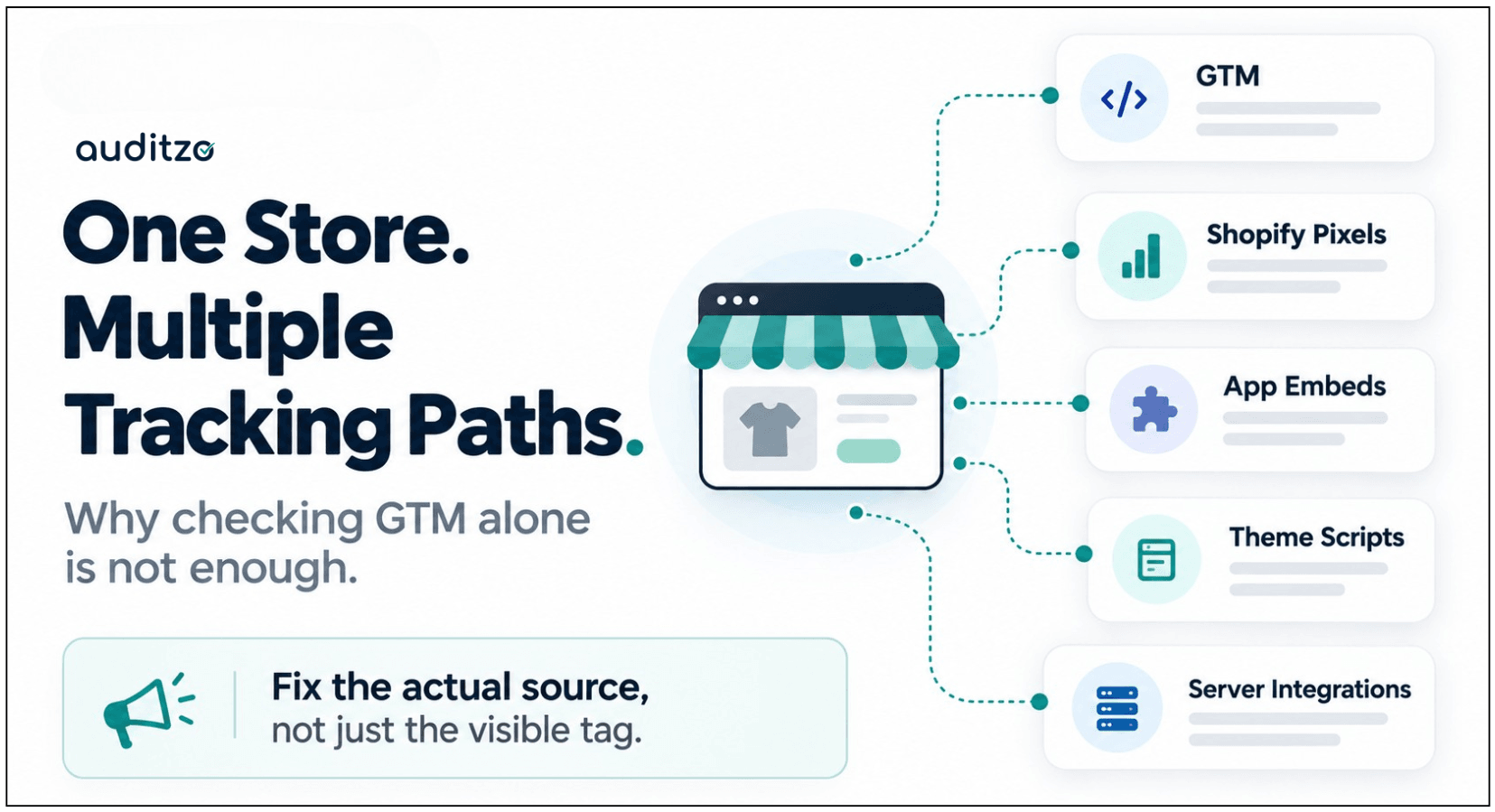
Many merchants start by reviewing GTM because it is familiar. But Shopify Customer Events, custom pixels, app web pixels, app embeds, and directly integrated applications can operate separately.
Shopify's Web Pixels API also uses sandboxed execution environments. A request from one of those paths may not originate from the GTM tag that happens to have a similar name.
What to check: Review Shopify Customer Events, installed app privacy settings, app embeds, theme-level scripts, and the browser request's initiator or execution context. Map each observed request to a real source before changing anything.
3. The consent platform and GTM do not agree
A consent management platform (CMP) can show a rejected state while GTM still holds a different advertising or analytics consent setting. This can happen when the default state is incorrect, an update runs too late, or a regional rule does not cover the current visitor.
Google recommends establishing consent defaults before measurement and sending updates when a visitor changes preferences. In GTM, custom consent templates should use the appropriate Tag Manager consent APIs.
What to check: Compare the CMP's stored choice, Shopify's reported privacy state, and GTM's effective consent state during the same controlled session. Do not rely on the banner appearance alone.
4. An app or embed initializes through a second path
A merchant may implement a consent-aware loader while an application separately injects a snippet through a Shopify app embed or app block. One path can be gated while another still initializes.
What to check: Compare application embed settings, theme blocks, custom loaders, and actual network initiators. Do not assume that disabling or gating one copy controls every installed execution path.
5. A vendor request uses restricted consent behavior
Google Consent Mode is a useful example. Depending on its implementation, some measurement traffic can continue with denied or restricted consent indicators. Seeing a Google endpoint after Reject is therefore not, by itself, proof of unrestricted advertising tracking.
What to check: Inspect the consent parameters and request contents, not just the destination domain. Determine whether the observed behavior matches the configured consent mode and the store's intended requirements.
6. A functional or customer-service app keeps communicating
Affiliate tools, chat assistants, recommendation widgets, and other apps may make requests in a denied or restricted state. Some traffic may serve an operational purpose; other activity may require a closer look at identifiers, payloads, and consent dependencies.
What to check: Establish what the application does, what data it transmits, which privacy category it is expected to follow, and whether the communication is necessary for the feature the visitor is using.
7. The browser is not the only event source
Shopify and connected platforms may also send events through APIs or server-to-server integrations. Even if browser pixels stop after Reject, a separate platform-side event may still need independent verification.
What to check: Identify enabled server and platform integrations, then use destination-side diagnostics or event records when you need to establish their state-specific behavior.
A Network Request Is Not Automatically a Consent Failure
There are at least three different questions behind the phrase "the pixel still fires":
- Did something load? A script or configuration request appeared.
- Was information sent? A browser request contained data, identifiers, or an event payload.
- Was it supposed to be suppressed? The observed behavior conflicts with the intended privacy control or applicable requirement.
These questions cannot always be answered with one screenshot. An app may fetch configuration without sending the same event data that its advertising pixel would send. A consent-restricted measurement ping is also different from an unrestricted advertising event.
A defensible assessment records the endpoint, method, timestamp, initiator, payload or consent signals where available, visitor state, and limitations. It then classifies the result instead of labeling every third-party connection a violation.
How to Test Reject All Correctly
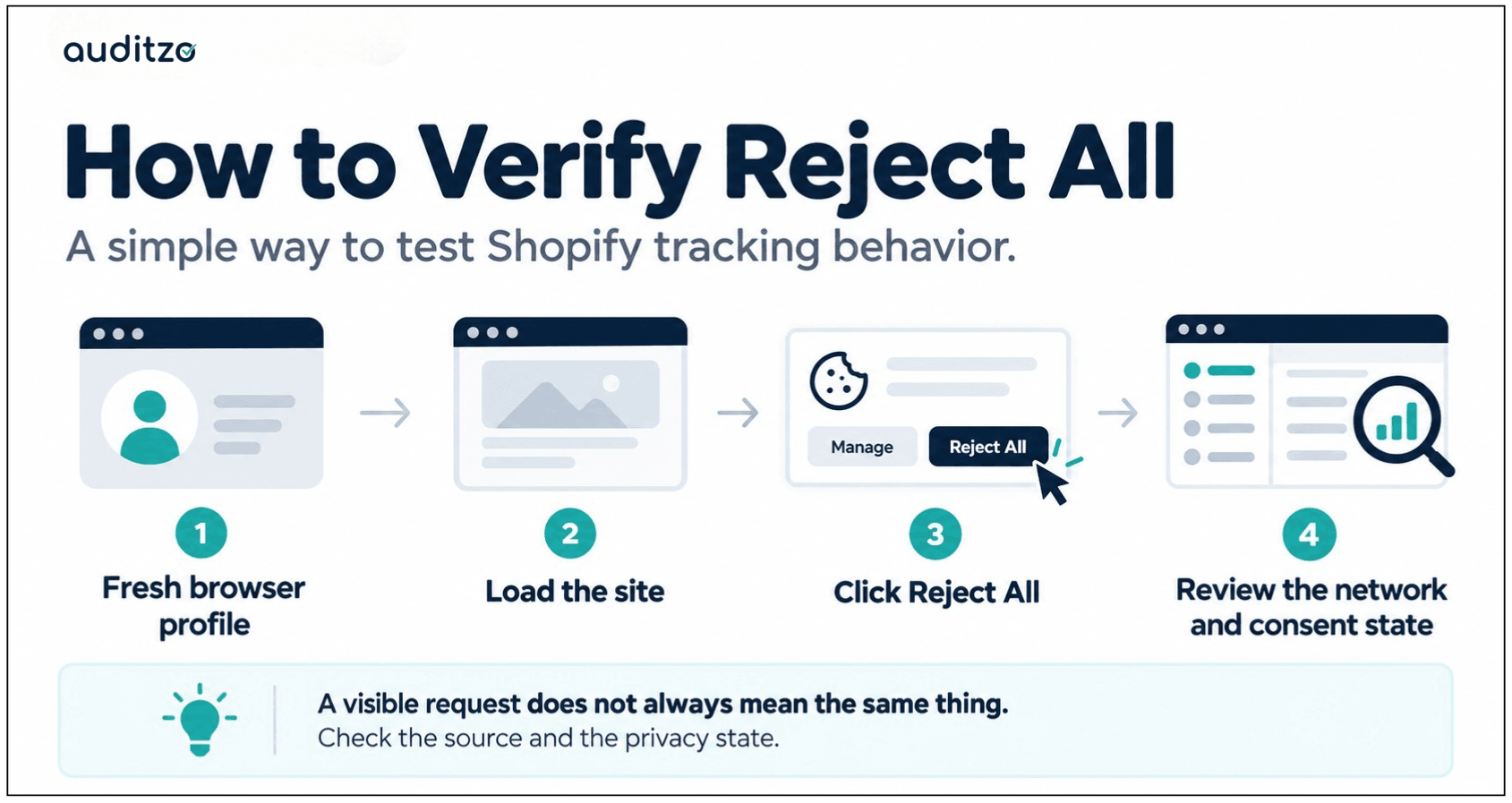
You can run a useful initial check with your browser's developer tools. The steps below are for technical diagnosis, not a legal-compliance certification.
- Start clean. Use a fresh browser profile with no previous cookies or consent preferences for the store.
- Fix the test environment. Choose the intended state or region and keep it consistent. Regional privacy rules may change the initial behavior.
- Keep GPC off for the manual Reject test. If GPC is enabled, you are testing an additional privacy signal and can no longer isolate the effect of the banner click.
- Open Network before visiting. Enable Preserve log, record the session start, and capture the initial requests.
- Click Reject All and record the checkpoint. Verify that the resulting preference is persisted. Check the CMP, Shopify privacy state, and GTM consent state where accessible.
- Continue a representative journey. Test homepage, product page, cart, and checkout before payment, as applicable to the question.
- Review post-Reject requests only. Inspect timestamps, request initiators, payload context, and consent parameters. Separate necessary functionality from marketing and attribution activity.
- Run an Accept All control in a separate fresh profile. This helps establish which expected vendor paths work when allowed.
- Document what you actually proved. Distinguish browser-side observations from any platform-side behavior that remains unverified.
Common testing mistake
Do not switch GPC on midway through a Reject session, reuse an accepted browser profile, or use a whole-session request count as proof of post-Reject activity. Those choices make it harder to isolate the behavior you are trying to investigate.
Why Cold, Accept, Reject and GPC Need Separate Tests
| Test state | GPC | Visitor action | Main question |
|---|---|---|---|
| Cold | Off | No banner interaction | What happens before any choice? |
| Accept | Off | Accept All | Do expected permitted tracking paths work? |
| Reject | Off | Reject All | What stops after the manual opt-out checkpoint? |
| GPC-only | On | No banner interaction | Does the site recognize the browser signal without a click? |
GPC deserves its own test because receiving a browser signal, saving a privacy preference, updating GTM, and changing individual vendor behavior are distinct steps. A storefront may correctly recognize GPC while a connected integration still needs attention.
For GPC, verify both the outgoing signal and the resulting state. Where supported, inspect the Sec-GPC: 1 request header and the browser's navigator.globalPrivacyControl value. Also check any user-facing acknowledgement and relevant persisted consent record.
How to Investigate and Fix the Actual Source
Once you confirm unexpected post-Reject behavior, avoid the temptation to disable every advertising integration at once. That can disrupt measurement without addressing the real cause.
A better engineering sequence is:
- Identify the active execution path. Use runtime initiator evidence and Shopify configuration to determine whether the request comes from GTM, an app pixel, a custom pixel, an embed, or another source.
- Define the expected privacy state. Specify the relevant category, regional rule, and visitor action. Confirm the intended requirement with the appropriate privacy or legal team.
- Check consent propagation. Compare the CMP, Shopify, and relevant tag or application consent state.
- Correct the source that actually runs. Updating a paused GTM tag will not fix a request generated by an active Shopify app pixel.
- Retest the rejected state. Use a fresh session and the same region and journey as the original finding.
- Retest the accepted state. Confirm that permitted marketing or analytics behavior still works where intended.
- Repeat after future changes. App releases, CMP settings, and GTM versions can introduce new execution paths or consent mismatches.
In a separate Shopify engagement, Auditzo took this evidence-led approach through investigation, production remediation, and controlled retesting. Read the Shopify tracking and consent remediation case study for the project-level story.
The Server-Side Tracking Limitation
A browser HAR cannot independently prove that a separate server-side tracking event stopped. That matters for integrations such as Meta Conversions API, TikTok Events API, Google server/platform connections, and ecommerce-to-marketing-platform synchronization where those pathways are enabled.
The correct process is to verify that the pathway exists, determine what the browser test establishes, and then use destination or platform diagnostics if proof of downstream event handling is required.
For example, "we did not see a browser Meta Pixel request after Reject" is a narrower and more defensible statement than "all Meta tracking stopped."
When to Get an Independent Shopify Tracking Review
An independent review may be useful when your team sees unexplained pixels after rejection, cannot tell which Shopify app is responsible, has inconsistent results across regions, or needs evidence that development changes actually worked.
It is especially helpful when marketing, engineering, and privacy teams are looking at different settings and drawing different conclusions.
Auditzo reviews material tracking integrations, controlled consent states, browser-visible activity, and relevant server/platform architecture. Findings are documented with technical evidence and practical next steps. Where agreed, the work can extend into implementation support and retesting.
Explore our Shopify Privacy and Consent Audit or contact Auditzo about your store's tracking setup.
Frequently Asked Questions
Does a Shopify pixel appearing after Reject All mean the store is non-compliant?
No. A request's timing, purpose, content, initiator, consent state, and applicable requirements all matter. Technical observations alone are not legal conclusions.
Can Shopify app pixels run outside Google Tag Manager?
Yes. Shopify supports app and custom web pixels, and some integrations may use other app or theme execution paths. GTM is not a complete inventory of every tracking source.
Why do Google requests sometimes continue after Reject All?
Depending on the implementation, Google Consent Mode may send restricted measurement requests. Review the consent indicators and configuration instead of relying only on whether a Google endpoint appeared.
Is Reject All the same as Do Not Sell?
Not always. Some configurations distinguish cookie-category rejection from a sale or sharing opt-out. Test the exact control and resulting state you intend to evaluate.
Does GPC automatically turn off every advertising pixel?
Do not assume so. Verify that the browser signal is received, the privacy state is updated, and each relevant integration responds as intended.
Can a HAR confirm that server-side tracking is suppressed?
No. HAR files document browser-visible requests. Separate server-to-server events may require destination-side or platform-level verification.
Should I disable every app that communicates after Reject All?
No. First determine the function and content of the request, the relevant privacy state, and whether it represents activity that needs suppression or a different technical treatment.
Related Resources
- Shopify Tracking and Consent Remediation Case Study
- Shopify Cookie Consent Audit Case Study
- Shopify Privacy and Consent Audit
- Shopify Privacy and Accessibility Audit
- Manual Evidence Audit
Technical references: Shopify Customer Privacy API, Shopify Web Pixels API, and Google Consent Mode implementation guidance.
This guide explains technical testing and implementation considerations. Auditzo provides technical evidence and engineering support, not legal advice or compliance certification. Legal requirements and conclusions should be reviewed with qualified counsel.
Table of Contents
- What Should Happen After Reject All?
- Seven Reasons Requests May Continue
- A Network Request Is Not Automatically a Consent Failure
- How to Test Reject All Correctly
- Why Cold, Accept, Reject and GPC Need Separate Tests
- How to Investigate and Fix the Actual Source
- The Server-Side Tracking Limitation
- When to Get an Independent Shopify Tracking Review
- Frequently Asked Questions
- Related Resources