GDPR Cookie Consent 2026: Why Banners Still Need Technical Checks
In 2026, GDPR cookie consent is no longer just a banner design task. For SaaS teams, ecommerce businesses, agencies, developers, and compliance teams, the real question is not only whether the banner looks right, but whether the website behaves correctly before and after consent.
A cookie banner may show clear buttons and still create risk if analytics, advertising pixels, tag managers, or third-party scripts fire before the user has made a valid choice. That is why cookie consent now needs both user-friendly design and technical evidence.
This guide explains the practical GDPR cookie consent requirements teams should review in 2026, including Accept and Reject choices, granular consent, dark patterns, pre-consent tracking, consent logs, third-party scripts, and audit-ready evidence.
If your analytics fires before consent, your site may be creating avoidable compliance risk.
If your Reject option is harder to find than Accept, your cookie banner should be reviewed for dark-pattern risk.
If you cannot show timestamped consent records or technical proof of script blocking, your audit trail may be difficult to support.
Cookie consent is no longer only a UX decision. It is a technical control that should be reviewed through observable website behavior, consent records, and evidence of what happens before consent.
Updated for 2026: This guide reflects continuing scrutiny around cookie banner design, pre-consent tracking, execution timing, and technical validation of consent mechanisms. Many reviews now look beyond how the banner appears and examine whether non-essential scripts, cookies, and tracking requests execute before consent.
Quick action for busy teams: if you want to validate what your site actually does before consent, use Auditzo to check your GDPR cookie consent setup. It can help identify observable tracking, consent, and script behavior that may need review by your legal or compliance team.
Why GDPR Cookie Consent Rules Tightened
From 2018 to 2023, many websites relied on weak consent patterns: "By using this site, you agree to cookies," oversized Accept buttons, faint Reject links, or cookie settings buried in a second layer. Users noticed. Regulators and privacy teams noticed too.
Today, GDPR cookie consent expectations focus more strongly on clear choice, fair presentation, granular control, easy withdrawal, and technical enforcement. A banner that once passed a casual visual review may now need a deeper technical check.
- User choice matters: people should be able to accept or reject non-essential cookies without pressure or confusing design.
- Dark patterns create risk: designs that steer users toward Accept through visual bias, extra refusal steps, or vague wording should be reviewed.
- Technical behavior matters: consent is weak if scripts, pixels, or analytics tools run before the user has opted in.
- Evidence matters: teams may need logs, screenshots, cookie records, HAR files, or network evidence to support their review.
Cookie Banners Then vs Now
| Area | Older Risky Pattern | Safer 2026 Review Standard |
|---|---|---|
| Reject option visibility | Reject hidden in a secondary layer or shown as a small grey link. | Clear first-layer refusal option with similar prominence to Accept. |
| Pre-checked boxes | Analytics, ads, or social cookies enabled by default. | Active opt-in for non-essential categories. |
| Consent categories | Vague labels with limited user control. | Clear groups such as essential, analytics, advertising, personalization, and social media. |
| Script behavior | Trackers or pixels load on page load before consent. | Non-essential scripts blocked until the relevant consent choice is given. |
| Dark patterns | Asymmetric colors, nudging copy, or extra refusal steps. | Neutral wording, balanced choices, and no unnecessary refusal friction. |
| Withdrawal | Withdrawal buried inside a policy page or hard to find. | Visible cookie settings link or similar control available on every page. |
| Audit trail | Minimal or no records of user choice or script behavior. | Consent timestamps, category choices, policy versions, and technical proof where appropriate. |
For official reading on cookie banner and storage technology expectations, review the EDPB Cookie Banner Taskforce report and the UK ICO's guidance on storage and access technologies.
Non-essential cookies and tracking technologies should generally be blocked until the user has made a valid consent choice. Accept and Reject choices should be clear, consent categories should be understandable, and withdrawal should be easy to access.
Visual Cookie Compliance vs Technical Consent Enforcement
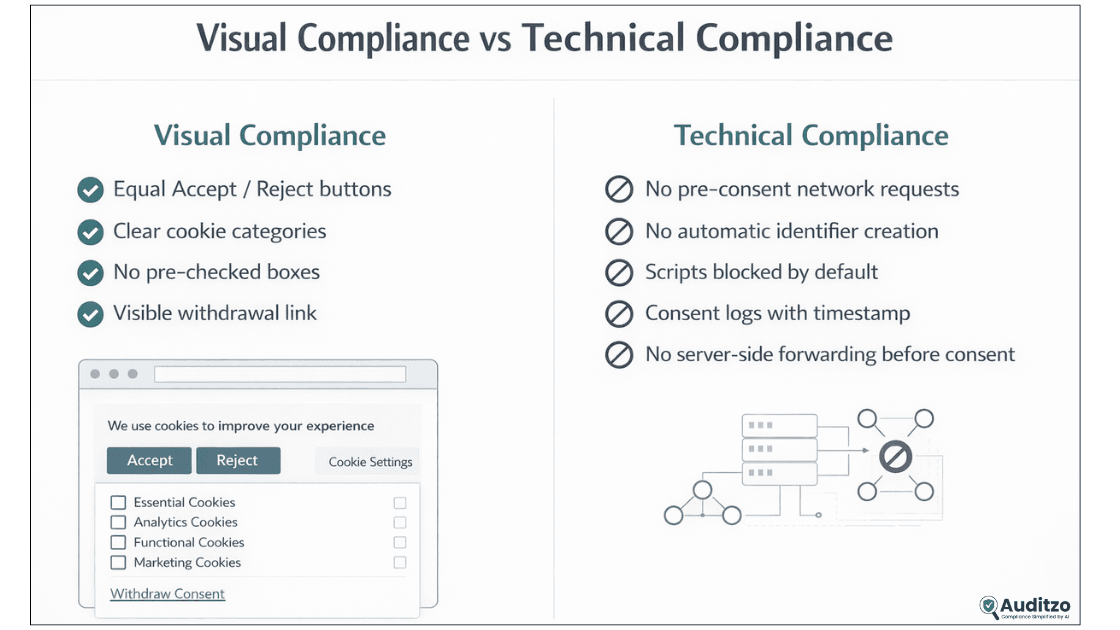
A cookie banner can look compliant and still create risk if the technical setup behind it is weak.
Visual cookie compliance means the banner presents clear choices: Accept, Reject, category settings, plain wording, and easy withdrawal.
Technical consent enforcement means checking whether the site actually respects those choices. Non-essential cookies, analytics tools, advertising pixels, tag managers, and third-party scripts should not run before the relevant consent is granted.
This distinction matters because many teams review only the banner interface. But during a deeper audit, the more important question is often:
What did the website actually load, set, or transmit before the user clicked anything?
That is where technical evidence becomes important. Browser storage, network requests, cookie tables, HAR files, timestamps, screenshots, and consent logs can all help identify whether the banner and the website behavior are aligned.
What Happens Before You Click Accept?
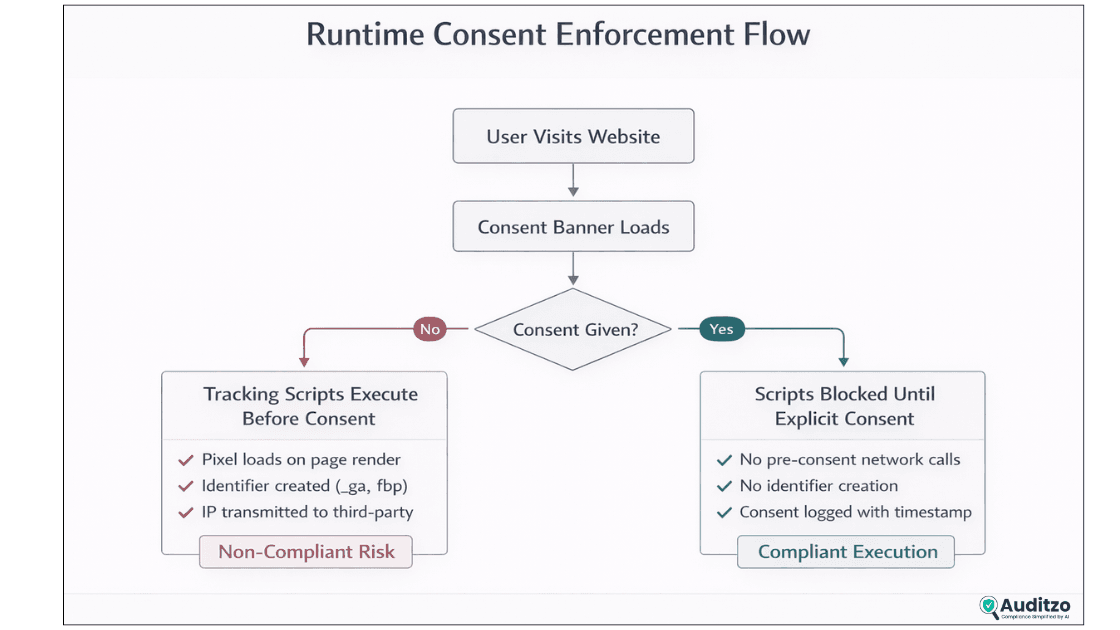
Many organisations assume that if a banner appears, tracking is blocked. In practice, runtime behavior often tells a different story.
- Advertising pixels may load during the first page render.
- DNS requests to third-party domains may occur before interaction.
- Persistent identifiers such as analytics or ad-related cookies may be created automatically.
- Server-side tracking may forward IP address, URL, user-agent, or referrer data regardless of banner state.
- Tag managers may fire events before consent logic has fully resolved.
- Heatmap, session replay, chat, or personalization scripts may load before the user has selected a category.
From a compliance review perspective, cookie consent is not limited to interface design. Teams should also review whether personal data, identifiers, or tracking requests are processed before a valid consent choice exists.
If you are not sure whether analytics, pixels, or third-party scripts fire before consent, review your pre-consent tracking behavior.
How to Check If Scripts Fire Before Consent
A basic manual review can help teams spot obvious consent enforcement gaps before a deeper audit. This does not replace legal or compliance review, but it can reveal technical behavior worth investigating.
- Step 1: Open the website in a private or incognito browser session.
- Step 2: Clear existing cookies and site storage.
- Step 3: Open browser DevTools and go to the Network tab.
- Step 4: Load the page without clicking Accept, Reject, or settings.
- Step 5: Check whether third-party domains load before consent.
- Step 6: Open the Application or Storage panel and review cookies before consent.
- Step 7: Look for analytics, advertising, personalization, social, or tracking-related cookies.
- Step 8: Click Reject and confirm non-essential scripts remain blocked.
- Step 9: Click Accept and compare what changes after consent.
- Step 10: Export a HAR file or capture screenshots if the finding needs evidence.
Useful technical evidence may include request timestamps, third-party domains, cookie names, page URLs, referrer data, consent state, and screenshots showing the banner before any user interaction.
For teams preparing internal reviews, a GDPR evidence report template for cookie violations can help organize findings around consent state, requests, cookies, screenshots, and recommended remediation.
What 2026 Requires for GDPR Cookie Consent
Use this section as a practical review list for your cookie banner, consent management platform, tag manager, and website tracking setup. Requirements may vary by jurisdiction and use case, so legal and compliance teams should review the final implementation.
Equal Accept and Reject Choices
Accept and Reject should be easy to see and easy to use. A large colorful Accept button with a faint Reject link buried in settings may create dark-pattern risk. Users should be able to refuse non-essential cookies without extra friction.
No Pre-Checked Boxes
Consent should be an active choice. Analytics, advertising, social, personalization, or similar non-essential categories should not be enabled by default. Strictly necessary cookies may be treated differently, but teams should define that category carefully.
Clear Categorisation and Granular Control
Cookie categories should be easy to understand. Common groups include essential, analytics, advertising, personalization, and social media. Each category should map cleanly to the scripts, cookies, and tools it controls.
Consent Logging for Auditability
Consent records should capture useful review data, such as timestamp, consent choice, categories accepted or rejected, policy version, banner version, and withdrawal events where appropriate. Reliable consent logging can support an evidence-backed GDPR compliance audit.
Ban on Dark Patterns
Avoid hiding Reject, adding extra refusal steps, using confusing labels, or making refusal feel harmful. Clear choices reduce both user frustration and compliance risk.
One-Click Withdrawal
Withdrawal should be easy to find, usually through a persistent cookie settings link in the footer or another visible control. When consent is withdrawn, non-essential scripts should stop firing going forward where applicable.
Mini-summary: the safer pattern is simple: balanced choices, no pre-selection, clear categories, easy withdrawal, and technical proof that the website respects the user's choice.
Developer-Friendly Compliance Checklist
Use this implementation checklist to review consent behavior across frameworks, CMS platforms, tag managers, and deployments.
- Provide clear Accept and Reject actions on the first banner view.
- Disable all non-essential scripts until the relevant consent is given.
- Add category toggles for essential, analytics, advertising, personalization, and social tools where relevant.
- Map each script, pixel, tag, and cookie to the correct consent category.
- Log consent decisions with timestamps, policy version, and user or session identifiers where lawful and appropriate.
- Offer easy withdrawal through a visible cookie settings link.
- Remove pre-checked boxes for non-essential categories.
- Sync banner state with tag managers, consent mode, CDPs, and server-side tracking flows.
- Test in private browsing mode with cookies cleared.
- Check cookies and Network requests before consent, after rejection, after acceptance, and after withdrawal.
- Retest after CMP updates, plugin updates, tag manager changes, redesigns, or new marketing pixels.
Summary: build cookie consent like infrastructure. It should be centralized, testable, logged, and reviewed after changes.
Need a practical review list? Download the GDPR cookie consent checklist to review Accept and Reject choices, consent categories, pre-consent tracking, script blocking, and withdrawal behavior.
Implementing GDPR Cookie Consent Across Tech Stacks
Implementation details differ by stack, but the pattern is the same: block by default, enable after consent, log the choice, and verify the runtime behavior.
React and Next.js
- Create a global consent context that exposes current consent state and update methods.
- Render the banner early enough to prevent non-essential scripts from loading during hydration.
- Guard analytics, pixels, and tracking initialisers behind consent state checks.
- Persist consent choice and version in storage, and record server-side logs where appropriate.
- Expose a clear cookie settings link for withdrawal and re-consent.
WordPress
- Use a consent management plugin that supports equal choices, category toggles, script blocking, and consent logs.
- Disable pre-checked categories for non-essential cookies.
- Audit themes, plugins, embedded widgets, and marketing tools for hidden trackers.
- Retest after plugin, theme, or tag manager updates.
- Use a technical scan to confirm that scripts are blocked before consent, not just hidden behind banner text.
Enterprise Stacks and Tag Managers
- Map consent categories to GTM, Segment, analytics, pixels, and advertising destinations.
- Allow tags to fire only when the required consent state is granted.
- Review server-side tracking separately because browser banner behavior may not reveal all data flows.
- Store consent logs centrally with timestamp, policy version, jurisdiction, and category state where appropriate.
- Keep previous banner and policy versions for audit review.
Single-Page Apps and Edge Rendering
- Guard tracking initialisation before hydration to avoid race conditions.
- Ensure route changes do not re-enable trackers after rejection or withdrawal.
- Keep consent state stable across navigation, reloads, and language versions.
- Test first load, route transitions, and withdrawal flows separately.
Summary: implementation differs by stack, but the review question is always the same: did non-essential tracking stay blocked until the user made a valid choice?
Cookie Banner Dark Patterns to Avoid
Dark patterns can make consent look collected while making refusal harder than acceptance. These patterns may create risk and should be reviewed by privacy, legal, or compliance teams.
Accept Is Easy, Reject Is Hidden
If Accept appears on the first layer but Reject is hidden under settings, the user journey may be unbalanced. A safer approach is to provide a clear first-layer path to reject non-essential cookies.
Accept Button Is Visually Stronger
A bold Accept button and a pale Reject link can create visual bias. Safer designs use similar weight, clarity, and placement for both choices.
Refusal Requires More Clicks
If accepting takes one click but refusing requires several steps, the design may create friction against refusal. The user should be able to reject without unnecessary effort.
Pre-Enabled Categories
Analytics, advertising, social, or personalization toggles should not be enabled by default. Consent should be based on active selection.
Vague or Manipulative Copy
Labels such as "improve your experience" may be too vague if they hide analytics, advertising, or profiling purposes. Use plain category names and clear descriptions.
Consent Walls Without Careful Review
Consent-or-pay or consent-wall models can be complex and may require legal review. Avoid using them without a clear lawful basis and proper user choice design.
Mini-summary: if the interface nudges acceptance more than refusal, review it. Balanced choices are better for users, trust, and audit readiness.
Regional Notes: EU, UK, Germany and Other Markets
Cookie consent principles are similar across many markets, but the exact legal basis and enforcement approach can vary. This page focuses mainly on GDPR-style cookie consent expectations and related European cookie rules.
- EU: review EDPB guidance and national data protection authority interpretations, especially around consent, transparency, and dark patterns.
- UK: review ICO guidance under PECR and UK GDPR, especially for cookies, tracking pixels, device fingerprinting, web storage, scripts, tags, and similar technologies.
- Germany: review consent clarity, lawful basis, and technical blocking before consent, especially for non-essential tracking.
- US and CPRA: focus may differ, especially around sale/share, opt-out signals, and cookie purpose disclosures. Do not assume a GDPR banner solves every US privacy requirement.
Specific cookie consent expectations should be reviewed with qualified legal or compliance teams for your jurisdiction, user base, and tracking setup.
What Evidence a Cookie Consent Audit Should Capture
Good evidence can reduce uncertainty during internal reviews, client reviews, privacy assessments, and compliance audits. The goal is not to make unsupported legal conclusions, but to document observable website behavior clearly.
A useful cookie consent audit should capture:
- Banner screenshots before any user interaction.
- Accept, Reject, settings, and withdrawal flows.
- Cookie list before consent, after rejection, after acceptance, and after withdrawal.
- Third-party domains and requests seen before consent.
- Analytics, advertising, social, heatmap, chat, or personalization scripts that load before consent.
- Tag manager firing sequence and consent state mapping.
- Consent log timestamp, category choice, policy version, and banner version where available.
- HAR files or Network tab exports showing request timing.
- Evidence that non-essential scripts were blocked until consent where applicable.
- Recommended technical review items for developers, privacy teams, or legal counsel.
To understand how these findings can be documented, review a sample evidence-backed audit report.
Example Finding Format
Finding: an advertising pixel request appears during initial page load before the user selects Accept or Reject.
Technical evidence: Network request timestamp, third-party domain, request URL, banner screenshot, and cookie/storage state before consent.
Review note: this may indicate a consent enforcement gap and should be reviewed by technical, privacy, and legal/compliance teams.
Possible remediation: update CMP or tag manager trigger rules, retest in a clean browser session, and document the before/after behavior.
Compliance design is not enough. If you cannot technically verify that scripts are blocked before consent, your banner may still need review. Evidence-backed checks help teams see what the website actually does.
Common Pitfalls and How to Fix Them
- Asymmetric design: rebuild the banner with equal visibility for Accept and Reject choices.
- Scripts firing early: move analytics, pixels, and non-essential scripts behind consent gates.
- Tag manager race conditions: confirm that tags do not fire before consent state is resolved.
- Plugin regressions: retest after CMP, theme, plugin, and tag manager updates.
- Ambiguous copy: replace vague labels with clear purpose-based categories.
- Weak withdrawal flow: add a visible cookie settings link and verify that withdrawal changes script behavior going forward.
- No evidence trail: preserve screenshots, consent logs, cookie states, and HAR/network evidence where relevant.
For a broader remediation workflow, use the GDPR compliance audit checklist.
When to Run a GDPR Cookie Consent Audit
A cookie consent audit is especially useful when tracking behavior changes, marketing tools are added, or a site is preparing for a privacy review.
- After adding Google Analytics, Google Tag Manager, Meta Pixel, TikTok Pixel, LinkedIn Insight Tag, Hotjar, Microsoft Clarity, HubSpot, Segment, or similar tools.
- After launching a new landing page, ecommerce checkout, SaaS signup flow, or campaign page for EU or UK users.
- After changing your consent management platform or cookie banner design.
- After updating WordPress plugins, Shopify apps, themes, tag manager containers, or tracking scripts.
- Before a client, investor, legal, or compliance review.
- After users, customers, or privacy teams raise concerns about cookies or tracking.
GDPR Cookie Consent FAQs
What are the GDPR cookie consent requirements in 2026?
GDPR cookie consent should be clear, specific, informed, and based on an active user choice. Non-essential cookies should generally be blocked until consent is given. Banners should offer clear Accept and Reject options, granular categories, easy withdrawal, and consent records that can support later review.
Does GDPR require a Reject All button?
A first-layer Reject option is widely treated as a safer consent design because refusing cookies should be as easy as accepting them. Hiding Reject behind extra clicks, using weaker colors, or making refusal harder may create dark-pattern risk and should be reviewed.
Can analytics cookies run before consent?
In most EU and UK contexts, analytics cookies should be treated as non-essential unless a narrow local exemption applies. Teams should usually block analytics, advertising pixels, and similar tracking tools until the user has opted in.
What is pre-consent tracking?
Pre-consent tracking happens when scripts, cookies, pixels, or third-party requests load before the user gives consent. This may include analytics requests, ad pixels, persistent identifiers, or tag manager events that fire during the first page load.
How can developers check if scripts fire before consent?
Open the site in a clean browser session, do not click the banner, and inspect cookies plus Network requests in DevTools. Check for third-party domains, analytics cookies, pixels, and identifiers before consent. HAR files, screenshots, and timestamps can help document findings.
What evidence should a cookie consent audit capture?
A useful audit should capture the banner state, consent choices, cookie list before and after consent, third-party requests, tag firing behavior, consent logs, policy version, timestamps, and screenshots or HAR/network evidence where relevant.
Is "by continuing to use this site" valid cookie consent?
A passive "by continuing to use this site" message is generally not a safe consent pattern for non-essential cookies. Consent should involve a clear affirmative action, balanced choices, and the ability to reject or withdraw without unnecessary friction.
How does Auditzo help review GDPR cookie consent issues?
Auditzo helps identify observable website behavior such as cookies, trackers, pixels, third-party requests, and scripts that may fire before consent. Auditzo provides technical, evidence-backed audit reports for review; it does not provide legal advice.
Conclusion: Cookie Consent Needs Design and Evidence
GDPR cookie consent in 2026 is not only about adding a banner. Teams need clear user choices, no pre-selected non-essential categories, easy withdrawal, consent records, and technical validation that the website respects the user's choice.
The most important shift is simple: visual compliance is not enough. A banner may look acceptable, but analytics, pixels, third-party scripts, and tag managers should still be checked to understand what happens before consent.
When you are ready, check your GDPR cookie consent setup, download the GDPR cookie consent checklist, or review a sample evidence-backed audit report to understand how technical findings can be documented.
This guide is for technical and educational purposes only and is not legal advice. Cookie consent requirements should be reviewed with qualified legal or compliance teams for your jurisdiction and use case. Auditzo helps identify observable website behavior and technical evidence; it does not provide legal conclusions.
In This Guide
- Why GDPR Cookie Consent Rules Tightened
- Visual Cookie Compliance vs Technical Consent Enforcement
- What Happens Before You Click Accept
- How to Check If Scripts Fire Before Consent
- What 2026 Requires for GDPR Cookie Consent
- Developer-Friendly Compliance Checklist
- Implementing GDPR Cookie Consent Across Tech Stacks
- Cookie Banner Dark Patterns to Avoid
- Regional Notes: EU, UK, Germany and Other Markets
- What Evidence a Cookie Consent Audit Should Capture
- Common Pitfalls and How to Fix Them
- When to Run a GDPR Cookie Consent Audit
- GDPR Cookie Consent FAQs