Website Tracking Evidence Reliability: A Technical Review Checklist
Website tracking evidence can look detailed while still leaving important questions unanswered. A report may contain screenshots, cookies, request logs, storage records, or technical findings without clearly explaining which browser session produced them, which page was reviewed, what consent state applied, or how each finding connects to its supporting artifact.
A website tracking evidence reliability review examines whether the technical record is understandable, traceable, appropriately scoped, and transparent about its limitations. It does not decide whether the evidence is legally admissible, whether a privacy law applies, whether consent was legally valid, or whether a violation occurred.
This checklist is designed for law firms, privacy teams, developers, technical reviewers, and organizations evaluating the quality of website tracking observations before relying on them for legal review, remediation, internal investigation, or follow-up testing.
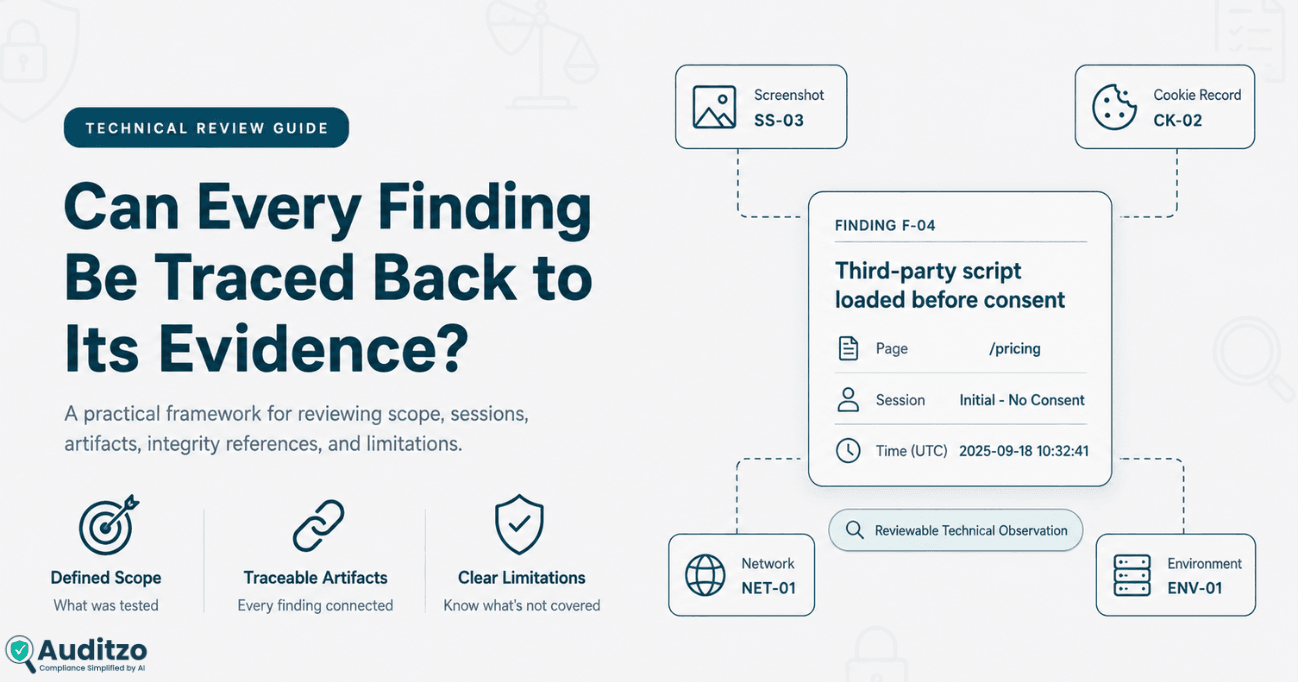
Key point: A technically reliable evidence set should explain what was reviewed, how the session was prepared, what was observed, which artifacts support each finding, and what limitations remain. Technical reliability does not by itself establish admissibility, legal authenticity, statutory coverage, consent validity, a violation, or liability.
Technical Reliability Is Not the Same as Admissibility
Technical reliability and legal admissibility are related concepts, but they are not interchangeable.
A technical reviewer may assess whether:
- The review scope was documented
- The browser environment was recorded
- The reviewed pages and consent states are identifiable
- The evidence files are labeled consistently
- Findings link to supporting artifacts
- Original and altered copies are distinguishable
- File hashes were recorded correctly
- Known technical limitations are disclosed
- Another reviewer can understand the observation process
Qualified counsel and the relevant court, regulator, tribunal, or authority may separately consider:
- Authentication
- Admissibility
- Relevance under applicable law
- Foundation
- Expert testimony
- Privilege or work-product protection
- Procedural requirements
- Statutory coverage
- Consent validity
- Liability
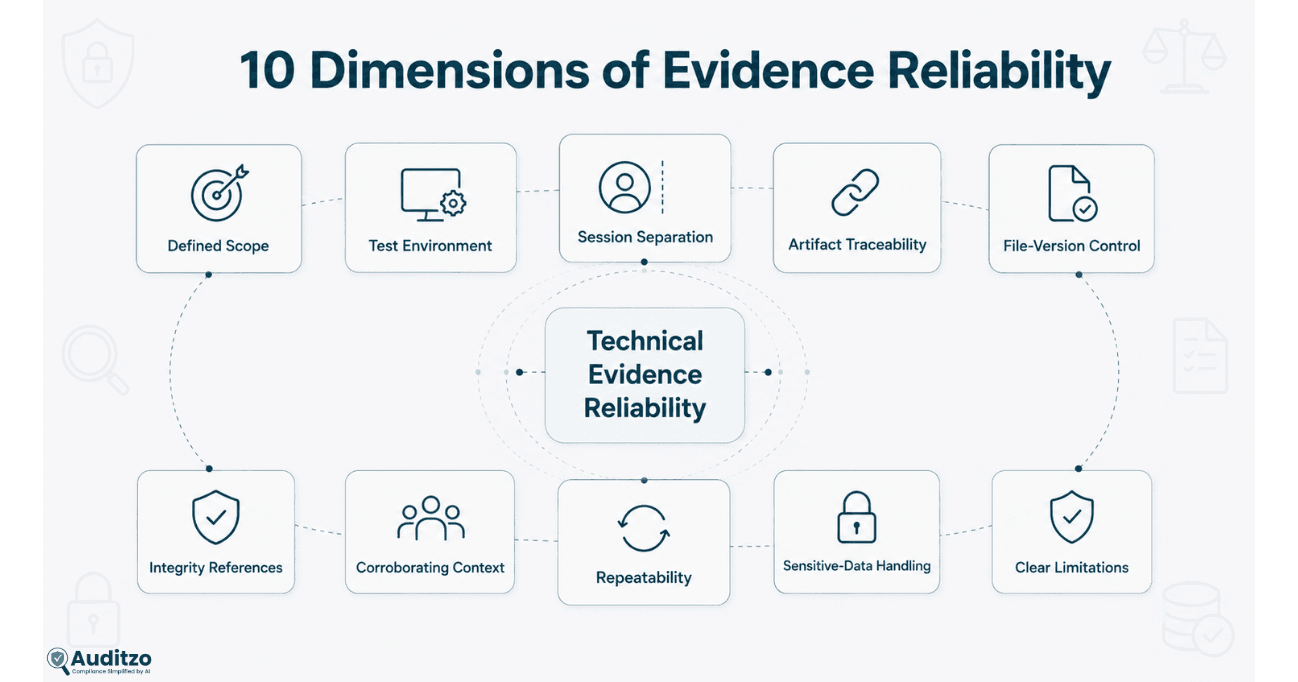
A technically organized file is not automatically admissible. Similarly, a technically incomplete record is not automatically unusable. The legal significance depends on the matter, forum, purpose, supporting testimony, and applicable rules.
The Federal Rules of Evidence, for example, govern admission and exclusion in most United States federal-court proceedings. Other courts, jurisdictions, regulators, and administrative bodies may apply different rules and procedures.
Review boundary: Auditzo assesses observable website behavior and technical documentation. It does not determine whether a report or artifact satisfies the evidentiary requirements of a particular proceeding.
1. Confirm That the Review Scope Is Defined
A reliability assessment should begin by determining whether the evidence was collected under a clearly defined scope.
The scope should identify the website areas and technical questions the reviewer intended to investigate. A statement such as “the website was audited” is usually too broad to explain what was actually tested.
Domain and page scope
The record should identify the domains and representative pages included in the review, such as:
- Homepage
- Marketing landing page
- Search or results page
- Product or service page
- Lead-generation form
- Registration or account-creation journey
- Chat or customer-support interface
- Video or embedded-media page
- Cart or checkout journey
- Logged-in account area
Interaction scope
The review should explain which actions were performed, including:
- Opening the page without interacting with the consent interface
- Selecting Reject
- Selecting Accept
- Opening consent settings
- Submitting a form
- Starting a chat
- Playing an embedded video
- Navigating between defined pages
- Logging in or creating an account
Environment scope
The scope may also define:
- Browser
- Device type
- Visitor region
- Language or locale
- Logged-in or logged-out state
- New or returning visitor state
- Testing date or campaign period
Exclusions
A reliable report should disclose material exclusions, such as:
- Checkout was not completed
- Account login was not tested
- Mobile behavior was not reviewed
- Only one browser was used
- Only one geographic environment was tested
- Consent settings were not changed
- Authenticated or personalized sessions were excluded
- Native mobile applications were outside scope
A narrow scope is not necessarily weak. A clearly stated narrow scope is more reliable than a broad conclusion unsupported by documented testing.
For guidance on planning the capture itself, review how to preserve and organize website tracking evidence for legal review.
2. Check the Test Environment Record
Website behavior can vary across browsers, devices, visitor regions, campaigns, cache states, and previously stored preferences. Evidence is easier to evaluate when the associated environment is recorded.
A useful environment record may contain:
- Date and time
- Time zone
- Full page URL
- Browser name and version
- Operating system
- Device or viewport context
- Visitor region or network environment
- Language and locale
- Logged-in or logged-out state
- Cookie status before the session
- Local-storage and session-storage status
- Cache status
- Browser extensions in use
- Developer tools or capture tools used
- Tool version
- Methodology or audit version
- Tester actions
Clean-session preparation
If the report states that testing began with a clean session, it should explain how that state was prepared.
Relevant details may include:
- Whether cookies were cleared
- Whether local and session storage were cleared
- Whether cache was cleared
- Whether a new browser profile was used
- Whether private-browsing mode was used
- Whether service workers or site data were present
- Whether browser extensions could affect requests
Private-browsing mode alone does not describe every relevant technical condition. The report should state what was actually done rather than relying on a broad label.
Why environment metadata matters
Without environment metadata, a reviewer may be unable to determine:
- Which browser generated the request
- Whether a previous consent value influenced the session
- Whether an extension modified page behavior
- Whether the evidence came from the stated region
- Whether repeated results came from equivalent conditions
The environment record does not prove that every visitor would observe the same behavior. It defines the conditions represented by the evidence.
3. Verify That Browser Sessions Are Properly Separated
Consent-state comparisons are more useful when each state can be connected to a clearly defined browser session.
Depending on scope, separate sessions may represent:
- Initial or no-interaction state
- Reject state
- Accept state
- Customized preference state
- Returning visitor state
- Previously stored consent state
Questions to ask
- Was each consent state captured in a separately identified session?
- Was the browser state reset between sessions where required?
- Were the same pages and actions used for the comparison?
- Were the observation windows reasonably consistent?
- Were the session start and end points documented?
- Can every screenshot, request, cookie table, and storage record be assigned to one session?
- Were any deviations recorded?
Common weakness
A report may show an initial screenshot, a Reject screenshot, and an Accept screenshot without explaining whether they came from:
- Three clean sessions
- One continuous session
- Different browsers
- Different dates
- Different page versions
- A previously consented browser
Without that context, apparent differences may be difficult to interpret.
A technically reliable comparison should document the session methodology and avoid presenting one browser journey as representative of every visitor.
4. Review Finding-to-Artifact Traceability
Each material technical finding should connect to the evidence that supports it.
A finding may reference:
- Environment record
- Page screenshot
- Consent-state screenshot
- HAR or browser-network file
- Request extract
- Cookie table
- Local-storage comparison
- Session-storage comparison
- Console record
- Technology inventory
Minimum traceability fields
A structured finding may include:
- Finding ID
- Observed behavior
- Reviewed page
- Browser session
- Consent state
- Timestamp or observation window
- Technology or hostname
- Artifact references
- Technical interpretation
- Known limitation
- Suggested follow-up
Illustrative finding
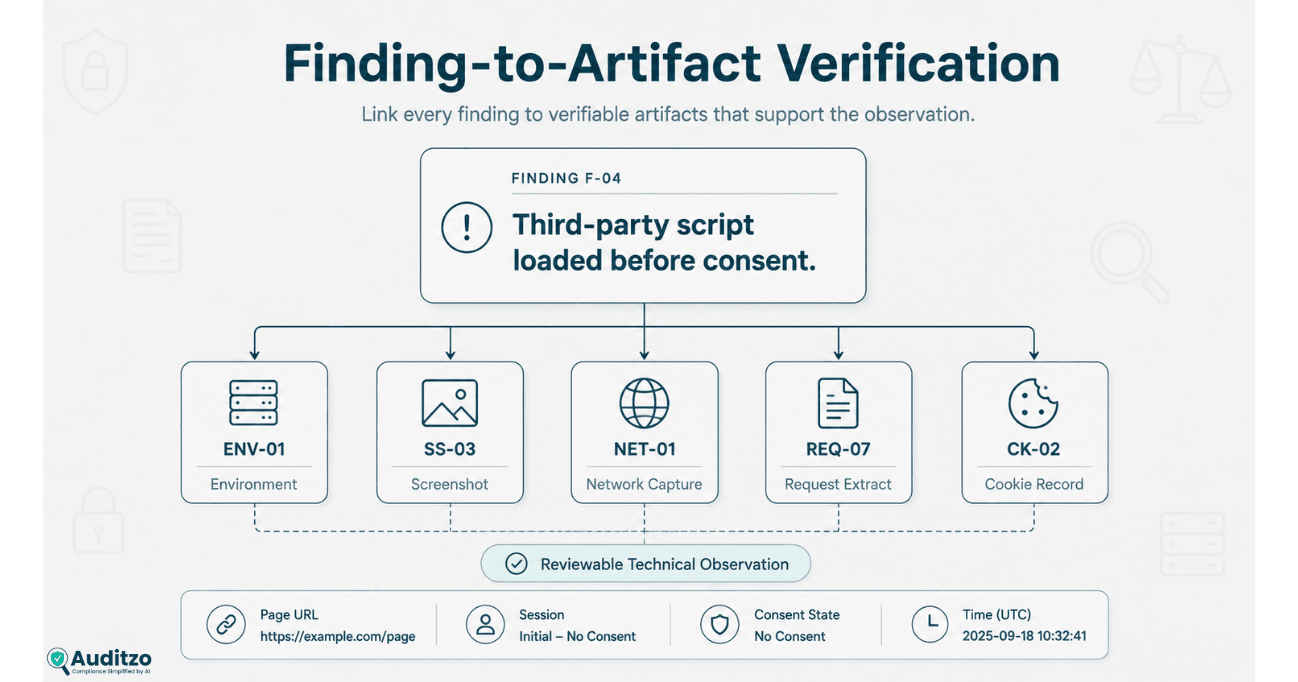
This example is illustrative. A traceable observation does not by itself establish statutory coverage, consent validity, a legal violation, or admissibility.
Finding ID:
F-04

Reviewed page:
https://example.test/product

Browser session:
SESSION-INITIAL-01

Consent state:
Initial / no consent interaction

Observation:
A request to analytics.example appeared during
the defined initial-state observation window.

Observed timing:
1.42 seconds after page navigation

Supporting artifacts:
ENV-01
SS-03
NET-01
REQ-07
CK-02

Technical interpretation:
The selected request was observable before the
reviewer interacted with the consent interface.

Limitation:
The observation represents the defined browser
session, page, environment, and testing period.

Legal conclusion:
Not provided. Reserved for qualified counsel.
Traceability test
A second reviewer should be able to start with a finding ID and locate:
- The relevant page and session
- The associated screenshot
- The request or storage record
- The environment information
- The report’s interpretation
- The stated limitation
If a finding cannot be connected to any supporting artifact, it may represent an unsupported conclusion rather than a documented technical observation.
5. Distinguish Original, Working, and Redacted Files
Evidence packages frequently contain more than one version of the same underlying material.
Common versions include:
- Original capture
- Working copy
- Filtered copy
- Redacted copy
- Converted copy
- Illustrative extract
- Report-embedded image or table
A reliable evidence record should distinguish these versions rather than labeling each one as the original.
Original capture
An original capture is the file produced through the documented collection process before content is redacted, filtered, reformatted, or extracted.
Working copy
A working copy may be used for analysis, filtering, annotation, or review while the original remains separately retained according to the agreed handling process.
Redacted copy
A redacted copy may remove:
- Authentication tokens
- Session values
- Account information
- Personal information
- Form values
- Internal URLs
- Client-identifying information
Report extract
A report extract may display only the fields needed to explain a finding. It should remain linked to the source artifact from which it was derived.
Version-review questions
- Is the original file clearly identified?
- Are working and redacted copies labeled separately?
- Is the relationship between versions documented?
- Does each changed file have its own hash where hashes are used?
- Are redactions recorded?
- Does the report explain whether an extract omits surrounding context?
A redacted file is not identical to its original. It should not be represented as having the same contents or integrity value.
6. Evaluate Hashes and Integrity References
A cryptographic hash produces a value based on the contents of a file. Recalculating the hash can help determine whether the file matches the version for which the reference value was originally recorded.
Where hashes are included, the evidence record should identify:
- File name
- Evidence ID
- File version
- Hash algorithm
- Hash value
- Date and time calculated
- Person, system, or process that calculated it
What a hash can support
A matching hash may support the statement that the tested file has not changed since the reference hash was calculated.
What a hash does not establish
A hash does not independently establish:
- That the file was captured from the stated website
- That the browser session was prepared correctly
- That the capture method was complete
- That the file contains every relevant event
- That the file is legally authentic
- That the evidence is admissible
- That the associated interpretation is correct
- That a legal violation occurred
Important limitation: Hashing is an integrity-reference technique. It should not be presented as automatic proof of authenticity, admissibility, chain of custody, or legal validity.
The NIST Digital Evidence Preservation guidance discusses hashing and other considerations for preserving digital evidence.
7. Check Whether Artifacts Provide Corroborating Context
Multiple artifacts can improve understanding when each explains a different part of the same observation.
For example:
- A screenshot may show the visible consent state.
- A browser-network record may show a request and its timing.
- A cookie table may show browser state.
- A storage comparison may show changes between sessions.
- An environment record may explain the testing conditions.
This does not mean that adding more files automatically makes the evidence stronger.
Useful corroboration
Artifacts provide useful corroborating context when:
- They relate to the same page and session
- Their timestamps are reasonably consistent
- Their evidence IDs are linked
- They explain different aspects of the observation
- Any apparent conflicts are disclosed
False appearance of corroboration
Multiple files may not meaningfully corroborate one another when:
- They come from different sessions without explanation
- They use different browsers or regions
- The screenshots and network records have no shared context
- The report repeats the same unsupported conclusion across several tables
- Several extracts come from one file but are presented as independent sources
Reliability depends on contextual alignment, not simply the number of artifacts collected or the names of the tools used.
8. Assess Repeatability Without Overstating Reproducibility
A website is a dynamic environment. Scripts, campaigns, tag rules, consent configurations, visitor attributes, vendor settings, and releases can change between sessions.
Repeated testing may help determine whether an observation appears again under reasonably similar conditions. It does not guarantee that the website behaves identically for every visitor.
Repeatability questions
- Were the repeated sessions conducted under similar conditions?
- Were the same browser and region used?
- Was browser state reset consistently?
- Were the same pages and interactions tested?
- Were the observation windows comparable?
- Were material website changes recorded?
- Were differences between runs disclosed?
Reasons results may differ
- A/B testing
- Advertising campaign changes
- Consent-platform updates
- Tag-manager publications
- Geolocation rules
- Browser privacy controls
- Vendor availability
- Network failures
- Personalization
- Logged-in state
- Cache or storage differences
- Website deployments
A report should avoid universal conclusions such as “the tracker always fires” or “all users experience this behavior” when the evidence comes from a limited set of sessions.
A safer factual statement is:
The selected request was observed during the defined sessions, pages, environments, and testing period described in the report.
9. Review Sensitive-Data Handling
Website evidence files may contain sensitive or confidential values.
Potentially sensitive content can include:
- Authentication tokens
- Session tokens
- Cookie values
- Account identifiers
- Email addresses
- Form fields
- Page URLs containing query values
- Internal endpoints
- Customer or employee information
- Client-identifying details
Collection review
The reviewer should consider whether the collected material was necessary for the defined technical question and whether avoidable sensitive values were captured.
Access review
The evidence record should identify who is permitted to access:
- Original files
- Working copies
- Redacted versions
- Reports
- Transferred evidence packages
Redaction review
Where redaction occurs, the record may identify:
- Source evidence ID
- Derived file name
- Type of value removed
- Reason for removal
- Date of redaction
- Role performing the redaction
- Hash of the original file
- Hash of the redacted file
Storage and transfer review
Depending on scope and sensitivity, the review may consider:
- Private storage
- Role-based access
- Authentication controls
- Encryption
- Transfer method
- Authorized recipients
- Retention period
- Deletion instructions
- Legal-hold instructions supplied by counsel
Auditzo does not determine whether a legal hold, privilege, or work-product protection applies. The responsible organization or counsel should establish the applicable handling instructions.
10. Confirm That Limitations Are Clearly Disclosed
Technical evidence is more trustworthy when the report explains what it does not cover.
A limitations section may address:
- Pages not reviewed
- Interactions not performed
- Consent states not tested
- Browsers or devices not tested
- Regions not tested
- Authenticated areas not accessed
- Observation-window limits
- Encryption and capture-layer limits
- Request or payload fields not visible
- Network failures
- Dynamic or intermittent behavior
- Third-party availability
- Website changes after the review
- Session-specific results
- Manual and automated tooling limitations
Why limitations improve reliability
Limitations help prevent readers from treating a scoped observation as a complete representation of:
- Every website page
- Every user
- Every visitor region
- Every browser
- Every session
- Every period of operation
- Every privacy or legal question
A report that states limitations is not necessarily weaker. It is more transparent about the boundaries of its technical record.
Review Auditzo’s audit scope and limitations for the distinction between automated reports, Manual Evidence Audits, and matters outside Auditzo’s role.
Website Tracking Evidence Reliability Matrix
The following matrix can help reviewers identify strong documentation and common warning signs.
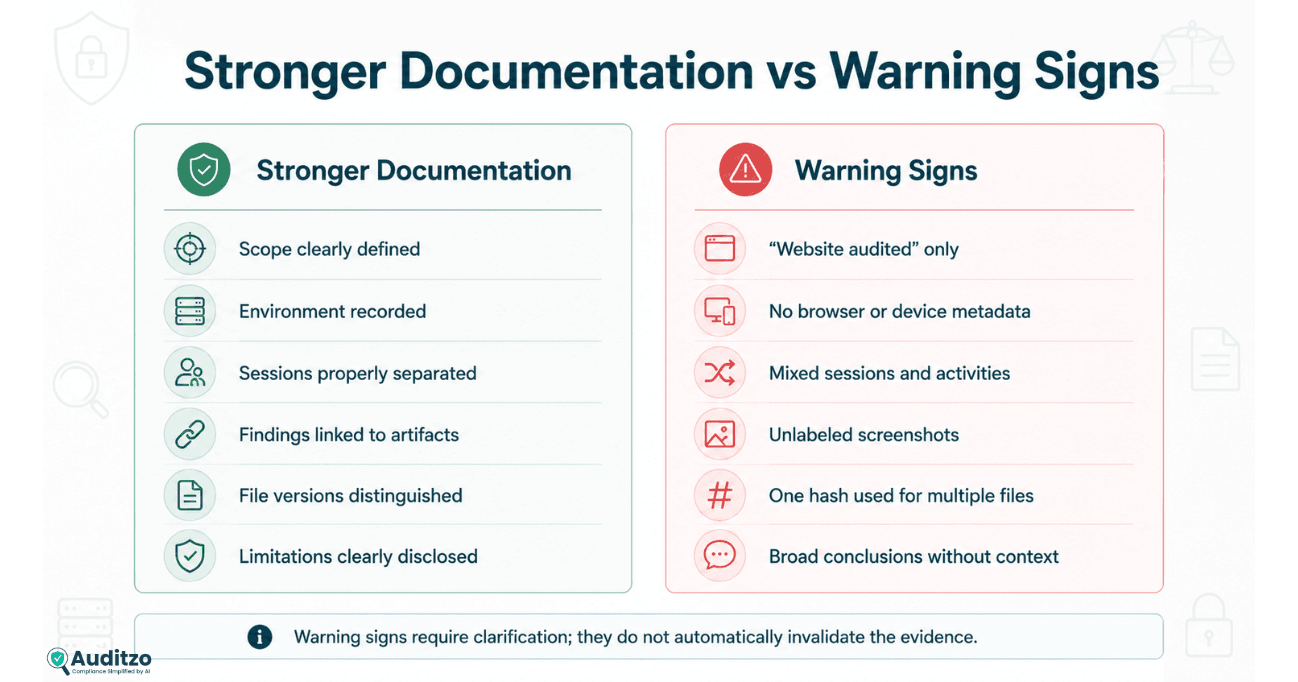
| Review Area | Stronger Technical Documentation | Warning Sign |
|---|---|---|
| Scope | Domains, pages, journeys, states, and exclusions are defined. | The report states only that the website was audited. |
| Environment | Browser, version, device, region, time, and session preparation are recorded. | No environment metadata is provided. |
| Session separation | Initial, Reject, and Accept evidence is linked to clearly identified sessions. | Consent-state screenshots are shown without explaining how sessions were prepared. |
| Traceability | Every material finding references supporting artifacts. | Findings contain conclusions but no evidence IDs. |
| Visual context | Screenshots identify the page, state, time, and related technical evidence. | Unlabeled screenshots appear without URLs or session context. |
| Network context | Requests are connected to the reviewed page, session, and observation window. | A HAR file is supplied without explaining which journey created it. |
| File versions | Original, working, redacted, and derived files are distinguishable. | Every file is described as original. |
| Integrity references | Each hashed file has its own algorithm, value, version, and calculation record. | One hash is claimed to cover several different or redacted files. |
| Corroboration | Artifacts explain different parts of the same observation. | Multiple unrelated captures are presented as mutually confirming. |
| Repeat testing | Conditions and differences between runs are documented. | One session is generalized to all users and future visits. |
| Sensitive data | Access, redaction, transfer, and retention are addressed. | Tokens or identifiers are shared without handling controls. |
| Limitations | Excluded pages, states, regions, tools, and uncertainties are stated. | The report presents universal conclusions without boundaries. |
| Legal boundary | Observed facts are separated from legal interpretation. | A scanner or technical reviewer declares legal violations or admissibility. |
This matrix is a technical review aid. It is not a legal admissibility test or compliance certification framework.
Common Evidence Reliability Warning Signs
The following patterns should prompt further questions before a report is relied on for legal, privacy, or remediation review.
No defined test scope
The report lists technologies but does not identify the pages, journeys, environments, or session states reviewed.
Two or more unrelated browser sessions combined
Screenshots, cookies, and network entries from different sessions appear together without explaining their relationship.
Unlabeled screenshots
The report includes screenshots without page URLs, timestamps, consent states, session IDs, or evidence references.
HAR file without context
A network file is supplied without recording the browser, page, session, action, or observation window that generated it.
Findings without artifact references
The report describes tracking behavior but does not connect the statement to a request, screenshot, cookie table, storage record, or other evidence.
Tool names presented as proof
The report assumes that using HAR, DevTools, Fiddler, Wireshark, or another tool automatically makes the results accurate, complete, or admissible.
Hashes overstated
A hash is described as proof that a file is authentic, legally valid, or correctly captured.
Redacted copy described as the original
Sensitive values have been removed, but the report does not disclose that the file was changed or identify the source version.
Technical observations converted into legal conclusions
The report states that a request, cookie, identifier, or consent-state difference automatically proves a violation.
Universal conclusions from one session
The report claims that behavior occurs for all visitors based on a single browser, region, page, or testing period.
No limitations section
The report does not disclose which pages, states, regions, browsers, interactions, or capture layers were outside scope.
These warning signs do not automatically invalidate the technical record. They indicate areas requiring clarification, supplemental evidence, or a more carefully scoped review.
A Practical Reliability Review Process
Law firms, privacy teams, and technical reviewers can use the following process when evaluating an existing evidence package.
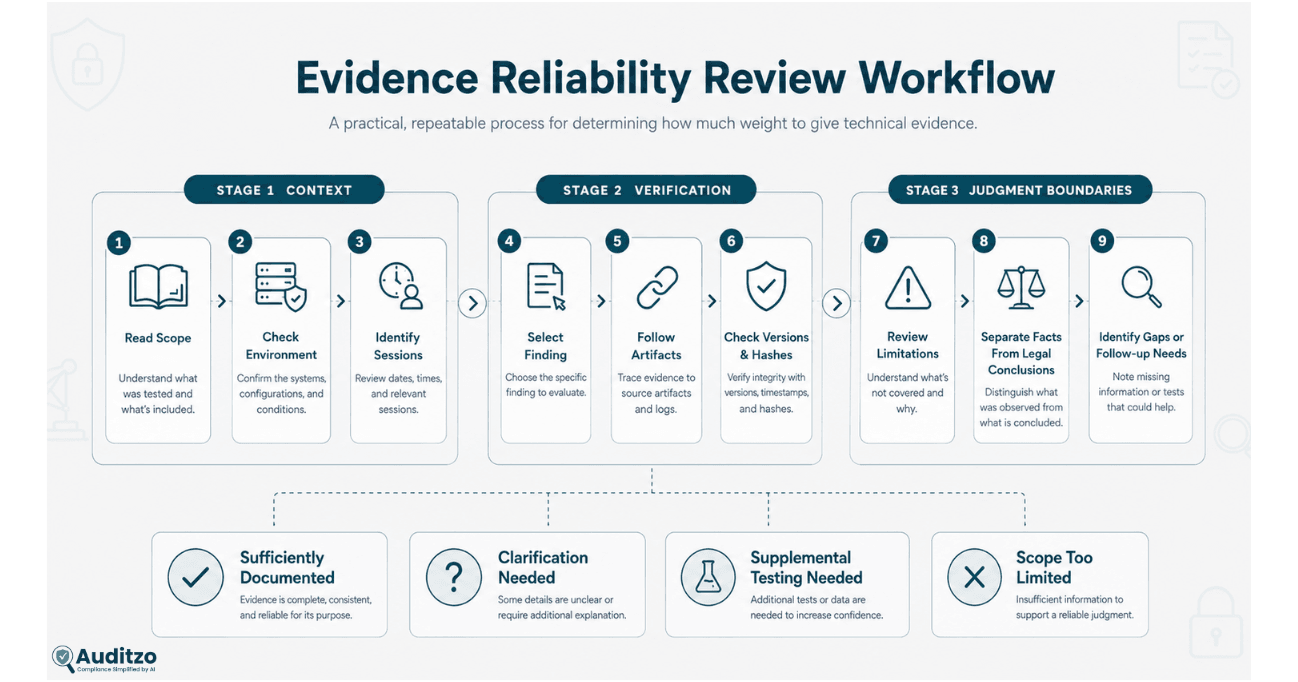
Step 1: Read the scope before the findings
Confirm which domains, pages, journeys, environments, and consent states were reviewed.
Step 2: Review the environment record
Check the browser, version, device, region, time, session preparation, and tooling information.
Step 3: Identify each browser session
Determine whether the Initial, Reject, Accept, returning-visitor, or other states are clearly separated.
Step 4: Select a material finding
Choose one important finding and follow its evidence references.
Step 5: Locate the supporting artifacts
Verify that the screenshot, network entry, cookie or storage record, and environment information relate to the same observation.
Step 6: Review the file versions
Determine whether the available artifacts are originals, working copies, redacted copies, or report extracts.
Step 7: Check integrity references
Verify that hashes, where used, belong to the specific file versions described.
Step 8: Review redaction and sensitive-data handling
Confirm that altered copies and removed values are documented appropriately.
Step 9: Read the limitations
Identify what was not tested and whether the finding language stays within the documented scope.
Step 10: Separate technical facts from legal interpretation
Determine whether the report clearly distinguishes observable behavior from questions reserved for counsel.
A reliability review can identify gaps that require clarification, supplemental testing, re-capture, or a narrower conclusion.
Automated Report vs Manual Evidence Review
Automated reporting and manual evidence review serve different purposes.
| Review Area | Automated Website Audit | Scoped Manual Evidence Audit |
|---|---|---|
| Primary purpose | Initial technical visibility and triage | Human-reviewed investigation of defined technical questions |
| Initial page-load observation | Yes, within the automated observation window | Yes, across agreed pages and sessions |
| Consent interaction | No Accept or Reject interaction | May include Initial, Reject, and Accept sessions where scoped |
| Human verification | No | Yes |
| Multiple journeys | Limited to the configured automated run | Representative journeys defined in scope |
| Raw evidence package | Not provided as a downloadable raw-evidence deliverable | May include agreed screenshots, HAR, network, cookie, storage, and related files |
| Finding-to-artifact review | Automated report context | Human-reviewed traceability where included |
| Reliability assessment | No independent human reliability conclusion | Technical quality and limitations may be reviewed within scope |
| Legal conclusion | No | No |
| Admissibility or compliance certification | No | No |
An automated report may identify technologies or observations requiring deeper investigation. A Manual Evidence Audit is more appropriate where the engagement requires human validation, consent-state interaction, multiple pages, request-level review, evidence files, or finding-to-artifact traceability.
Review the website privacy audit plan comparison before selecting the appropriate review path.
Website Tracking Evidence Reliability Checklist
Scope
- Are the reviewed domains identified?
- Are the reviewed pages listed?
- Are the visitor journeys defined?
- Are the consent states identified?
- Are relevant browsers, devices, and regions recorded?
- Are exclusions stated?
Environment
- Is the date and time recorded?
- Is the time zone recorded?
- Is the browser and version recorded?
- Is the operating system recorded?
- Is the visitor region or network environment documented?
- Is session preparation explained?
- Are tool and methodology versions recorded?
Session separation
- Can each artifact be assigned to a specific session?
- Are Initial, Reject, and Accept states separated where relevant?
- Was browser state reset where required?
- Are deviations between sessions documented?
Evidence traceability
- Does each material finding have an ID?
- Does each finding identify the reviewed page?
- Does each finding identify the consent state?
- Does each finding reference supporting artifacts?
- Can another reviewer locate those artifacts?
File versions
- Are original files identified?
- Are working copies labeled?
- Are redacted copies labeled?
- Are report extracts connected to source artifacts?
- Are version relationships documented?
Integrity references
- Is the hash algorithm recorded?
- Does each hash correspond to a specific file version?
- Is the calculation date recorded?
- Are hashes described as integrity references rather than proof of admissibility?
Corroborating context
- Do screenshots and network records relate to the same session?
- Are cookie and storage records connected to the relevant state?
- Do multiple artifacts explain different aspects of the observation?
- Are conflicting results disclosed?
Repeat testing
- Were repeat sessions conducted under similar conditions?
- Are differences between runs recorded?
- Does the report avoid universal claims from limited sessions?
Sensitive-data handling
- Are sensitive values identified?
- Are original files access-controlled?
- Are redactions documented?
- Are transfer and retention requirements defined?
Limitations and conclusions
- Does the report disclose material limitations?
- Are observed facts separated from interpretation?
- Are legal questions reserved for qualified counsel?
- Does the report avoid guaranteeing compliance, admissibility, or legal outcomes?
This checklist supports technical quality review. It should be adapted to the website, matter, evidence package, legal instructions, and purpose of the engagement.
How Legal Frameworks Affect the Review
The same technical artifacts may be relevant to several legal or regulatory reviews. That does not mean those frameworks use the same definitions, elements, consent requirements, procedural rules, or evidentiary standards.
CIPA-oriented review
A technical evidence set may document requests, routing or addressing information, cookies, session technologies, consent context, and observable browser behavior.
California Penal Code Section 631 and Sections 638.50–638.51 address different statutory concepts. Auditzo does not determine whether a particular website technology qualifies under either provision or whether a violation occurred.
Review the current statutory text through California Legislative Information.
For a deeper technical overview, read what law firms should look for in a CIPA website tracking evidence report.
GDPR-oriented review
A technical evidence set may help advisers investigate website technologies, personal-data questions, processing purposes, lawful bases, consent behavior, transparency, storage or access on a device, and international transfers.
The GDPR contains several possible lawful bases for processing under Article 6. Consent is not automatically the only lawful basis for every processing activity. Cookie and device-access rules may also involve national laws implementing the ePrivacy framework.
Review the official regulation through EUR-Lex.
CCPA and CPRA-oriented review
Technical evidence may help counsel evaluate observable third-party requests, disclosures, opt-out behavior, vendor relationships, and potential sale or sharing questions.
A technical reviewer should not automatically label a request as a sale, sharing, legal disclosure, or violation without the required legal and factual analysis.
Cross-framework boundary: One technical artifact may be relevant to several reviews, but it should not be automatically mapped to multiple legal violations. Each framework requires its own matter-specific analysis.
What a Reliability Review Cannot Establish
A technical reliability review does not independently establish:
- That an artifact is admissible
- That evidence is legally authentic
- That a file was lawfully collected
- That a communication is privileged
- That work-product protection applies
- That a hash proves correct capture
- That every relevant website event was recorded
- That evidence represents every visitor or session
- That consent was legally required
- That consent was valid or invalid
- That an identifier is personal information
- That a value is communication content
- That a technology is a pen register or trap-and-trace device
- That CIPA, GDPR, CCPA, CPRA, or another law applies
- That a statutory exception applies or does not apply
- That a violation occurred
- That a party is liable
- That a regulator, court, or authority will accept the evidence
- That a legal claim, defense, investigation, or proceeding will succeed
Those questions depend on the applicable law, forum, facts, procedures, supporting evidence, testimony, and analysis performed by qualified counsel and the relevant authority.
Auditzo’s role is limited to documenting and reviewing observable technical website behavior within the agreed scope.
Frequently Asked Questions
What makes website tracking evidence technically reliable?
Technical reliability is supported when the evidence clearly identifies the review scope, browser environment, session state, observed behavior, supporting artifacts, file versions, integrity references, and material limitations.
Is technically reliable evidence automatically admissible?
No. Technical reliability may support review and authentication efforts, but admissibility depends on the applicable evidence rules, forum, foundation, relevance, procedure, testimony, and decisions made by counsel and the relevant authority.
Can screenshots be reliable website evidence?
Screenshots can reliably document visible website context when they are linked to the relevant page, session, consent state, timestamp, and evidence record. They do not independently prove that a specific request or transmission occurred.
Does a HAR file prove that tracking was unlawful?
No. A HAR file may document requests observed during a browser session. It does not independently establish statutory coverage, legal meaning, consent validity, a violation, or liability.
Does a hash prove that a file is authentic?
A matching hash can help show that a specific file matches the version for which the reference value was calculated. It does not independently prove the file’s origin, correct capture, legal authenticity, or admissibility.
Should Initial, Reject, and Accept tests use separate sessions?
Separate, clearly documented sessions generally provide a cleaner technical comparison. The appropriate methodology depends on the website, technical question, and agreed review scope.
Why must original and redacted files be distinguished?
A redacted copy has different contents from the original. Distinguishing the versions helps reviewers understand what changed, why it changed, and which integrity reference belongs to each file.
Does more evidence always mean a stronger report?
No. Additional files add value only when they relate to the review question and can be connected to the same page, session, state, or finding. Unrelated artifacts may create volume without improving reliability.
Can one browser session represent all website visitors?
No. A browser session represents the defined conditions under which it was performed. Website behavior may vary by browser, device, region, stored state, campaign, visitor attributes, and time.
Can an automated audit provide a complete reliability review?
Auditzo’s automated audits provide initial technical visibility but do not include human verification, Accept or Reject interaction, or a downloadable raw-evidence package.
A scoped Manual Evidence Audit is more appropriate where a team needs human-reviewed testing, multiple consent states, request-level analysis, artifact traceability, or agreed supporting files.
Does every Manual Evidence Audit include HAR files and hashes?
No. Deliverables depend on the agreed scope. HAR files, screenshots, cookie and storage comparisons, hashes, redacted extracts, and evidence indexes may be included where expressly agreed and technically appropriate.
Can Auditzo determine whether a CIPA or GDPR violation occurred?
No. Auditzo documents observable technical behavior. Qualified counsel determines statutory coverage, consent validity, legal violations, liability, and evidentiary use.
Can Auditzo review evidence collected by another team?
A review of externally collected evidence may be possible where the scope, files, metadata, handling history, and technical questions are sufficiently defined. Auditzo would identify available context, gaps, and limitations rather than certifying the evidence as valid or admissible.
Request a Scoped Technical Evidence Review
Law firms, privacy teams, and organizations can engage Auditzo to review website tracking behavior or assess the technical organization and traceability of an existing evidence set.
A scoped Manual Evidence Audit may include agreed pages, browser sessions, consent-state testing, screenshots, network review, cookie and storage comparisons, evidence indexing, integrity references, technical findings, limitations, and remediation guidance.
Discuss a scoped Manual Evidence Audit or review Auditzo’s technical evidence support for law firms.
Teams requiring only an initial view of cookies, trackers, technologies, and third-party requests can run an automated website audit.
Scope reminder: Automated reports provide initial technical visibility and do not include human verification, consent-button interaction, or downloadable raw evidence files. Manual Evidence Audit deliverables depend on the agreed scope. Auditzo does not provide legal advice, certify compliance, guarantee admissibility, determine legal violations, establish privilege, or predict legal outcomes.
Official and Technical References
- California Legislative Information: Penal Code Chapter 1.5
- EUR-Lex: General Data Protection Regulation
- NIST Digital Evidence Preservation
- United States Courts: Federal Rules of Evidence
This article provides general technical information. It is not legal advice and should not replace current statutory, regulatory, procedural, evidentiary, or matter-specific advice from qualified counsel.
Table of Contents
- Technical Reliability Is Not the Same as Admissibility
- 1. Confirm That the Review Scope Is Defined
- 2. Check the Test Environment Record
- 3. Verify That Browser Sessions Are Properly Separated
- 4. Review Finding-to-Artifact Traceability
- 5. Distinguish Original, Working, and Redacted Files
- 6. Evaluate Hashes and Integrity References
- 7. Check Whether Artifacts Provide Corroborating Context
- 8. Assess Repeatability Without Overstating Reproducibility
- 9. Review Sensitive-Data Handling
- 10. Confirm That Limitations Are Clearly Disclosed
- Website Tracking Evidence Reliability Matrix
- Common Evidence Reliability Warning Signs
- A Practical Reliability Review Process
- Automated Report vs Manual Evidence Review
- Website Tracking Evidence Reliability Checklist
- How Legal Frameworks Affect the Review
- What a Reliability Review Cannot Establish
- Frequently Asked Questions
- Request a Scoped Technical Evidence Review