1. Context
A GDPR website audit is a structured technical review of how a website processes personal data at runtime.
Many organizations assume GDPR compliance is satisfied through privacy policies, consent banners, and vendor agreements.
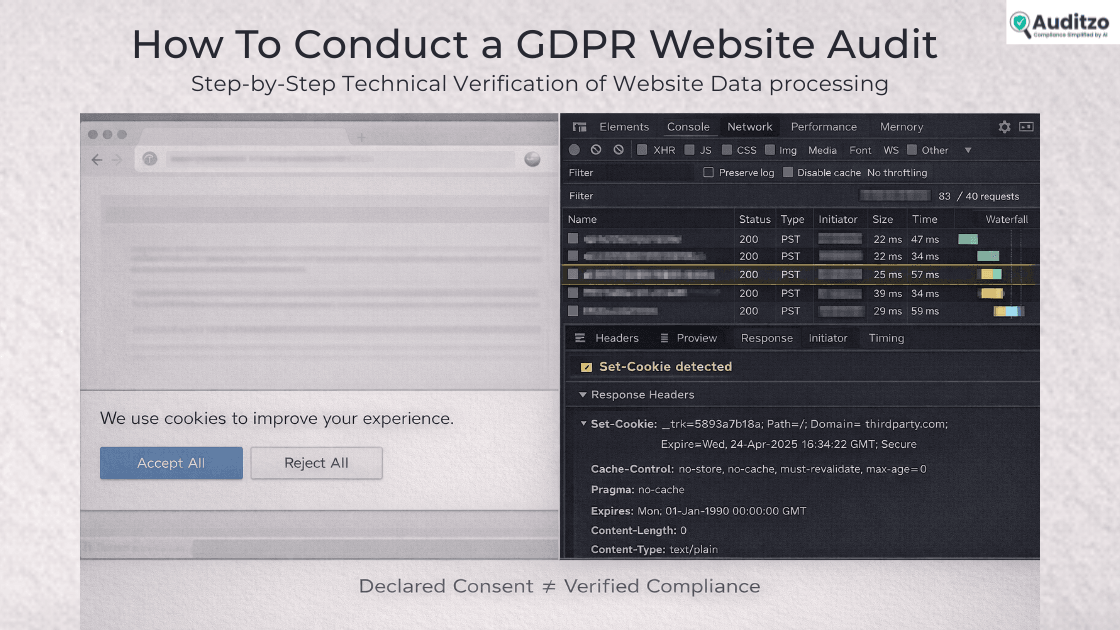
In practice, enforcement actions frequently begin with a simple question: what does the website actually do when a user visits it?
Regulators assess how personal data is processed in real runtime conditions, not just how it is described in documentation.
This guide explains how to conduct a GDPR website audit step by step, focusing on technical verification rather than documentation review.
This guide covers:
- Identification of personal data at the network layer
- Runtime detection of tracking behavior
- Consent enforcement validation
- Evidence capture and documentation
2. Legal and Regulatory Explanation
Understanding the legal baseline clarifies what the audit must measure.
The General Data Protection Regulation (EU) 2016/679 governs the processing of personal data of individuals in the European Union.
A website falls within its scope when it processes personal data of EU residents, regardless of where the organization is established.
Under Article 4(1), personal data means any information relating to an identified or identifiable natural person.
This includes online identifiers such as IP addresses, cookie identifiers, and device fingerprints.
In a website context, many of these identifiers are transmitted automatically during page load.
Article 6 requires that all processing have a lawful basis.
For most website-level tracking and analytics, consent is the primary lawful basis relied upon.
Articles 4(11) and 7 define valid consent as freely given, specific, informed, and unambiguous.
Consent must also be demonstrable.
This means organizations must be able to show not only that a banner exists, but that processing behavior changes based on user choice.
Article 5 establishes core principles: lawfulness, fairness, transparency, purpose limitation, data minimization, and integrity.
These principles apply to every data transmission initiated by the website.
Article 28 governs processor relationships.
Any third-party script receiving personal data must be evaluated within that framework.
Chapter V regulates international transfers.
Personal data transmitted outside the European Economic Area must comply with its requirements.
Article 30 requires records of processing activities.
A website audit supports the accuracy of those records by validating actual processing.
A GDPR website audit therefore evaluates whether technical behavior aligns with these obligations.
The focus is observable data processing, not documentation alone.
| GDPR Article | Legal Requirement | Website-Level Impact | What Engineer Must Verify |
|---|---|---|---|
| Article 4(1) | Definition of personal data | IPs, cookies, device IDs count | Are these transmitted at load? |
| Article 6 | Lawful basis | Consent required for tracking | Is tracking gated by consent? |
| Articles 4(11), 7 | Valid consent | Must be freely given, specific, demonstrable | Does runtime behavior change? |
| Article 28 | Processor obligations | Third-party scripts receive data | Are vendors documented? |
| Chapter V | International transfers | Data sent outside EEA | Where are requests routed? |
| Article 30 | Records of processing | Must reflect actual activity | Does runtime match documentation? |
3. Practical Application: Conducting the Audit
This section translates legal requirements into a structured GDPR audit process.
A structured reference such as a GDPR website compliance checklist can help standardize documentation during this process.
3.1 Defining Scope
A clear scope prevents ambiguity and keeps the audit process focused.
The audit scope includes:
- Front-end behavior
- Third-party scripts
- Network requests
- Cookies
- Data transmissions
- Consent enforcement
- Cross-border transfers
It does not replace a DPIA.
It evaluates website-layer data processing as experienced by an end user.
3.2 Identifying Personal Data at the Network Layer
The first step in the GDPR audit process is defining personal data in operational terms.
Personal data includes:
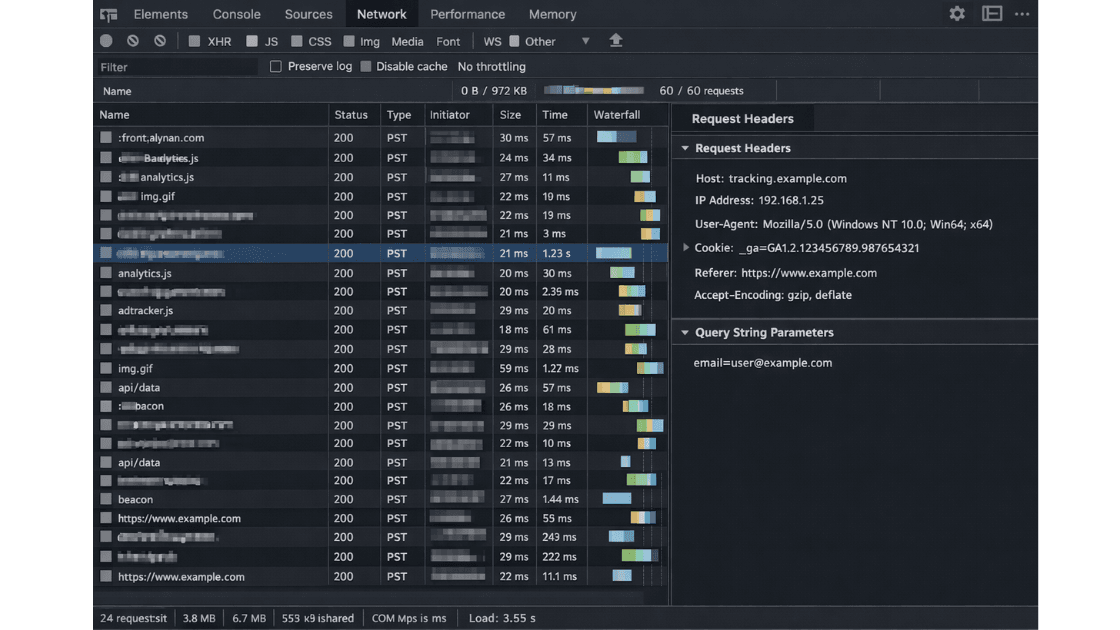
- IP addresses
- Cookie identifiers
- Advertising IDs
- Device identifiers
- Email addresses in URLs
- User IDs
- Query parameters containing user attributes
- Referrer URLs revealing user behavior
- Session tokens
For example, a request such as ?email=user@example.com constitutes direct personal data exposure.
A request containing a unique analytics identifier may also qualify if it enables tracking.
Pseudonymous identifiers remain personal data if they relate to an identifiable individual.
IP addresses are personal data under GDPR.
Cookie identifiers qualify when they enable tracking across sessions.
Query strings containing “email=” or “uid=” create direct exposure risk.
Referrer headers may leak internal paths containing user information.
This classification step determines what to detect during runtime inspection and reduces misinterpretation of technical logs.
3.3 Preparing the Testing Environment
Testing requires a controlled and reproducible baseline.
Use a fresh browser profile or incognito mode.
Disable browser extensions.
Clear all cookies and local storage.
Confirm that no prior consent signal exists.
If relevant, simulate EU access conditions to reflect actual regulatory scope.
Record date, time, browser version, and environment details.
This ensures first-visit behavior is accurately observed and that results can be reproduced later.
Clean Environment Checklist
- Use fresh browser profile
- Disable extensions
- Clear cookies
- Clear local storage
- Disable cache
- Record date/time
- Confirm geo context
3.4 Using Browser DevTools for Runtime Inspection
This step operationalizes the technical portion of the GDPR website audit.
Open Developer Tools and navigate to the Network tab.
Enable “Preserve log.”
Enable “Disable cache.”
Reload the page without interacting with any banner.
Observe all requests initiated during initial load.
Filter requests by:
- Third-party domains
- XHR
- Fetch calls
- Script loads
- Image beacons
- POST requests
For each request, inspect:
- Request headers
- Query parameters
- Request payload
- Response headers
- Set-Cookie headers
Record timestamps for sequencing.
Determine whether identifiers are transmitted before user consent is provided.
This establishes pre-consent behavior and forms the baseline for consent validation.
3.5 Detecting Pre-Consent Tracking
This stage evaluates whether tracking begins before user choice.
Assess whether:
- Analytics scripts load automatically
- Advertising pixels fire
- Tag managers initialize
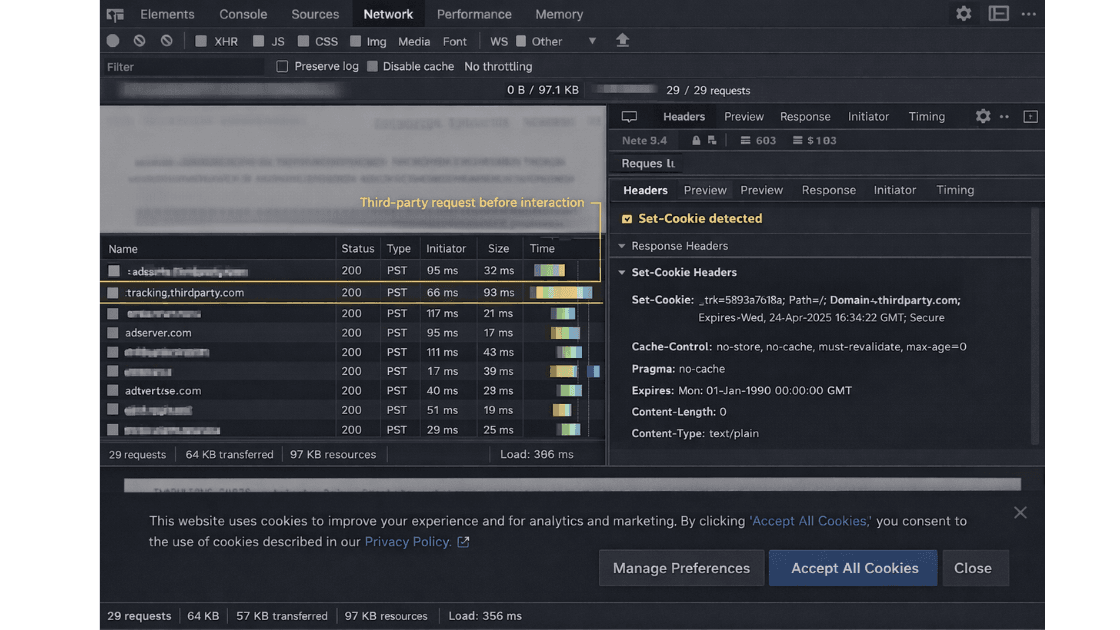
- Cookies are set before consent
- Device fingerprinting scripts execute
For example, if an analytics cookie appears in the Network log immediately upon page load, that may indicate pre-consent processing.
Verify whether the consent banner appears before third-party scripts load.
If scripts load regardless of user interaction, consent gating is not operational.
This issue frequently arises when tag managers are configured to trigger by default.
3.6 Consent Validation Testing
Consent must affect runtime behavior, not just interface appearance.
Conduct structured consent scenario testing.
Test 1: First load without interaction.
Test 2: Explicit “Reject All.”
Test 3: Explicit “Accept All.”
Test 4: Granular consent selection.
Test 5: Reload after consent.
For each scenario, document:
- Network requests
- Cookies set
- Scripts loaded
- Behavioral differences
Compare logs across scenarios.
If network activity remains identical between “Reject All” and “Accept All,” consent is not enforced at runtime.
Consent must materially alter processing behavior.
Further regulatory interpretation on consent requirements is detailed in the EDPB Guidelines 05/2020 on Consent.
Confirm that cookies categorized as “necessary” are strictly required for service delivery.
Ensure tag managers do not deploy marketing tags before consent.
Export HAR files and capture screenshots for each scenario to preserve sequence and context.
| Scenario | Third-Party Requests | Cookies Set | Tag Manager Active | Compliant? |
|---|---|---|---|---|
| No Interaction | Yes | Yes | Yes | ❌ |
| Reject All | No | No | No | ✅ |
| Accept All | Yes | Yes | Yes | ✅ |
| Granular Consent | Partial | Partial | Conditional | Depends |
3.7 Inspecting Headers and Payloads
Headers and payloads often reveal more than visible interface elements.
Examine Request headers for:
- IP-related metadata
- User agent strings
- Referer values
- Tracking parameters
Inspect Request payload for:
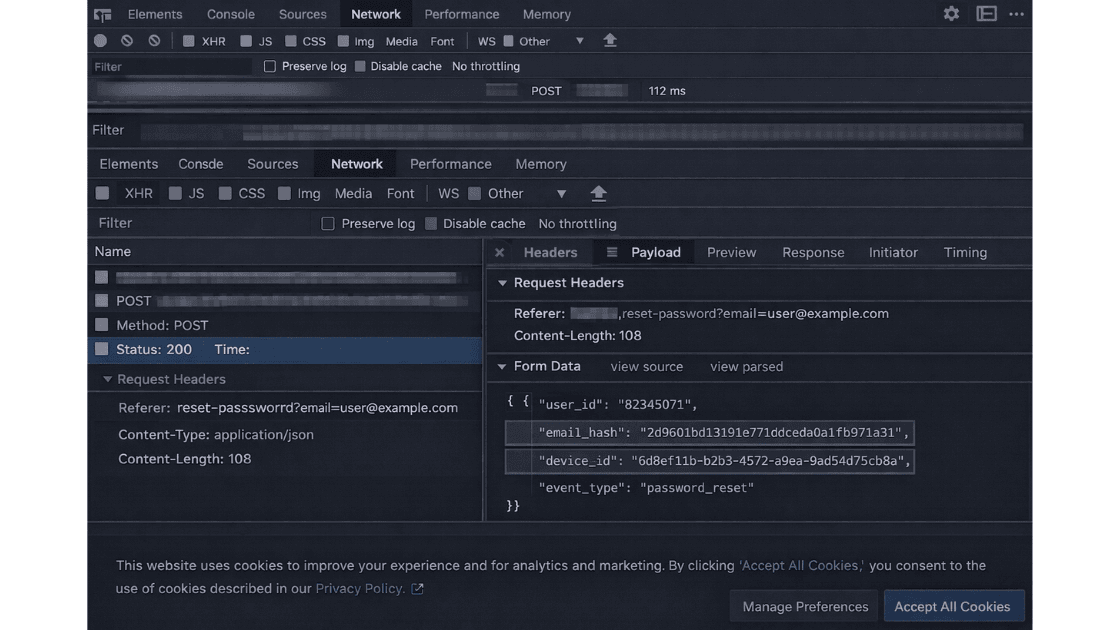
- Hashed email addresses
- User identifiers
- Purchase data
- Behavioral signals
For example, a POST request transmitting a hashed email to a marketing endpoint may indicate profiling activity.
Review Set-Cookie headers for:
- Tracking cookies
- Long expiration dates
- Third-party domains
Verify secure and HttpOnly flags.
Improper configuration may implicate integrity and security principles under Article 5.
3.8 Third-Party Processor Mapping
Every third-party request represents a potential data disclosure.
Compile a list of third-party domains contacted during runtime.
Categorize each as:
- Analytics provider
- Advertising platform
- CDN
- Fraud detection
- Payment processor
- Chat widget
- A/B testing tool
Assess whether each:
- Receives personal data
- Acts within processor relationships
- Transfers data internationally
For instance, an analytics provider hosted outside the EEA may create transfer exposure.
Compare findings against documented processor lists.
Undocumented vendors receiving personal data may create transparency risk and recordkeeping inconsistencies.
| Domain | Category | Personal Data Observed | Jurisdiction | Documented Processor? |
|---|---|---|---|---|
| analytics.example.com | Analytics | Cookie ID, IP | US | Yes |
| marketing.pixel.com | Advertising | Device ID | US | No |
| cdn.provider.net | CDN | IP | EU | Yes |
3.9 International Transfer Review
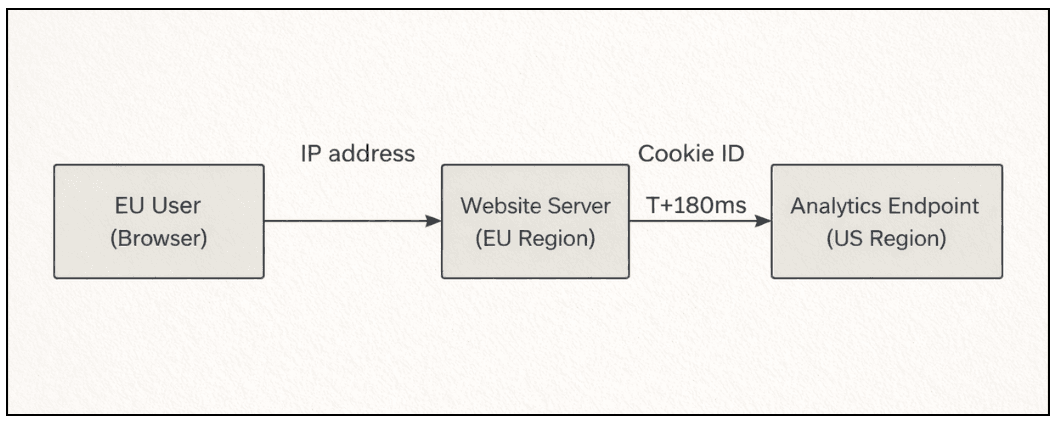
Cross-border transmission is a technical event that must be documented.
Identify destinations outside the European Economic Area.
Review DNS resolution and hosting geography where necessary.
If personal data is transmitted to non-EEA services, document the transfer path, including domain and endpoint.
This stage records technical transfer exposure.
It does not determine adequacy of legal safeguards, but it establishes factual transmission evidence.
3.10 Evidence Capture and Documentation
Evidence capture is essential in the GDPR audit process.
Export HAR files for each test scenario.
Take full-page screenshots.
Capture request and response headers.
Log timestamps.
Create a domain mapping table including:
- Domain
- Purpose
- Data transmitted
- Consent state
- Jurisdiction
- Risk rating
Maintain original exports without alteration to preserve evidentiary integrity.
Documentation should allow another reviewer to replicate the findings independently.
A structured reference such as a GDPR audit checklist for EU websites can assist in maintaining reporting consistency.
Evidence Preservation Checklist
- Export HAR file
- Capture full-page screenshot
- Extract request headers
- Record timestamps
- Save original file (unaltered)
- Log consent state
- Update domain mapping table
4. Common Misconceptions
Several recurring assumptions distort compliance assessments.
A cookie banner does not guarantee lawful processing.
IP addresses are personal data.
Partial anonymization does not automatically eliminate identifiability.
Hashed identifiers remain personal data if linkable.
Vendor reputation does not eliminate controller responsibility.
Server-side tracking does not remove consent obligations.
Clarifying these misconceptions reduces misclassification during audit review.
5. Risk Scenarios
Concrete examples illustrate how technical behavior translates into regulatory exposure.
Pre-Consent Analytics Loading
Analytics fires on page load before interaction.
Risk: Consent not freely given.
Advertising Pixel Auto-Firing
Marketing pixel loads automatically.
Risk: Unlawful profiling.
Undocumented Third-Party Script
Script transmits device identifiers.
Risk: Transparency violation under Articles 13 and 14.
Email in URL Parameters
Password reset links leak email addresses via referrer.
Risk: Direct personal data exposure.
Cross-Border Transfer Without Documentation
US-based analytics receives EU traffic.
Risk: Transfer mechanism invalidation.
Cookie Misclassification
Tracking cookies labeled as “necessary.”
Risk: Invalid consent structure.
6. Evidence Regulators Look For
Regulatory review is evidence-driven.
Supervisory authorities may request:
- Description of processing activities
- Lawful basis documentation
- Proof of consent
- Technical evidence of enforcement
- Processor agreements
- International transfer safeguards
- Security measures
- Data retention policies
Authorities may conduct independent testing replicating user access.
Network activity may be reviewed directly.
HAR files and server logs may be examined.
Consent logs should demonstrate:
- Timestamp
- User action
- Specific preferences selected
- Version of notice presented
If runtime behavior conflicts with declared policies, enforcement risk increases.
Consistency between documentation and observable behavior is essential.
7. Closing Clarity
A GDPR website audit evaluates actual data processing behavior at the technical level.
It verifies whether runtime activity aligns with GDPR obligations.
In summary:
- Identify personal data at the network layer
- Validate consent enforcement through runtime comparison
- Capture reproducible technical evidence
Compliance must be demonstrable through technical records.
It cannot be assumed from documentation alone.
Organizations seeking to conduct a structured review may initiate a formal assessment through the GDPR website audit process.
A disciplined audit approach creates verifiable evidence of due diligence.
The objective is measurable alignment between declared practices and observable behavior.
| Section | Purpose | Evidence Attached |
|---|---|---|
| Executive summary | High-level findings | No |
| Scope definition | Testing boundaries | No |
| Runtime findings | Observed violations | Yes |
| Consent validation results | Behavior matrix | Yes |
| International transfer observations | Data flow log | Yes |
| Evidence appendix | HAR + screenshots | Yes |
Frequently Asked Question
1. What is the difference between a GDPR website audit and a DPIA?
A GDPR website audit focuses on runtime data processing behavior at the technical level. A DPIA evaluates broader data protection risks associated with processing activities.
2. Is a cookie banner alone sufficient for GDPR compliance?
No. Consent must be freely given and demonstrable. Runtime behavior must change based on user interaction.
3. How can you verify if tracking occurs before consent?
By using browser Developer Tools to inspect network requests during first page load and checking for third-party requests or Set-Cookie headers before user interaction.
4. Are IP addresses considered personal data in a website audit?
Yes. Under Article 4(1) of GDPR, IP addresses can qualify as personal data when they relate to an identifiable individual.
5. What evidence should be retained after conducting a GDPR audit?
HAR files, full-page screenshots, request and response headers, timestamps, consent logs, and documented third-party mappings.
6. Does server-side tracking remove GDPR consent requirements?
No. Server-side data transmission involving personal data still requires a lawful basis under Article 6.
7. How often should a GDPR website audit be performed?
Audits should be conducted whenever significant changes occur in tracking scripts, third-party integrations, or consent mechanisms.
Table of Contents
- 1. Context
- 2. Legal and Regulatory Explanation
- 3. Practical Application: Conducting the Audit
- 3.1 Defining Scope
- 3.2 Identifying Personal Data at the Network Layer
- 3.3 Preparing the Testing Environment
- 3.4 Using Browser DevTools for Runtime Inspection
- 3.5 Detecting Pre-Consent Tracking
- 3.6 Consent Validation Testing
- 3.7 Inspecting Headers and Payloads
- 3.8 Third-Party Processor Mapping
- 3.9 International Transfer Review
- 3.10 Evidence Capture and Documentation
- 4. Common Misconceptions
- 5. Risk Scenarios
- 6. Evidence Regulators Look For
- 7. Closing Clarity
- 8. Frequently Asked Questions