How to Preserve and Organize Website Tracking Evidence for Legal Review
Website tracking evidence can lose important context quickly. Scripts change, tag containers are republished, campaigns begin and end, consent settings are updated, and different browsers or visitor regions may produce different technical behavior.
A structured preservation process helps maintain the relationship between a website observation, the reviewed page, browser session, consent state, timestamp, request, screenshot, cookie, storage value, and supporting evidence file.
This guide explains how law firms, privacy teams, developers, and technical reviewers can scope, capture, label, preserve, redact, store, and organize website tracking evidence for legal and privacy review.
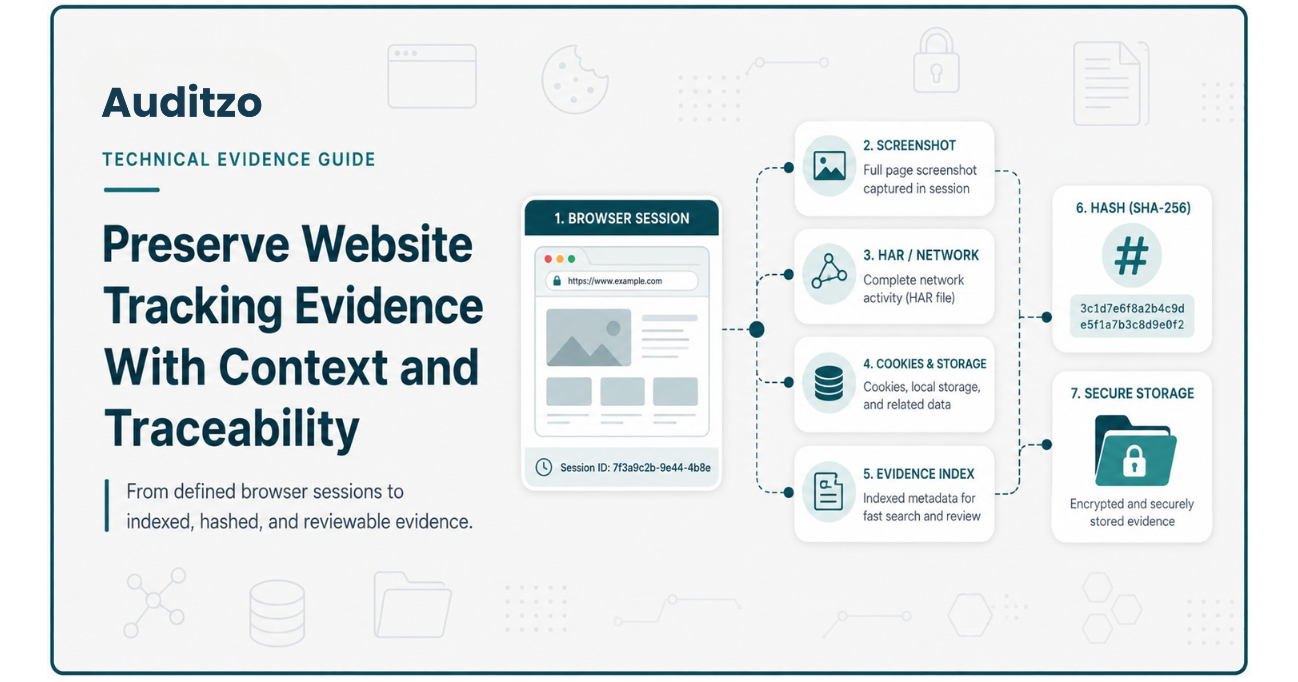
Key point: Evidence preservation helps maintain technical context, integrity references, and traceability. It does not by itself establish admissibility, legal authenticity, statutory coverage, consent validity, a violation, or liability. Those questions remain with qualified counsel and the relevant court, regulator, or authority.
Why Website Evidence Can Lose Context Quickly
A website is not a fixed document. It is a dynamic technical environment that can change between sessions and releases.
Observable tracking behavior may change because of:
- Tag-manager publications
- Consent-management platform updates
- New advertising or analytics campaigns
- Plugin and theme changes
- A/B testing
- Regional configurations
- Browser and device differences
- Logged-in or logged-out states
- Previously stored cookies or consent values
- Cache and local-storage state
- Vendor-side configuration changes
- Website releases and deployment changes
A screenshot captured today may show a banner or page state that no longer appears tomorrow. A request visible in one browser session may not appear after a campaign, trigger, or consent rule changes.
For that reason, useful preservation requires more than downloading a screenshot or exporting a HAR file. The reviewer should preserve enough surrounding information to explain how, when, where, and under what conditions the observation occurred.
When preservation is being considered because a business has received a CIPA website-tracking demand letter, see our CIPA demand letter evidence guide for the broader allegation-to-evidence workflow.
Preservation should be designed around a defined technical question rather than capturing an unnecessarily broad set of website data.
For an overview of the technical facts counsel may investigate in a CIPA-oriented review, read what law firms should look for in a CIPA website tracking evidence report.
Start With a Defined Review Scope
Evidence collection should begin with a written scope. Without one, reviewers may capture large volumes of technical data while missing the visitor journey or consent state relevant to the matter.
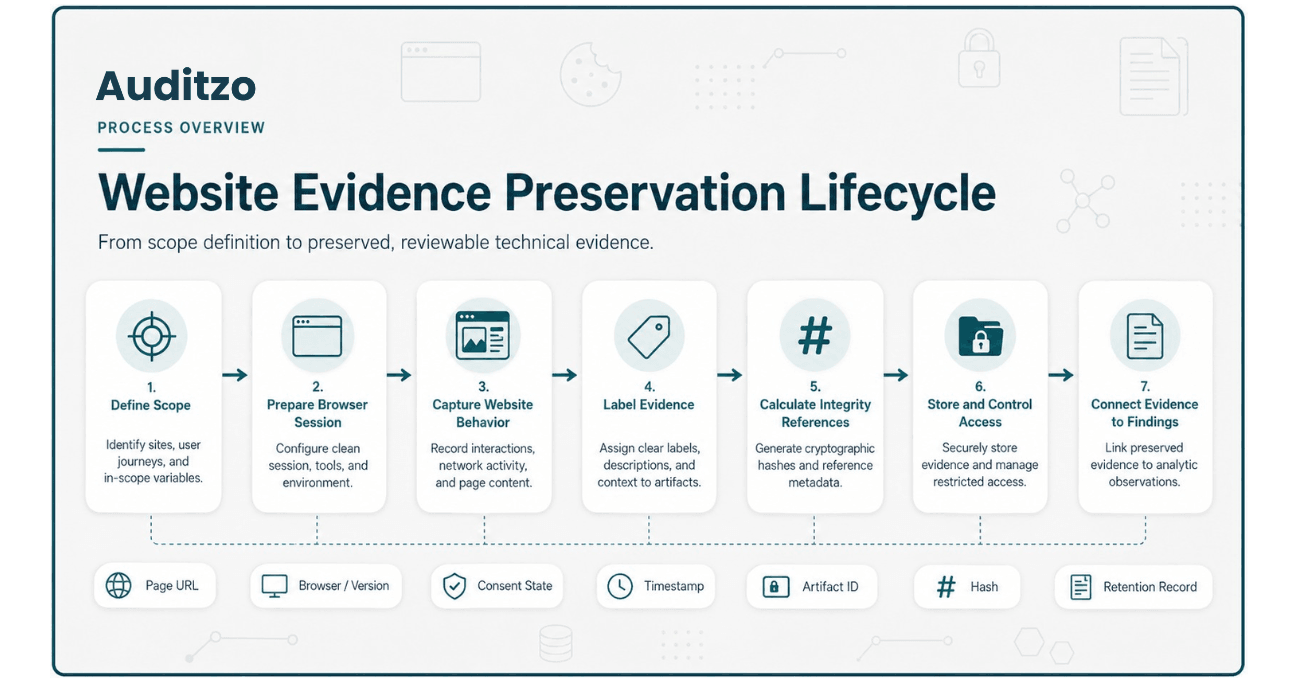
Define the domains and pages
The scope should identify the domains and representative pages requiring review, such as:
- Homepage
- Campaign landing page
- Search page
- Product or service page
- Registration journey
- Lead-generation form
- Chat or customer-support interaction
- Video or embedded-media page
- Cart or checkout
- Account creation or login
Define the visitor journey
A page URL alone may not describe the relevant behavior. Record the actions the reviewer is expected to perform, such as:
- Open a clean browser session.
- Navigate directly to the reviewed page.
- Wait for the defined observation period.
- Record the visible consent state.
- Select Reject, Accept, or a settings option where included in scope.
- Interact with the agreed component or journey.
- Capture the relevant screenshots and browser evidence.
Define the consent states
The scope may include separate sessions for:
- Initial or no-interaction state
- Reject journey
- Accept journey
- Consent-settings changes
- Returning visitor state
- Previously stored consent state
Define the technical questions
Counsel or the privacy team may want the reviewer to investigate:
- Whether a named technology appeared
- When a selected request occurred
- Which destination received the request
- Which observable fields appeared in it
- Whether the behavior changed after a consent choice
- Whether different pages loaded different technologies
- Whether a script originated from a tag manager, template, plugin, or embedded service
- Whether a cookie or storage value changed between sessions
Define the required deliverables
The engagement should state whether it includes:
- Technical report
- Findings register
- Timestamped screenshots
- HAR or browser-network files
- Cookie and browser-storage comparisons
- Evidence index
- File hashes
- Redacted evidence extracts
- Developer remediation guidance
- Selected post-change verification
The defined scope becomes the foundation for the evidence index, report limitations, and review methodology.
Record the Test Environment
Website behavior can vary between browsers, devices, regions, and session states. The report should record enough environment information to explain the conditions under which the evidence was created.
Useful environment records may include:
- Date and local time
- Time zone
- Domain and full page URL
- Browser name and version
- Operating system
- Device or viewport context
- Regional or network environment
- Language or locale
- Logged-in or logged-out state
- Cache status
- Cookie and browser-storage status
- Extensions or developer tools in use
- Capture tool and version
- Audit or methodology version
- Tester actions
- Known deviations from the planned procedure
Where a clean session is required, the reviewer should document how the browser state was prepared. Merely stating “incognito mode” may not explain all relevant storage, caching, service-worker, extension, or network conditions.
The environment record does not prove that every other visitor would experience the same behavior. It identifies the specific conditions associated with the reviewed session.
Preserve Visual Website Context
Screenshots help preserve what the reviewer could see during a particular stage of the website journey.
Visual evidence may document:
- The reviewed page
- The visible consent banner
- Accept, Reject, and settings controls
- The state of a form, chat, video, or embedded component
- The page before and after an interaction
- A browser error or loading state
- A consent-preference confirmation
- The point in the journey associated with a technical observation
A screenshot should be linked to the relevant page, session, timestamp, and evidence reference.
Useful screenshot metadata may include:
- Evidence identifier
- File name
- Page URL
- Capture date and time
- Consent state
- Tester action
- Short factual description
- Related network or storage evidence
A screenshot does not independently prove that a request occurred or that a particular value was transmitted. It preserves visible context.
Similarly, a request record may not show what the visitor saw when the request occurred. Stronger documentation links the visual and technical records without presenting either one as conclusive on its own.
Preserve HAR and Browser-Network Evidence
A HAR file or browser-network export may preserve request and response information generated during a browser session.
Depending on the browser, website, tooling, and capture configuration, this may include:
- Request URL
- Hostname and endpoint
- Request method
- Timestamp and duration
- Query-string fields
- Request and response headers
- Response status
- Cookies associated with a request
- Initiator or request-sequence context
- Page URL and referrer information
- Redirect information
Preserve the original capture
The original network file should generally be retained separately from working, redacted, filtered, or converted copies where the agreed handling process requires preservation.
The evidence index should distinguish between:
- Original capture
- Working copy
- Redacted copy
- Illustrative extract
- Report-embedded excerpt
Handle sensitive data carefully
Network evidence can contain sensitive information, including:
- Authentication values
- Session tokens
- Cookie values
- Identifiers
- Page and referrer information
- Form or request fields
- Internal endpoint details
Collection, access, transfer, retention, and redaction should follow the engagement scope and instructions established by the responsible organization or counsel.
Document limitations
A HAR or browser-network file has limitations:
- It represents a defined browser session
- It may not include every lower-level network event
- Encryption affects what is visible at different capture layers
- Tool configuration can affect the record
- Dynamic website behavior may differ between sessions
- Some values may be generated or modified by the browser
- A request does not independently establish the legal meaning of the data flow
Network evidence should be interpreted together with the scope, environment record, screenshots, cookies, browser storage, consent state, and documented methodology.
Preserve Cookies and Browser Storage
Cookies and browser storage can help explain how a website or third-party technology maintains state across pages and sessions.
A technical review may document:
- Cookie name
- Cookie domain
- Cookie path
- Expiry or duration
- Secure and SameSite attributes where observable
- First-party or third-party context
- Local-storage keys
- Session-storage keys
- State changes between defined sessions
- Relationships between a browser value and a selected request
The preservation record should explain when the browser state was captured and which consent state or visitor journey it represents.
The existence of a cookie, storage key, or identifier does not by itself establish that the value is personal information, communication content, routing information, or legally prohibited data.
Its significance may depend on:
- How it is generated
- Whether it is persistent
- What it can be linked to
- Which party receives it
- How it is used
- The surrounding website behavior
- The applicable legal framework
Technical reporting should document what was observable and reserve legal classification for qualified counsel.
Compare Defined Consent States
Where relevant to the agreed scope, separate browser sessions may be used to compare:
- Initial or no-interaction state
- Reject journey
- Accept journey
The comparison may examine changes in:
- Cookies
- Local and session storage
- Third-party requests
- Script activation
- Consent values
- Visible banner state
- Page functionality
Each state should be captured through a clearly defined session rather than repeatedly changing preferences inside one undocumented browser state.
The report should explain:
- How the session was prepared
- Which action was performed
- When the state was recorded
- Which artifacts correspond to that state
- Which differences were directly observed
- Which uncertainties or limitations remain
A consent-state difference is a technical observation. It does not independently establish whether consent was legally required, obtained, valid, effective, or sufficient.
For French cookie guidance, the CNIL cookie and tracking-device resources provide additional context. The applicable requirements and exceptions remain jurisdiction- and purpose-specific.
Label and Index Evidence Files
A consistent evidence index helps reviewers locate the artifact supporting each technical observation.
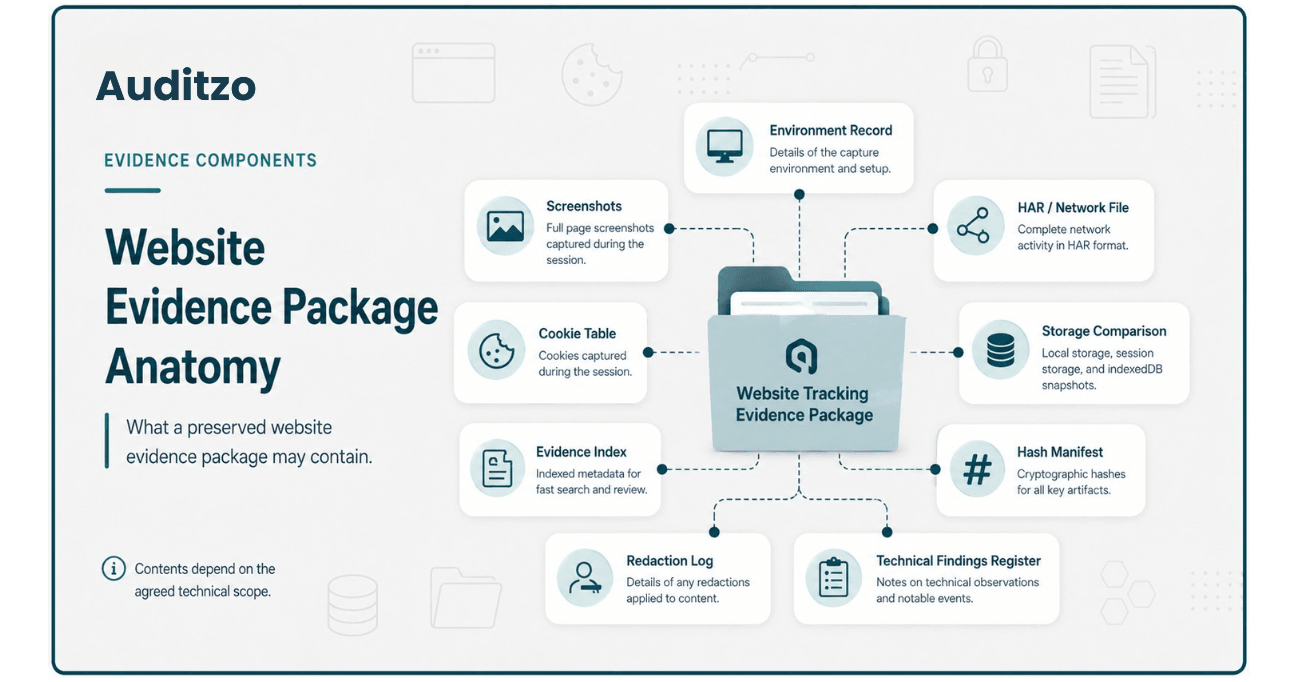
This illustration shows possible evidence components. Actual deliverables depend on the agreed technical scope, website behavior, capture method, and handling requirements.
Each item may be assigned a unique identifier, such as:
- ENV-01 for an environment record
- SS-01 for a screenshot
- NET-01 for a network file
- REQ-01 for a request extract
- CK-01 for a cookie table
- ST-01 for a storage comparison
- F-01 for a technical finding
A useful evidence index may include:
| Field | Purpose |
|---|---|
| Evidence ID | Provides a unique reference for the artifact. |
| File name | Identifies the stored file. |
| Artifact type | Distinguishes screenshots, network captures, cookie tables, storage records, and other files. |
| Reviewed page | Links the artifact to the applicable URL or journey. |
| Session or consent state | Identifies the browser state represented by the artifact. |
| Capture time | Records when the observation or file was created. |
| Description | Provides a short factual explanation of the artifact. |
| Related finding | Links the artifact to the relevant technical finding. |
| Hash | Records an integrity reference where calculated. |
| Version or redaction status | Distinguishes an original, working, redacted, or derived copy. |
File names should remain stable and understandable. Avoid renaming evidence files repeatedly without recording the relationship between versions.
Use Hashes as Integrity References
A cryptographic hash creates a value based on the contents of a file. If the file changes, recalculating the hash will generally produce a different value.
Hashes may be recorded for:
- Original network files
- Screenshot files
- Cookie and storage exports
- Evidence archives
- Reports
- Redacted copies
The evidence index should identify:
- File name
- Hash algorithm
- Calculated hash value
- Date and time calculated
- Version of the file
Where an original and redacted copy both exist, each should have its own hash because they are different files.
Important limitation: A matching hash can help show that a particular file has not changed since the reference hash was calculated. It does not prove that the file was captured correctly, that the methodology was complete, that the content is authentic in a legal sense, or that the artifact is admissible.
Digital-evidence preservation guidance from NIST describes hashing and related preservation considerations. The appropriate process for a legal matter should still be established by counsel and the responsible evidence custodian.
Document Redactions and Derived Copies
Website evidence may contain tokens, identifiers, account values, personal information, or other sensitive data that should not appear in a broadly shared report or public example.
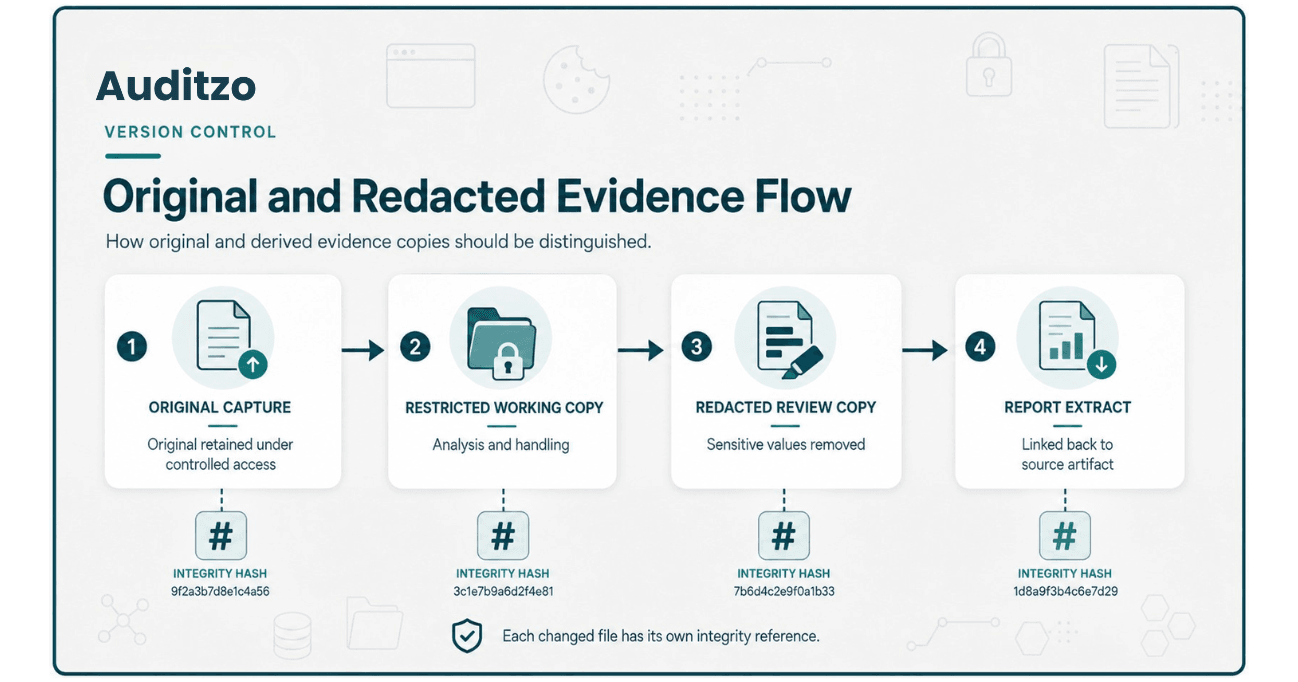
A controlled redaction process may distinguish between:
- Original evidence retained under restricted access
- Working copy used for analysis
- Redacted evidence prepared for review
- Illustrative extract included in a report
- Public sample with client and sensitive values removed
A redaction record may document:
- Original evidence ID
- Derived file name
- Values or regions redacted
- Reason for redaction
- Person or role performing the redaction
- Date of redaction
- Hash of the original file
- Hash of the redacted file
Redaction should not silently change the technical meaning of an extract. Where removal affects interpretation, the report should state that limitation.
Public sample reports should clearly identify illustrative, anonymized, and redacted content rather than presenting it as a complete client evidence package.
Control Storage, Access, Transfer, and Retention
Evidence preservation includes controlling how files are stored, accessed, transferred, retained, and deleted.
Access controls
Access should be limited according to the engagement requirements and the sensitivity of the material.
Useful controls may include:
- Role-based access
- Named authorized recipients
- Private storage
- Strong authentication
- Access logging where available
- Restricted evidence-download routes
File transfer
Evidence transfer should use a method appropriate to the sensitivity and scope of the engagement.
The transfer record may document:
- Files transferred
- Sender and recipient
- Transfer date
- Transfer method
- Associated hashes
- Any encryption or password-sharing procedure
Retention
The engagement should define how long evidence will be retained and what happens when the retention period ends.
Retention decisions may consider:
- Engagement requirements
- Contractual instructions
- Sensitivity of the evidence
- Operational storage needs
- Legal-hold instructions
- Deletion and confirmation requirements
Auditzo does not determine whether a legal hold applies. Counsel or the responsible organization should provide any preservation, retention, or deletion instructions relevant to the matter.
Review Auditzo's audit scope and limitations for the distinction between automated reports and scoped Manual Evidence Audits.
Connect Evidence to Technical Findings
A technical finding should identify the evidence supporting the observation rather than presenting a conclusion without traceability.
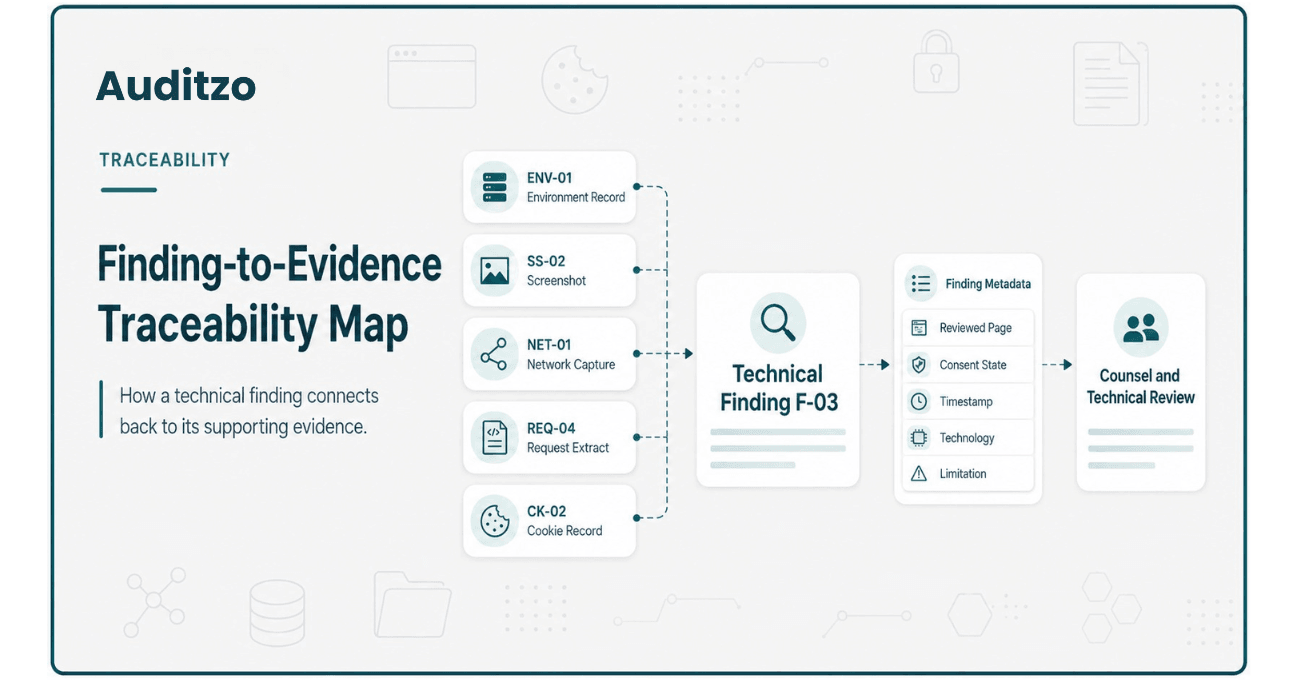
A structured finding may include:
- Finding identifier
- Factual observation
- Reviewed page
- Browser session
- Consent state
- Relevant timestamp
- Technology or hostname
- Evidence references
- Technical context
- Known limitation
- Suggested technical owner
- Potential remediation or follow-up question
For example:
Finding ID:
F-03

Reviewed page:
https://example.test/product

Session state:
Initial / no consent interaction

Observation:
A request to analytics.example appeared during
the defined initial-state observation window.

Observed timing:
1.42 seconds after page navigation

Evidence references:
SS-02
NET-01
REQ-04
CK-02

Technical context:
The request included the reviewed page URL and
an illustrative session value.

Limitation:
The observation represents the defined browser
session and does not establish behavior for all users.

Legal conclusion:
Not provided. Reserved for qualified counsel.
The report should separate:
- Directly observed facts
- Technical interpretation
- Unresolved questions
- Suggested remediation
- Matters reserved for legal review
This separation reduces the risk of presenting a technical observation as a statutory conclusion.
Handle Cross-Jurisdictional Reviews Carefully
The same website observation may be relevant to more than one privacy framework, but different laws do not use identical definitions, duties, exceptions, evidence rules, or procedural standards.
CIPA-oriented review
A technical report may document browser requests, routing or addressing information, cookies, session technologies, consent context, and other observable facts.
Auditzo does not determine whether a particular technology is legally a pen register or trap-and-trace device, whether California Penal Code Section 631 or Section 638.51 applies, or whether a violation occurred.
The current statutory text should be reviewed through California Legislative Information.
GDPR and ePrivacy-oriented review
A technical report may help advisers review website technologies, personal-data questions, processing purposes, lawful-basis issues, consent behavior, disclosures, storage or access on a device, and international data flows.
The GDPR recognizes several potential lawful bases under Article 6; consent is not the only lawful basis for every processing activity. Cookie and device-access rules may also arise under national laws implementing the ePrivacy framework.
The official text is available through GDPR.eu, while CNIL cookie guidance provides practical regulatory context.
CCPA and CPRA-oriented review
Technical evidence may help counsel evaluate disclosures, opt-out behavior, sale or sharing questions, vendor relationships, and observable third-party activity.
Auditzo does not decide whether an observed request legally constitutes a sale, sharing, disclosure, or violation.
Cross-jurisdictional boundary: A single evidence set may support several legal reviews, but the report should not map one technical observation automatically to multiple violations. Each framework requires its own legal analysis.
Automated Audit vs Manual Evidence Audit
Auditzo's automated audits and Manual Evidence Audits serve different purposes. Neither service provides legal conclusions or compliance certification.
| Review Area | Automated Initial Audit | Scoped Manual Evidence Audit |
|---|---|---|
| Primary purpose | Initial technical visibility and triage | Human-reviewed investigation of agreed technical questions |
| Initial page-load observation | Yes, within the automated observation window | Yes, across agreed pages and sessions |
| Consent interaction | No Accept or Reject interaction | May include Initial, Reject, and Accept sessions where scoped |
| Multiple pages and journeys | Limited to the configured run | Representative pages and journeys defined in scope |
| Human verification | No | Yes |
| Raw evidence files | No downloadable raw-evidence package | May include agreed screenshots, HAR, network, cookie, storage, and supporting files |
| Evidence index and hashes | Report-level automated traceability where generated | May be included according to the agreed evidence scope |
| Redacted extracts | Not a manual deliverable | May be prepared where agreed |
| Technical remediation guidance | Automated observations and general guidance | Finding-specific developer guidance where included |
| Legal mapping | No legal determination | No legal determination |
| Admissibility or compliance conclusion | No | No |
An automated audit may help identify technologies or behaviors that warrant closer review. A Manual Evidence Audit is the more appropriate path where counsel requires defined sessions, multiple pages, consent interaction, human validation, request-level analysis, screenshots, or agreed evidence files.
Compare the available options through Auditzo's website privacy audit plan comparison.
What Evidence Preservation Does Not Prove
A complete preservation process can improve organization and traceability, but it does not independently establish:
- That evidence is admissible
- That a file is legally authentic merely because it has a hash
- That the capture methodology was complete
- That every relevant website event was recorded
- That a visitor gave or withheld legally valid consent
- That consent was legally required for every observed activity
- That an identifier is personal information or communication content
- That a technology is a pen register or trap-and-trace device
- That CIPA, GDPR, CCPA, CPRA, or another law applies
- That a statutory exception does or does not apply
- That a legal violation occurred
- That a website operator, technology provider, or other party is liable
- That a communication or report is privileged
- That the evidence represents every browser, user, region, or future session
- That a legal claim, defense, filing, investigation, or regulatory position will succeed
Authentication, admissibility, privilege, foundation, expert testimony, legal relevance, and procedural use depend on the applicable rules, forum, evidence, and decisions made by qualified counsel and the relevant authority.
Auditzo's role is to document and organize observable technical website behavior within the agreed scope.
Website Tracking Evidence Preservation Checklist
Scope
- Identify the domain and pages.
- Define the visitor journey.
- Define the consent states.
- Identify browsers, devices, and regions.
- Document the technical questions.
- Agree on the required deliverables.
Environment
- Record date, time, and time zone.
- Record browser and version.
- Record operating system and device context.
- Record regional or network environment.
- Record session, cache, cookie, and storage status.
- Record tooling and methodology version.
Evidence capture
- Capture visible page context.
- Capture consent-banner states.
- Preserve agreed network evidence.
- Preserve cookie and storage records.
- Record tester actions.
- Link each capture to the relevant session.
Organization
- Assign unique evidence identifiers.
- Use stable file names.
- Create an evidence index.
- Link findings to supporting artifacts.
- Record file versions.
- Separate originals from redacted and derived copies.
Integrity and handling
- Calculate hashes where appropriate.
- Record the hash algorithm and date.
- Document redactions.
- Restrict access according to scope.
- Use an appropriate transfer method.
- Follow agreed retention and deletion instructions.
Reporting
- Separate observed facts from interpretation.
- State known limitations.
- Identify unresolved technical questions.
- Avoid unsupported legal conclusions.
- Reserve statutory and evidentiary analysis for counsel.
This checklist provides a technical starting point. It should be adapted to the website, matter, jurisdiction, evidence-handling requirements, and instructions provided by counsel or the responsible organization.
Frequently Asked Questions
What is website tracking evidence preservation?
It is the process of maintaining the technical context, files, metadata, integrity references, and traceability associated with website tracking observations.
It may include environment records, screenshots, browser-network evidence, cookies, browser storage, evidence indexes, hashes, redaction records, and technical findings.
Does preserving a HAR file make it admissible evidence?
No. Preserving a HAR file can maintain technical information from a defined browser session. Admissibility depends on the applicable evidence rules, authentication, foundation, relevance, procedure, and decisions made by counsel and the relevant court or authority.
Do screenshots prove that a website transmitted data?
Not by themselves. Screenshots preserve visible website context. Network or request-level records may provide separate evidence of observable browser communications.
Does a hash prove that evidence is authentic?
A hash can help determine whether a particular file has changed after the reference hash was calculated. It does not independently prove correct capture, legal authenticity, methodology, authorship, or admissibility.
Should original and redacted evidence have the same hash?
No. A redacted copy is a different file and should produce a different hash. The evidence record should document the relationship between the original and redacted versions.
Can an automated audit preserve a full evidence package?
Auditzo's automated audits provide initial technical visibility but do not include human verification, Accept or Reject interaction, or a downloadable raw-evidence package.
A scoped Manual Evidence Audit is more appropriate when deeper evidence capture and human-reviewed documentation are required.
Does every Manual Evidence Audit include HAR files?
No. Deliverables depend on the agreed scope. HAR, network evidence, screenshots, cookie and storage comparisons, hashes, and other supporting files may be included where expressly agreed and technically appropriate.
Does Auditzo always use DNS, Fiddler, or Wireshark captures?
No. The tools and capture methods depend on the technical questions, environment, website behavior, access, and agreed methodology.
Can the same evidence be used for CIPA and GDPR review?
The same technical artifacts may be relevant to more than one legal review, but CIPA, GDPR, ePrivacy, CCPA, and other frameworks do not use identical legal tests.
Counsel must evaluate the evidence separately under each applicable framework.
Does Auditzo provide legal mapping?
Auditzo may organize findings around an agreed technical or regulatory review context, but it does not determine statutory coverage, legal violations, liability, admissibility, or compliance.
Can Auditzo work under instructions from a law firm?
Yes. Auditzo can perform a counsel-directed technical review based on defined pages, sessions, environments, technologies, and deliverables.
Auditzo does not determine whether the engagement or resulting communications are privileged or protected work product. Counsel should establish the appropriate structure.
Can Auditzo help after evidence capture?
Yes. Separate technical remediation support may include tag-manager review, consent-platform configuration support, script cleanup, developer guidance, and selected post-change verification.
Learn more about website tracking remediation support.
Request a Counsel-Directed Technical Review
Law firms, privacy teams, and organizations can engage Auditzo to document website tracking behavior within a defined technical scope.
A Manual Evidence Audit may include agreed pages, visitor journeys, consent states, screenshots, browser-network review, cookie and storage comparisons, evidence references, hashes, redacted extracts, technical findings, and remediation guidance.
Discuss a scoped Manual Evidence Audit or review Auditzo's technical evidence support for law firms.
Teams requiring only an initial view of cookies, trackers, and third-party activity can run an automated website audit.
Scope reminder: Automated reports provide initial technical visibility and do not include human verification, consent-button interaction, or downloadable raw evidence files. Manual Evidence Audit deliverables depend on the agreed scope. Auditzo does not provide legal advice, certify compliance, determine violations, guarantee admissibility, establish privilege, or predict legal outcomes.
Official and Technical References
- California Legislative Information
- GDPR.eu
- CNIL cookie and tracking-device guidance
- NIST Digital Evidence Preservation
This article provides general technical information. It is not legal advice and should not be used as a substitute for current statutory, regulatory, procedural, evidentiary, and matter-specific advice from qualified counsel.
Table of Contents
- Why Website Evidence Can Lose Context Quickly
- Start With a Defined Review Scope
- Record the Test Environment
- Preserve Visual Website Context
- Preserve HAR and Browser-Network Evidence
- Preserve Cookies and Browser Storage
- Compare Defined Consent States
- Label and Index Evidence Files
- Use Hashes as Integrity References
- Document Redactions and Derived Copies
- Control Storage, Access, Transfer, and Retention
- Connect Evidence to Technical Findings
- Handle Cross-Jurisdictional Reviews Carefully
- Automated Audit vs Manual Evidence Audit
- What Evidence Preservation Does Not Prove
- Website Tracking Evidence Preservation Checklist
- Frequently Asked Questions
- Request a Counsel-Directed Technical Review